CLAUDE CODE / COST OPTIMIZATION GUIDE

Claude Code 토큰 절약 가이드

Claude Code는 매 턴 전체 컨텍스트를 다시 보내고, 비용은 그 크기에 비례합니다. 개인 세션 습관부터 캐시 경제학, 조직과 Bedrock 단위의 비용 관리까지 토큰 소모를 줄이는 방법을 정리합니다.

01. 작성 기준일 - 2026-08-25

02. 적용 대상 - Claude Code 사용자(구독 플랜, Console API, Amazon Bedrock 등 클라우드 프로바이더)

03. 핵심 점검 명령 - /usage, /context, /insights

04. 주 출처 - Claude Code 공식 문서(code.claude.com, 2026-08 확인)와 Amazon Bedrock 사용자 가이드

요약

01비용 구조: 토큰은 어디서 쓰이는가

모델은 요청 사이에 아무것도 기억하지 않습니다. 그래서 Claude Code는 메시지를 보낼 때마다 시스템 프롬프트, 프로젝트 컨텍스트, 지금까지의 모든 대화와 도구 결과를 통째로 다시 전송합니다. 한 턴 안에서 Claude가 도구를 여러 번 쓰면 그때마다 또 한 번의 요청이 나갑니다. 토큰 비용이 질문의 길이가 아니라 세션의 크기에 비례하는 이유입니다.

표 1. 요청을 구성하는 세 계층. 변하지 않는 내용일수록 앞에 배치됩니다
계층내용바뀌는 시점
시스템 프롬프트 코어 지시, 도구 정의, 출력 스타일 도구 정의 집합이 바뀌거나 Claude Code 업그레이드 시
프로젝트 컨텍스트 CLAUDE.md, 자동 메모리, 미스코프 규칙 세션 시작, /clear, /compact 이후
대화 사용자 메시지, 응답, 도구 결과 매 턴

이 구조를 감당 가능하게 만드는 것이 프롬프트 캐시입니다. 직전 요청과 동일한 Prefix는 재처리하는 대신 캐시에서 읽어오고, 표준 입력 단가의 약 10%로 과금됩니다. 캐시를 새로 쓰는 비용은 표준보다 비싸지만 한 번뿐이고, 이후 턴은 그 Prefix를 계속 싼 단가로 재사용합니다.

캐시 쓰기(1시간 TTL) 2.0배
캐시 쓰기(5분 TTL) 1.25배
표준 입력 1.0배
캐시 읽기 약 0.1배
그림 1. 표준 입력 단가를 1.0배로 둔 상대 단가입니다. 같은 토큰도 캐시 읽기로 처리되면 단가가 10분의 1로 떨어지고, 쓰기 비용은 그 할인을 얻기 위한 1회성 투자입니다.

과금 방식은 접속 방법에 따라 다릅니다. 구독 플랜(Pro, Max, Team, Enterprise)은 달러가 아니라 5시간 롤링 윈도우와 주간 윈도우로 관리되는 사용량 한도를 소모합니다. Console API와 Amazon Bedrock 같은 클라우드 프로바이더는 토큰 단위로 과금됩니다.

원칙: 비용은 컨텍스트 크기에 비례하고, 실제로 내는 토큰 단가는 캐시 적중률이 정합니다. 이 문서의 모든 전략은 이 두 변수를 줄이는 방법입니다.

02측정: /usage와 /context

최적화는 측정에서 시작합니다. /usage는 API 과금 사용자에게는 현재 세션의 토큰 통계와 추정 비용을 담은 Session 블록을, 구독자에게는 플랜 사용량 바와 함께 최근 사용량의 어트리뷰션을 보여줍니다. 스킬, 서브에이전트, 플러그인, 개별 MCP 서버가 각각 전체의 몇 %를 차지하는지, 그리고 긴 컨텍스트나 캐시 미스처럼 최근 사용량의 10% 이상을 차지하는 행동 플래그가 여기에 표시됩니다.

대표적인 출력 형태는 다음과 같습니다. 표기는 버전에 따라 조금씩 다르지만 담기는 정보는 같습니다.

예시 - /usage 출력. 인증 방식에 따라 보이는 블록이 다릅니다
> /usage

# API 과금 사용자에게 표시되는 Session 블록
Session
  Input      1,242,310 tokens (cache read 1,180,450 | cache write 38,220 | uncached 23,640)
  Output     18,940 tokens
  Est. cost  $4.87

# 구독 사용자에게 표시되는 플랜 사용량과 어트리뷰션
Plan usage
  Session (5h)    ████████░░░░░░░░░░░░  41%   resets 18:00
  Week (all)      ███░░░░░░░░░░░░░░░░░  16%   resets Mon 09:00
  Week (Opus)     █░░░░░░░░░░░░░░░░░░░   4%

Recent usage attribution
  Subagents 28% | MCP: playwright 17% | Skills: pdf 6%

Behavior flags
  Long context sessions 14% | Cache misses after breaks 12%
참고 - /usage의 달러 표시는 추정치입니다

Claude Code는 이 금액을 표준 정가 기준으로 로컬에서 계산합니다. 프로모션이나 계약 할인 단가가 반영되지 않으므로 실제 청구액과 다를 수 있습니다. 청구 기준 수치는 Claude Console의 Usage 페이지에서 확인합니다.

/context는 지금 컨텍스트를 무엇이 차지하는지 보여줍니다. MCP 도구 정의, CLAUDE.md, 대화 이력의 비중을 확인해서 어디를 줄일지 정합니다. 상태 표시줄(statusline)을 설정하면 컨텍스트 사용률과 함께 응답마다 돌아오는 cache_creation_input_tokenscache_read_input_tokens를 상시 표시할 수 있습니다.

예시 - /context 출력
> /context

claude-sonnet-5 | 96.0K / 1.0M tokens (10%)

  System prompt      3.2K  ( 0.3%)
  System tools      12.8K  ( 1.3%)
  MCP tools         28.4K  ( 2.8%)   playwright, github 도구 정의
  Memory files       4.1K  ( 0.4%)   CLAUDE.md, 자동 메모리
  Messages          47.5K  ( 4.8%)   대화 이력과 도구 결과
  Free space       904.0K  (90.4%)

이 예시에서는 선로딩된 MCP 도구 정의가 대화 이력의 절반을 넘는 크기입니다. 이런 비중이 보이면 도구 오버헤드가 점검 대상입니다.

두 캐시 지표를 읽는 법은 단순합니다. 읽기(read)가 쓰기(creation)보다 압도적으로 크면 캐시가 잘 동작하는 상태입니다. 반대로 creation이 턴마다 높게 유지되면 Prefix가 계속 바뀌고 있다는 신호이므로 표 2의 무효화 행동 목록을 점검합니다.

/insights는 토큰 수가 아니라 일하는 방식을 분석합니다. 이 머신의 최근 세션을 최대 200개까지 분석해 자주 하는 작업, 요청이 오해된 지점 같은 마찰 요소를 HTML 리포트(~/.claude/usage-data/report.html)로 만들어 줍니다. 분석 자체도 플랜이나 API 사용량을 소모하므로 주기적으로 한 번씩 돌리는 정도가 적당합니다.

예시 - /insights 실행. 결과는 브라우저로 여는 HTML 리포트입니다
> /insights

Analyzing up to 200 recent sessions on this machine...
Report saved: ~/.claude/usage-data/report.html

03컨텍스트 정리: /clear, /compact, /rewind

가장 값싼 최적화는 컨텍스트를 애초에 키우지 않는 것입니다. 무관한 작업으로 넘어갈 때는 /clear로 새로 시작합니다. 추가 비용이 없고, 이전 이력이 다음 요청에 실리지 않습니다. 세션을 나중에 찾아야 하면 /rename으로 이름을 붙인 뒤 비우고, 필요할 때 /resume으로 돌아옵니다.

같은 작업을 이어가면서 컨텍스트만 줄여야 하면 /compact가 이력을 요약으로 교체합니다. /compact Focus on code samples and API usage처럼 보존할 내용을 지시할 수 있고, 매번 같은 지시를 쓴다면 CLAUDE.md에 상시 규칙으로 둡니다.

CLAUDE.md - 컴팩션 시 보존 우선순위 지시
# Compact instructions

When you are using compact, please focus on test output and code changes

컴팩션 자체의 비용도 계산에 넣어야 합니다. 요약을 만드는 요청은 전체 대화를 프롬프트로 보내는 큰 요청입니다. 캐시가 유지되는 동안은 대부분 캐시 읽기로 처리되어 저렴하지만, 캐시 수명이 지난 뒤 (예를 들어 오래된 세션을 resume한 직후) 실행하면 전체를 재처리하는 가장 비싼 컴팩션이 됩니다. auto-compact가 작업 한가운데서 터지기 전에, 작업이 일단락된 지점에서 직접 실행하는 것이 시점을 통제하는 방법입니다.

방향이 틀렸을 때는 컴팩션이 아니라 /rewind입니다. 대화를 이전 턴으로 되돌리면 그 지점까지의 Prefix는 이미 캐시에 있으므로 다음 요청이 그대로 캐시에 적중합니다. 새 요약을 만들어 캐시를 다시 쌓는 컴팩션보다 되돌리기가 훨씬 저렴합니다.

flowchart TD Q["작업 전환 시점"] -->|"무관한 새 작업"| CLR["/clear"] Q -->|"같은 작업 계속, 컨텍스트가 참"| CMP["/compact"] Q -->|"잘못된 방향 복구"| RWD["/rewind"] CLR --> R1["비용 없음, 캐시 재구축"] CMP --> R2["요약 요청 1회, warm 캐시일 때 실행"] RWD --> R3["기존 캐시 그대로 적중"]
그림 2. 컨텍스트 전환 3종의 선택 기준입니다. 셋 중 /rewind만 기존 캐시를 그대로 적중합니다.

auto-compact 윈도우는 기본값이 모델에 맞춰 자동으로 정해집니다. /autocompact 명령으로 윈도우 값을 설정하고(/autocompact auto는 모델 기본값 복귀), CLAUDE_CODE_AUTO_COMPACT_WINDOW 환경 변수로도 조정할 수 있습니다. 다만 윈도우를 낮추면 컴팩션이 잦아져서 요약 요청 비용이 누적되므로, 특별한 이유가 없으면 자동값을 둡니다. Sonnet 5는 기본값으로 약 967,000토큰에서 자동 컴팩션됩니다(다른 모델은 별도 문서화된 임계값이 없습니다).

CLAUDE.md는 세션 시작마다 로드되어 프로젝트 컨텍스트 계층에 상주합니다. 모든 턴이 이 비용을 지불하므로 200줄 이하로 유지하고, 특정 워크플로에만 필요한 상세 지시는 호출 시에만 로드되는 스킬로 옮깁니다.

주의 - CLAUDE.md 수정은 세션 중에 적용되지 않습니다

프로젝트 루트와 사용자 레벨 CLAUDE.md는 세션 시작 시 한 번 읽혀 메모리에 유지됩니다. 세션 중에 파일을 고쳐도 캐시는 깨지지 않지만 변경도 반영되지 않습니다. 새 내용은 다음 /clear, /compact, 재시작 때 로드됩니다. 지시가 안 먹힌다고 같은 세션에서 파일을 반복 수정하며 재시도하는 것은 토큰만 낭비합니다.

04모델 선택과 사고 깊이

모델 선택이 단가의 첫 결정입니다. 대부분의 코딩 작업은 Sonnet으로 충분하고, Opus는 복잡한 아키텍처 결정이나 다단계 추론에 아껴 씁니다. /model로 전환하고 /config에서 기본값을 정합니다. 조회나 포매팅처럼 단순한 서브에이전트 작업은 서브에이전트 설정에 model: haiku를 지정해 더 싼 단가로 돌립니다.

effort는 같은 모델 안에서 사고 깊이를 조절합니다. extended thinking의 토큰은 출력 토큰으로 과금되고, 기본값으로는 모델에 따라 요청당 수만 토큰까지 씁니다. 깊은 추론이 필요 없는 작업에서는 /effort 명령이나 /model 화면의 슬라이더로 수준을 낮추고, 고정해 두려면 effortLevel 설정이나 CLAUDE_CODE_EFFORT_LEVEL 환경 변수를 씁니다.

예시 - effort 수준 고정. 값은 low, medium, high, xhigh 중 선택(환경 변수는 auto도 허용)
# .claude/settings.json (프로젝트) 또는 ~/.claude/settings.json (사용자)
{
  "effortLevel": "medium"
}

# 또는 셸 환경 변수로 지정
export CLAUDE_CODE_EFFORT_LEVEL=medium

thinking 토큰에 고정 상한을 받는 모델은 MAX_THINKING_TOKENS로 제한합니다 (예: MAX_THINKING_TOKENS=8000). adaptive reasoning 모델은 0이 아닌 상한 값을 무시하므로 effort로만 조절합니다. Fable 5는 extended thinking을 끌 수 없어서 역시 effort 조절이 유일한 수단입니다.

캐시와의 관계를 알면 바꾸는 시점이 보입니다. 모델과 effort는 각각 별도의 캐시 키라서, 세션 중간에 바꾸면 다음 요청이 전체 이력을 캐시 미적중으로 재처리합니다. opusplan 설정은 plan mode 진입과 이탈마다 Opus와 Sonnet 사이를 오가므로 토글할 때마다 새 캐시를 쌓습니다. 모델과 effort는 세션 초반에 정하고 작업 중에는 유지하는 것이 캐시 관점의 정답입니다.

05도구 오버헤드: MCP와 CLI

MCP 서버의 도구 정의는 지원 모델(Claude 4.5 세대 이상)에서 기본적으로 지연(deferred) 로딩됩니다. tool search가 동작하면 도구 이름과 서버 지시만 컨텍스트에 올라가고, 실제 정의는 Claude가 그 도구를 쓰는 시점에 붙습니다. 그래도 서버가 많으면 부담이 쌓이므로 /context로 실제 점유를 확인하고 /mcp에서 쓰지 않는 서버를 비활성화합니다.

지연 로딩이 안 되는 경우가 문제입니다. custom ANTHROPIC_BASE_URL 게이트웨이와 Agent Platform의 Claude 4.5 이전 세대 모델에서는 tool search가 동작하지 않아 도구 정의 전체가 Prefix에 로딩됩니다. 게이트웨이는 ENABLE_TOOL_SEARCH=true로 재정의할 수 있지만 Agent Platform 쪽은 재정의되지 않고, Agent Platform의 4.5 세대 이상 모델에서는 Anthropic API와 동일하게 기본 동작합니다. alwaysLoad로 지정한 서버나 도구, threshold 기반 선로딩도 같은 결과를 만듭니다. 이때는 서버 하나가 연결되거나 끊기는 것만으로 캐시 전체가 무효화됩니다.

같은 일을 하는 CLI가 있으면 CLI를 우선합니다. gh, aws, gcloud, sentry-cli 같은 도구는 도구 목록 비용 자체가 없고, Claude가 명령을 직접 실행하면 됩니다.

타입 언어를 쓴다면 코드 인텔리전스 플러그인이 탐색 비용을 줄입니다. LSP의 go to definition 한 번이 grep 한 번과 후보 파일 여러 개 읽기를 대체하고, 편집 직후 타입 에러를 자동 보고해 컴파일을 돌리지 않고도 실수를 잡습니다.

06구조적 절약: 서브에이전트, 훅, 스킬

장황한 출력은 서브에이전트로 격리합니다. 테스트 실행, 로그 처리, 문서 fetch를 위임하면 장황한 출력은 서브에이전트의 컨텍스트에 남고 요약만 본 대화로 돌아옵니다. 부모의 캐시도 손상되지 않습니다. 다만 서브에이전트는 자체 시스템 프롬프트와 자체 캐시로 시작하고, 구독에서도 5분 TTL을 쓴다는 점은 알아둡니다.

훅은 Claude가 보기 전에 데이터를 전처리합니다. 10,000줄 로그를 통째로 읽히는 대신 훅이 ERROR 줄만 추려서 넘기면 수만 토큰이 수백 토큰이 됩니다. 테스트 출력에서 실패만 남기는 PreToolUse 훅 예시입니다.

~/.claude/hooks/filter-test-output.sh - PreToolUse 훅
#!/bin/bash
input=$(cat)
cmd=$(echo "$input" | jq -r '.tool_input.command')

# 테스트 명령이면 실패 부분만 남기도록 명령을 재작성한다
if [[ "$cmd" =~ ^(npm test|pytest|go test) ]]; then
  filtered="$cmd 2>&1 | grep -A 5 -E '(FAIL|ERROR|error:)' | head -100"
  echo "{\"hookSpecificOutput\":{\"hookEventName\":\"PreToolUse\",\"permissionDecision\":\"allow\",\"updatedInput\":{\"command\":\"$filtered\"}}}"
else
  echo "{}"
fi

이 스크립트를 settings.json의 hooks.PreToolUse에 Bash matcher로 연결하면 매 실행 전에 적용됩니다. 전체 설정 예시는 공식 비용 문서에 그대로 있습니다.

CLAUDE.md에 쌓인 워크플로 지시는 스킬로 옮깁니다. 스킬은 호출될 때만 로드되므로 기본 컨텍스트가 가벼워집니다. 프로젝트 아키텍처, 핵심 디렉토리, 네이밍 규칙을 담은 codebase-overview 스킬을 만들어 두면, Claude가 구조를 파악하려고 파일 여러 개를 읽는 대신 스킬 호출 한 번으로 같은 맥락을 얻습니다.

에이전트 팀은 실험 기능이며 비용 배수가 큽니다. 팀원마다 별도 인스턴스와 컨텍스트 윈도우를 유지해서, plan mode 기준 일반 세션의 약 7배 토큰을 씁니다. 쓴다면 팀을 작게, 팀원 모델은 Sonnet으로, 일이 끝난 팀원은 바로 종료합니다.

작업 습관도 토큰입니다. "이 코드베이스 개선해줘"처럼 모호한 요청은 광역 스캔을 유발하고, "auth.ts의 login 함수에 입력 검증 추가"는 최소한의 파일만 읽게 합니다. 복잡한 작업은 plan mode(Shift+Tab)로 방향을 합의한 뒤 실행하고, 잘못 가면 Escape로 즉시 멈춰 /rewind합니다. 테스트 케이스나 기대 출력 같은 검증 목표를 주면 재작업 요청 자체가 줄어듭니다.

07캐시 경제학

7.1 캐시 수명(TTL)

캐시는 적중할 때마다 타이머가 리셋되므로 계속 작업하는 동안은 만료되지 않고 유지됩니다. 구독에서는 Claude Code가 1시간 TTL을 자동으로 요청해서 한 시간 안쪽의 공백은 버팁니다. 플랜 한도를 넘겨 usage credits 과금으로 넘어가면 쓰기 단가가 싼 5분으로 자동 하락하는데, 유지하고 싶으면 ENABLE_PROMPT_CACHING_1H=1을 둡니다. API 키, Amazon Bedrock, Google Cloud의 Agent Platform에서는 기본 5분이고, 같은 변수로 1시간에 opt-in합니다.

셸 환경 또는 settings.json의 env 블록
export ENABLE_PROMPT_CACHING_1H=1          # API, Bedrock 등에서 1시간 TTL opt-in
export FORCE_PROMPT_CACHING_5M=1           # 디버깅용: 인증 방식과 무관하게 5분 강제
export MAX_THINKING_TOKENS=8000            # 고정 상한 방식 모델의 thinking 토큰 제한
export CLAUDE_CODE_GOAL_CHECKIN_MINUTES=0  # 유휴 중 goal 체크인 중지

7.2 캐시를 깨는 행동과 지키는 행동

캐시는 Prefix의 정확한 일치로 동작하므로, Prefix 어딘가를 바꾸는 행동은 그 뒤 전부를 재계산하게 만듭니다. 다음 행동들이 다음 요청을 부분 또는 전체 캐시 미적중으로 만듭니다.

표 2. 캐시를 무효화하는 행동. 한 번의 느리고 비싼 턴 뒤에 새 Prefix가 캐시됩니다
행동무효화 이유대응
/model 전환 모델마다 캐시가 분리됨 세션 초반에 결정하고 유지
/effort 변경 effort 수준마다 캐시가 분리됨 세션 초반에 결정하고 유지
fast mode 첫 활성화 요청 헤더가 캐시 키에 포함됨 사용할 예정이면 세션 초반에. 이후 on/off 토글은 캐시 유지
MCP 서버 연결/해제 Prefix에 로딩된 도구 정의가 변경됨 tool search 지연 로딩이면 영향 없음
MCP 제공 플러그인 토글 위와 동일한 규칙 적용 전체 재읽기가 예상되면 /reload-plugins가 경고함
도구 전체 deny 규칙 추가 내장 도구 정의가 시스템 프롬프트에서 제거됨 Bash(rm *) 같은 범위 규칙은 캐시에 영향을 주지 않음
/compact 대화 이력이 요약으로 교체됨 작업이 일단락된 시점에, 캐시가 만료되기 전에 실행
Claude Code 업그레이드 시스템 프롬프트와 도구 정의가 갱신됨 재시작 후 첫 턴 1회 비용. 시점 통제는 DISABLE_AUTOUPDATER=1

반대로 다음 행동들은 대화 끝에 내용을 덧붙이거나 요청 자체를 건드리지 않아서 캐시를 유지합니다.

  • 저장소 파일 편집. 변경 알림이 대화 뒤에 붙고, 필요하면 Claude가 다시 읽습니다.
  • CLAUDE.md와 출력 스타일 수정. 캐시는 유지되지만 변경도 적용되지 않습니다.
  • permission mode 전환. 단 opusplan의 plan mode 토글은 모델 전환이라 예외입니다.
  • 스킬과 커맨드 호출. 지시가 메시지로 덧붙습니다.
  • /recap/rewind, 그리고 서브에이전트 생성.
주의 - 업그레이드 직후의 긴 세션 resume이 가장 비쌉니다

업그레이드 뒤에 세션을 resume하면 대화 이력 전체가 새 시스템 프롬프트 뒤에 놓여 캐시 적용 없이 재처리됩니다. 비용이 이력 길이에 비례하므로, 오랫동안 유지한 큰 세션의 복귀 첫 턴이 그 세션에서 가장 비싼 요청이 될 수 있습니다. 큰 세션은 업그레이드 전에 정리하거나 요약에서 재개하는 쪽이 저렴합니다.

7.3 캐시 범위와 유휴 세션

Claude Code의 캐시는 사실상 머신과 디렉토리 단위입니다. 시스템 프롬프트에 작업 디렉토리, 플랫폼, git 상태가 포함되므로 디렉토리가 다르면 Prefix가 달라 서로의 캐시를 못 씁니다. 같은 저장소의 worktree도 각자 캐시를 쌓습니다. 반대로 같은 디렉토리의 병렬 세션은 Prefix가 일치해 서로의 캐시를 읽습니다.

세션이 놀고 있어도 동작하는 것들이 있습니다. scheduled task는 정해진 간격마다 전체 컨텍스트를 실어 요청을 보내고, 다른 세션에서 온 cross-session 메시지 수신도 새 턴을 시작합니다 (crossSessionInboundhold로 두면 보류). goal 체크인도 유휴 중에 턴을 시작할 수 있어 CLAUDE_CODE_GOAL_CHECKIN_MINUTES=0으로 끌 수 있습니다. 그 외 resume용 요약 같은 백그라운드 작업은 세션당 0.04달러 미만 수준입니다.

원칙: 캐시 보호 규칙은 하나입니다. 세션 중에 Prefix를 흔들지 마세요. 모델, effort, 도구 구성은 시작할 때 정합니다.

08조직 비용 관리: 구독, Console, Bedrock

조직의 통제 지점은 접속 방식이 정합니다. 지출을 어디서 보고, 어디서 한도를 걸고, 사용자별 수치를 어떻게 뽑는지가 세 가지 설정에서 각각 다릅니다.

표 3. 접속 방식별 비용 관리 지점
설정 지출 확인 한도 설정 사용자별 리포팅
Teams / Enterprise 플랜 조직 분석의 spend report(일 단위 갱신, CSV) usage credits 한도(조직/그룹/개인) spend report CSV, Enterprise는 Analytics API
Console(API) Console Usage 페이지 Claude Code 워크스페이스 spend limit Console 대시보드, Claude Code Analytics API
Bedrock 등 클라우드 클라우드 청구 콘솔 클라우드 예산 도구 OpenTelemetry 또는 게이트웨이

8.1 구독과 Console

Teams와 Enterprise에서는 각 멤버가 5시간 롤링 윈도우와 주간 윈도우로 리셋되는 좌석(Seat) 허용량을 사용합니다. 이 허용량은 Claude Chat, Cowork과 공유되므로, 코딩 좌석은 Chat 좌석보다 예산을 크게 잡아야 합니다. 턴마다 파일 내용과 도구 호출이 실리는 특성상 디버깅 세션 하나가 Chat 하루치보다 많이 소모할 수 있습니다. 허용량을 넘긴 사용을 허용하려면 usage credits를 켜고 조직, 그룹, 개인 단위로 한도를 겁니다.

Console 인증 조직은 최초 인증 시 자동 생성되는 Claude Code 전용 워크스페이스로 관리합니다. 여기에 spend limit을 걸어 총액을 제한하고, 워크스페이스 rate limit으로 Claude Code 트래픽이 프로덕션 API 워크로드의 한도를 잠식하지 않게 막습니다. 사용자별 수치는 Console 대시보드와 Claude Code Analytics API로 뽑고, 조직 규모별 TPM/RPM 권장값은 공식 비용 문서의 표를 따릅니다.

8.2 Bedrock 등 클라우드 프로바이더

클라우드 경유 사용은 Claude Code가 Anthropic으로 메트릭을 보내지 않으므로 Anthropic의 분석 대시보드에 잡히지 않습니다. 사용자별 어트리뷰션은 세 가지 중에서 고릅니다. 머신에서 직접 내보내는 OpenTelemetry는 사용자별 토큰과 비용을 준실시간으로 자체 관측 스택에 보내는 유일한 방법입니다. 셀프호스팅 Claude apps gateway는 사용자별 어트리뷰션, OTLP 메트릭, 사용자별 spend limit을 함께 제공합니다. LiteLLM 같은 LLM 게이트웨이는 키별 지출을 추적하지만 Anthropic 비제휴 오픈소스이므로 보안 검토는 조직 역할입니다.

주의 - 게이트웨이 경유는 캐시 효율을 깎습니다

custom ANTHROPIC_BASE_URL이나 LLM 게이트웨이를 거치면 Claude Code가 대화 중간에 덧붙이는 시스템 컨텍스트 블록이 캐시 마킹 없이 나가 매 요청 미캐시 입력으로 과금됩니다. 대화 자체의 캐시 breakpoint는 유지되므로, 게이트웨이가 이를 그대로 전달해야 대화 캐시를 사용할 수 있습니다. 게이트웨이 환경에서는 tool search도 동작하지 않아 MCP 도구 정의가 Prefix에 로딩됩니다. 어트리뷰션을 얻는 대신 캐시 효율을 얼마나 내주는지 계산에 넣으세요.

tool search가 동작하지 않는 환경은 게이트웨이 외에 Agent Platform의 Claude 4.5 이전 세대 모델이 더 있습니다. Agent Platform의 4.5 세대 이상 모델과 Bedrock에서는 Anthropic API와 동일하게 기본 동작합니다. tool search가 동작하지 않는 환경에서는 MCP 도구 정의가 Prefix에 전부 로딩되므로, 연결 서버 수를 줄이는 것이 곧 캐시할 Prefix를 줄이는 일입니다.

Bedrock의 프롬프트 캐시는 모델별로 체크포인트당 최소 토큰이 다릅니다. Prefix가 최소 토큰에 못 미치면 요청은 성공하지만 캐시는 만들어지지 않는 조용한 실패가 됩니다. 체크포인트는 요청당 최대 4개이고, toolssystemmessages 순서로 이어지므로 앞 섹션을 바꾸면 뒤 섹션 캐시까지 무효화됩니다.

표 4. Bedrock의 Claude 모델별 캐시 체크포인트 최소 토큰(2026-08 기준)
모델최소 토큰지원 TTL
Claude Fable 55125분, 1시간
Claude Opus 55125분, 1시간
Claude Opus 4.81,0245분, 1시간
Claude Sonnet 51,0245분, 1시간
Claude Sonnet 4.61,0245분, 1시간
Claude Haiku 4.54,0965분, 1시간

같은 세대 안에서도 값이 다릅니다. Opus 4.5에서 4.7까지는 4,096토큰이었다가 Opus 4.8에서 1,024토큰으로, Opus 5와 Fable 5에서 512토큰으로 내려왔습니다. 1시간 TTL은 체크포인트에 "ttl": "1h"를 지정해 씁니다.

참고 - Bedrock 사용량 집계와 rate limit 계산

Bedrock 응답의 inputTokens는 비캐시 입력만 나타냅니다. 총 입력은 inputTokens + cacheReadInputTokens + cacheWriteInputTokens로 합산해야 하며, 비용 대시보드에서 이 합산을 빠뜨리면 사용량이 과소 집계됩니다. 한편 캐시 적중분은 rate limit에서 차감되지 않으므로, 캐시 효율이 곧 같은 TPM 쿼터 안에서의 처리량입니다.

개발자의 한도 문의는 상황 구분부터 합니다. "session limit" 또는 "weekly limit" 메시지는 좌석 윈도우라 /model 전환으로 회피되지 않고 리셋을 기다리거나 usage credits를 씁니다. "Opus limit"처럼 모델별 메시지는 다른 계열 모델로 전환하면 계속 작업할 수 있습니다. 게이트웨이가 보낸 spend limit 메시지는 관리자가 건 캡이고, auto-compact 경고는 한도가 아니라 컨텍스트 관리 안내입니다.

09상황별 요약과 결론

자주 만나는 증상과 그 원인, 조치를 한 표로 정리합니다. 대부분은 앞 장에서 다룬 두 변수, 컨텍스트 크기와 캐시 적중률로 환원됩니다.

표 5. 증상별 원인과 조치
증상원인조치
한 줄 질문에도 사용량이 큼 하루 종일 열린 세션이 전체 이력을 매번 재전송 작업 전환마다 /clear, 오래된 큰 세션은 요약에서 재개
휴식 후 첫 턴이 느리고 비쌈 캐시 수명 초과로 전체 재처리 구독은 1시간 TTL 자동, API와 Bedrock은 ENABLE_PROMPT_CACHING_1H=1 검토
creation 토큰이 턴마다 높음 Prefix 불안정(모델, effort, 도구 구성 변동) 세션 초반에 고정, /usage 행동 플래그 확인
MCP 서버 추가 후 비용 증가 서드파티 플랫폼, 게이트웨이 등 도구 정의가 선로딩되는 환경 /context로 점유 확인, /mcp로 미사용 서버 비활성
Bedrock에서 캐시 토큰이 0 모델별 최소 체크포인트 토큰 미달 또는 미지원 표 4와 AWS 문서의 모델, 리전 지원 확인
유휴 세션에서 사용량 증가 scheduled task, cross-session 메시지, goal 체크인 보류/중지 설정, 쓰지 않는 세션 종료
API/클라우드 청구가 예상보다 큼 정리하지 않은 긴 세션, Opus 기본값 방치 /clear 습관화, Sonnet 기본에 필요할 때만 상향

적용 순서에는 우선순위가 있습니다. 1순위는 측정 체계입니다. /usage, /context, 상태 표시줄이 없으면 나머지 조치의 효과를 확인할 수 없고, Bedrock 조직이라면 OpenTelemetry나 게이트웨이 어트리뷰션이 같은 역할을 합니다. 측정이 서면 나머지는 데이터로 검증되고, 없으면 전부 감으로 남습니다.

2순위는 컨텍스트 정리 습관입니다. 작업 전환마다 /clear, CLAUDE.md 200줄 유지만으로 가장 큰 낭비 경로가 닫힙니다. 3순위는 모델과 effort를 작업에 맞추는 것, 4순위는 세션 중 구성 변경을 멈춰 캐시를 지키는 것입니다. 서브에이전트, 훅, 스킬로 구조를 바꾸는 5순위는 앞의 습관이 잡힌 뒤에 하는 고정 투자이고, 1~4순위 없이 먼저 하면 효과가 측정되지 않습니다.

절약의 목표는 사용을 줄이는 것이 아닙니다. 같은 작업을 더 작은 컨텍스트와 더 높은 캐시 적중률로 하는 것이고, 그 결과는 낮은 청구액과 함께 더 빠른 응답으로 돌아옵니다.
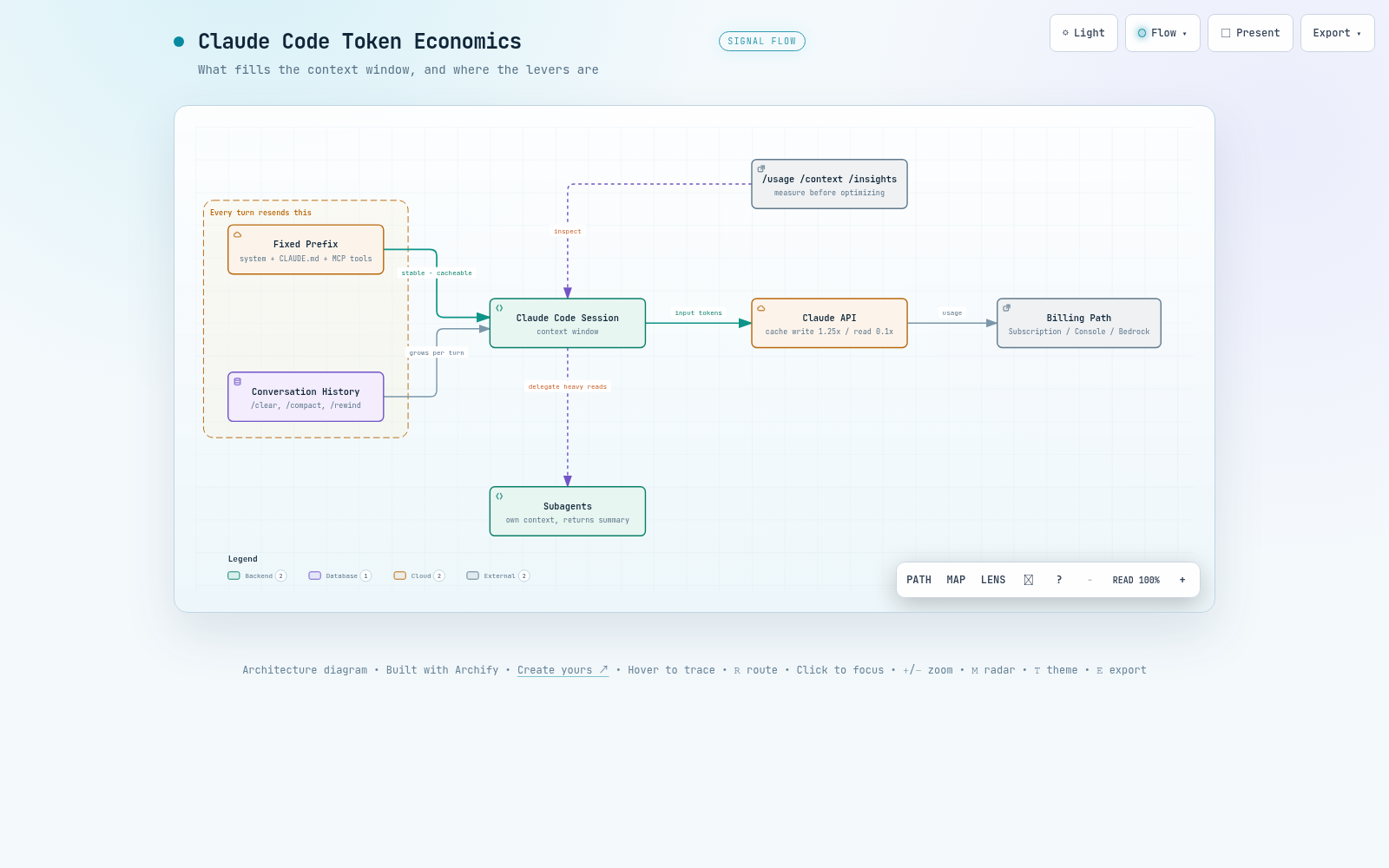
인터랙티브 아키텍처 맵 전체 이미지 - 컨텍스트 윈도우를 채우는 요소와 토큰 절약 레버의 위치
그림 3. 인터랙티브 아키텍처 맵 전체 보기. 이미지를 클릭하면 노드 탐색, 경로 추적, 다크/라이트 테마를 지원하는 인터랙티브 버전 ↗이 열립니다.

--참고 자료

핵심 출처

공식 문서

  • Model configuration - Anthropic, Claude Code Docs https://code.claude.com/docs/en/model-config
  • Prompt caching - Anthropic, Claude Platform Docs(TTL별 캐시 쓰기/읽기 단가표 포함) https://platform.claude.com/docs/en/build-with-claude/prompt-caching
  • Prompt caching for faster model inference - AWS, Amazon Bedrock User Guide(모델별 최소 토큰과 TTL 표) https://docs.aws.amazon.com/bedrock/latest/userguide/prompt-caching.html

관련 블로그

CLAUDE CODE / COST OPTIMIZATION GUIDE

Claude Code Token-Saving Guide

Claude Code re-sends the full context on every turn, and cost scales with its size. This guide covers how to cut token consumption, from personal session habits to cache economics and cost management at the organization and Bedrock level.

01. Written as of - 2026-08-25

02. Audience - Claude Code users (subscription plans, Console API, and cloud providers such as Amazon Bedrock)

03. Key inspection commands - /usage, /context, /insights

04. Primary sources - the official Claude Code docs (code.claude.com, checked 2026-08) and the Amazon Bedrock User Guide

TL;DR

01Cost structure: where tokens are spent

The model remembers nothing between requests. So every time you send a message, Claude Code re-transmits the system prompt, the project context, and every prior exchange and tool result in full. When Claude uses tools several times within one turn, each use fires another request. That is why token cost scales with the size of the session, not the length of your question.

Table 1. The three layers of a request. The less the content changes, the earlier it is placed
LayerContentsWhen it changes
System prompt Core instructions, tool definitions, output styles When the tool definition set changes or Claude Code is upgraded
Project context CLAUDE.md, auto memory, misscoped rules Session start, after /clear or /compact
Conversation User messages, responses, tool results Every turn

What makes this structure affordable is the prompt cache. A prefix identical to the previous request is read from the cache instead of being reprocessed, billed at about 10% of the standard input rate. Writing a new cache entry costs more than standard, but only once; subsequent turns keep reusing that prefix at the cheap rate.

Cache write (1-hour TTL) 2.0x
Cache write (5-min TTL) 1.25x
Standard input 1.0x
Cache read ~0.1x
Figure 1. Relative rates with standard input set at 1.0x. The same tokens cost one-tenth as much when served as cache reads, and the write cost is a one-time investment to earn that discount.

How you are billed depends on how you connect. Subscription plans (Pro, Max, Team, Enterprise) consume usage allowances managed as a 5-hour rolling window and a weekly window, not dollars. The Console API and cloud providers such as Amazon Bedrock bill per token.

Principle: cost scales with context size, and the token rate you actually pay is set by your cache hit ratio. Every strategy in this document is a way to reduce those two variables.

02Measurement: /usage and /context

Optimization starts with measurement. For API-billed users, /usage shows a Session block with the current session's token statistics and estimated cost; for subscribers it shows plan usage bars along with an attribution of recent usage. It reports what share of the total each skill, subagent, plugin, and individual MCP server accounts for, plus behavior flags — such as long context or cache misses — responsible for 10% or more of recent usage.

A representative output looks like this. The exact formatting varies slightly by version, but the information is the same.

Example - /usage output. Which blocks appear depends on the auth method
> /usage

# Session block shown to API-billed users
Session
  Input      1,242,310 tokens (cache read 1,180,450 | cache write 38,220 | uncached 23,640)
  Output     18,940 tokens
  Est. cost  $4.87

# plan usage and attribution shown to subscribers
Plan usage
  Session (5h)    ████████░░░░░░░░░░░░  41%   resets 18:00
  Week (all)      ███░░░░░░░░░░░░░░░░░  16%   resets Mon 09:00
  Week (Opus)     █░░░░░░░░░░░░░░░░░░░   4%

Recent usage attribution
  Subagents 28% | MCP: playwright 17% | Skills: pdf 6%

Behavior flags
  Long context sessions 14% | Cache misses after breaks 12%
Note - the dollar figure in /usage is an estimate

Claude Code computes this amount locally at standard list prices. Promotional or contract-discounted rates are not reflected, so it can differ from the actual bill. For billing-grade numbers, check the Usage page in the Claude Console.

/context shows what is occupying the context right now. Check the shares held by MCP tool definitions, CLAUDE.md, and conversation history to decide what to trim. If you configure a statusline, you can keep context utilization on screen along with the cache_creation_input_tokens and cache_read_input_tokens returned with every response.

Example - /context output
> /context

claude-sonnet-5 | 96.0K / 1.0M tokens (10%)

  System prompt      3.2K  ( 0.3%)
  System tools      12.8K  ( 1.3%)
  MCP tools         28.4K  ( 2.8%)   playwright, github tool definitions
  Memory files       4.1K  ( 0.4%)   CLAUDE.md, auto memory
  Messages          47.5K  ( 4.8%)   conversation history and tool results
  Free space       904.0K  (90.4%)

In this example, the preloaded MCP tool definitions are more than half the size of the conversation history. When you see a share like that, tool overhead is what to inspect.

Reading the two cache metrics is simple. If reads overwhelmingly exceed writes (creation), the cache is working well. If creation stays high turn after turn, it signals that the prefix keeps changing, so check the list of invalidating actions in Table 2.

/insights analyzes how you work, not token counts. It analyzes up to 200 recent sessions on this machine and builds an HTML report (~/.claude/usage-data/report.html) of friction points such as frequent tasks and where requests were misunderstood. The analysis itself consumes plan or API usage, so running it periodically, once in a while, is about right.

Example - running /insights. The result is an HTML report opened in a browser
> /insights

Analyzing up to 200 recent sessions on this machine...
Report saved: ~/.claude/usage-data/report.html

03Context hygiene: /clear, /compact, /rewind

The cheapest optimization is not growing the context in the first place. When you move to an unrelated task, start fresh with /clear. It costs nothing extra, and the previous history is not carried into the next request. If you will need the session later, name it with /rename before clearing, and come back with /resume.

When you need to continue the same task with a smaller context, /compact replaces the history with a summary. You can direct what to preserve, as in /compact Focus on code samples and API usage, and if you give the same instruction every time, make it a standing rule in CLAUDE.md.

CLAUDE.md - preservation priorities for compaction
# Compact instructions

When you are using compact, please focus on test output and code changes

Budget for the cost of compaction itself. The summarization request is a large request that sends the entire conversation as the prompt. While the cache is warm it is mostly served as cache reads and stays cheap, but run after the cache TTL has lapsed (for example, right after resuming an old session) it becomes the most expensive compaction possible, reprocessing everything. Running it yourself at a lull between tasks, before auto-compact fires in the middle of the work, is how you control the timing.

When the direction is wrong, the answer is /rewind, not compaction. Rolling the conversation back to an earlier turn means the prefix up to that point is already in the cache, so the next request hits it as-is. For undoing, it is far cheaper than compaction, which builds a new summary and re-warms the cache.

flowchart TD Q["Task switch point"] -->|"Unrelated new task"| CLR["/clear"] Q -->|"Same task continues, context is full"| CMP["/compact"] Q -->|"Recover from a wrong direction"| RWD["/rewind"] CLR --> R1["No cost, cache rebuilt"] CMP --> R2["One summary request, run while cache is warm"] RWD --> R3["Existing cache hits as-is"]
Figure 2. How to choose among the three context switches. Of the three, only /rewind hits the existing cache as-is.

The auto-compact window defaults to a value set automatically per model. You can set the window with the /autocompact command (/autocompact auto returns to the model default) and also adjust it via the CLAUDE_CODE_AUTO_COMPACT_WINDOW environment variable. Lowering the window makes compaction more frequent and its summary-request cost accumulates, so leave the automatic value unless you have a specific reason. Sonnet 5 auto-compacts at about 967,000 tokens by default (no separately documented threshold exists for other models).

CLAUDE.md is loaded at every session start and stays resident in the project context layer. Every turn pays that cost, so keep it under 200 lines and move detailed instructions needed only by specific workflows into skills, which load only when invoked.

Caution - CLAUDE.md edits do not apply mid-session

The project-root and user-level CLAUDE.md files are read once at session start and kept in memory. Editing the file mid-session does not break the cache, but the change is not applied either. New content loads on the next /clear, /compact, or restart. Repeatedly editing the file and retrying within the same session because an instruction "is not working" only wastes tokens.

04Model choice and thinking depth

Model choice is the first pricing decision. Sonnet is enough for most coding work; save Opus for complex architectural decisions and multi-step reasoning. Switch with /model and set the default in /config. For simple subagent work like lookups or formatting, specify model: haiku in the subagent configuration to run it at a cheaper rate.

effort adjusts thinking depth within the same model. Extended thinking tokens are billed as output tokens, and by default can consume up to tens of thousands of tokens per request depending on the model. For work that does not need deep reasoning, lower the level with the /effort command or the slider on the /model screen; to pin it, use the effortLevel setting or the CLAUDE_CODE_EFFORT_LEVEL environment variable.

Example - pinning the effort level. Valid values are low, medium, high, xhigh (the environment variable also accepts auto)
# .claude/settings.json (project) or ~/.claude/settings.json (user)
{
  "effortLevel": "medium"
}

# or set as a shell environment variable
export CLAUDE_CODE_EFFORT_LEVEL=medium

For models that take a fixed thinking-token ceiling, cap it with MAX_THINKING_TOKENS (e.g. MAX_THINKING_TOKENS=8000). Adaptive reasoning models ignore non-zero ceiling values, so adjust only through effort. Fable 5 cannot turn extended thinking off, so effort is likewise the only means of control.

Knowing the relationship to the cache tells you when to make changes. Model and effort are each a separate cache key, so changing either mid-session makes the next request reprocess the entire history as a cache miss. The opusplan setting alternates between Opus and Sonnet on every plan-mode entry and exit, building a new cache on each toggle. Deciding model and effort early in the session and holding them steady through the work is the cache-correct answer.

05Tool overhead: MCP and CLI

MCP server tool definitions are deferred-loaded by default on supported models (the Claude 4.5 generation and later). With tool search active, only tool names and server instructions enter the context, and the actual definitions attach at the moment Claude uses a tool. Overhead still accumulates with many servers, so check actual occupancy with /context and disable unused servers in /mcp.

The problem is where deferred loading is unavailable. With a custom ANTHROPIC_BASE_URL gateway and pre-4.5-generation Claude models on the Agent Platform, tool search does not work and the full tool definitions are loaded into the prefix. A gateway can be overridden with ENABLE_TOOL_SEARCH=true, but the Agent Platform case cannot, and 4.5-generation-and-later models on the Agent Platform behave the same as the Anthropic API by default. Servers or tools designated with alwaysLoad, and threshold-based preloading, produce the same result. In that state, a single server connecting or disconnecting invalidates the entire cache.

When a CLI does the same job, prefer the CLI. Tools like gh, aws, gcloud, and sentry-cli carry no tool-listing cost at all; Claude just runs the commands directly.

If you work in a typed language, a code-intelligence plugin cuts exploration cost. One LSP go-to-definition replaces a grep plus reading several candidate files, and automatic type-error reports right after an edit catch mistakes without running a compile.

06Structural savings: subagents, hooks, skills

Isolate verbose output in subagents. Delegate test runs, log processing, and documentation fetches, and the verbose output stays in the subagent's context while only a summary returns to the main conversation. The parent's cache is not damaged either. Do note that a subagent starts with its own system prompt and its own cache, and uses the 5-minute TTL even on subscriptions.

Hooks preprocess data before Claude sees it. Instead of having a 10,000-line log read in whole, a hook that passes along only the ERROR lines turns tens of thousands of tokens into hundreds. Here is a PreToolUse hook that keeps only the failures from test output.

~/.claude/hooks/filter-test-output.sh - PreToolUse hook
#!/bin/bash
input=$(cat)
cmd=$(echo "$input" | jq -r '.tool_input.command')

# For test commands, rewrite the command to keep only the failing parts
if [[ "$cmd" =~ ^(npm test|pytest|go test) ]]; then
  filtered="$cmd 2>&1 | grep -A 5 -E '(FAIL|ERROR|error:)' | head -100"
  echo "{\"hookSpecificOutput\":{\"hookEventName\":\"PreToolUse\",\"permissionDecision\":\"allow\",\"updatedInput\":{\"command\":\"$filtered\"}}}"
else
  echo "{}"
fi

Wire this script to hooks.PreToolUse in settings.json with a Bash matcher and it applies before every run. A full configuration example is in the official cost docs as-is.

Move workflow instructions that pile up in CLAUDE.md into skills. Skills load only when invoked, which keeps the default context light. Build a codebase-overview skill holding the project architecture, key directories, and naming conventions, and Claude gets the same context in one skill invocation instead of reading several files to figure out the structure.

Agent teams are an experimental feature with a large cost multiplier. Each teammate keeps its own instance and context window, consuming about 7x the tokens of a regular session in plan mode. If you use them, keep the team small, run teammates on Sonnet, and shut teammates down as soon as their work is done.

Work habits are tokens too. A vague request like "improve this codebase" triggers a wide scan, while "add input validation to the login function in auth.ts" reads only the minimum files. For complex work, agree on direction in plan mode (Shift+Tab) before executing, and when things go wrong, stop immediately with Escape and /rewind. Giving verification targets such as test cases or expected output reduces rework requests themselves.

07Cache economics

7.1 Cache lifetime (TTL)

The cache timer resets on every hit, so it stays warm as long as you keep working. On subscriptions, Claude Code automatically requests a 1-hour TTL, so gaps shorter than an hour survive. Once you exceed the plan limit and roll over to usage-credits billing, it automatically drops to the cheaper-to-write 5 minutes; to keep 1 hour, set ENABLE_PROMPT_CACHING_1H=1. With API keys, Amazon Bedrock, and the Agent Platform on Google Cloud the default is 5 minutes, and the same variable opts in to 1 hour.

Shell environment or the env block of settings.json
export ENABLE_PROMPT_CACHING_1H=1          # opt in to the 1-hour TTL on the API, Bedrock, etc.
export FORCE_PROMPT_CACHING_5M=1           # for debugging: force 5 minutes regardless of auth method
export MAX_THINKING_TOKENS=8000            # cap thinking tokens on fixed-ceiling models
export CLAUDE_CODE_GOAL_CHECKIN_MINUTES=0  # stop goal check-ins while idle

7.2 Actions that break the cache and actions that keep it

The cache works on an exact prefix match, so any action that changes something inside the prefix forces everything after it to be recomputed. The following actions make the next request a partial or full cache miss.

Table 2. Actions that invalidate the cache. After one slow, expensive turn, the new prefix is cached
ActionWhy it invalidatesResponse
/model switch Each model has a separate cache Decide early in the session and hold
/effort change Each effort level has a separate cache Decide early in the session and hold
First activation of fast mode The request header is part of the cache key If you will use it, do so early in the session. Later on/off toggles keep the cache
MCP server connect/disconnect The tool definitions loaded into the prefix change No effect with tool-search deferred loading
Toggling an MCP-providing plugin Same rule as above applies /reload-plugins warns when a full re-read is expected
Adding a whole-tool deny rule The built-in tool definition is removed from the system prompt Scoped rules like Bash(rm *) are harmless to the cache
/compact The conversation history is replaced by a summary Run at a lull, while the cache is warm
Claude Code upgrade The system prompt and tool definitions are refreshed A one-time cost on the first turn after restart. Control the timing with DISABLE_AUTOUPDATER=1

Conversely, the following actions keep the cache, because they append to the end of the conversation or do not touch the request at all.

  • Editing repository files. The change notice is appended after the conversation, and Claude re-reads when needed.
  • Modifying CLAUDE.md and output styles. The cache survives, but the change is not applied either.
  • Switching permission mode. The exception is opusplan's plan-mode toggle, which is a model switch.
  • Invoking skills and commands. The instructions are appended as messages.
  • /recap and /rewind, and spawning subagents.
Caution - resuming a long session right after an upgrade is the most expensive

Resume a session after an upgrade and the entire conversation history sits behind a new system prompt, reprocessed with no cache hits. Cost is proportional to history length, so the first turn back into a big, long-running session can be the most expensive request of that session. It is cheaper to wrap up big sessions before upgrading, or to resume from a summary.

7.3 Cache scope and idle sessions

Claude Code's cache is effectively per machine and per directory. The system prompt includes the working directory, platform, and git state, so a different directory means a different prefix, and the caches cannot serve each other. Worktrees of the same repository each build their own cache too. Conversely, parallel sessions in the same directory share a matching prefix and read each other's cache.

Some things run even while a session sits idle. Scheduled tasks send a request carrying the full context at each interval, and receiving a cross-session message from another session also starts a new turn (set crossSessionInbound to hold to defer). Goal check-ins can also start turns while idle and can be turned off with CLAUDE_CODE_GOAL_CHECKIN_MINUTES=0. Other background work, such as summaries for resume, stays under $0.04 per session.

Principle: there is one cache-protection rule. Do not shake the prefix mid-session. Set the model, effort, and tool configuration at the start.

08Organizational cost management: subscription, Console, Bedrock

How you connect determines the organization's control points. Where you see spend, where you set limits, and how you pull per-user numbers differ across the three setups.

Table 3. Cost-management points by connection method
Setup Spend visibility Limit setting Per-user reporting
Teams / Enterprise plans Spend report in org analytics (daily refresh, CSV) Usage-credit limits (org/group/individual) Spend report CSV; Analytics API on Enterprise
Console (API) Console Usage page Claude Code workspace spend limit Console dashboard, Claude Code Analytics API
Bedrock and other clouds Cloud billing console Cloud budgeting tools OpenTelemetry or a gateway

8.1 Subscriptions and the Console

On Teams and Enterprise, each member draws on a seat allowance that resets on a 5-hour rolling window and a weekly window. This allowance is shared with Claude chat and Cowork, so budget coding seats larger than chat seats. Because every turn carries file contents and tool calls, a single debugging session can consume more than a full day of chat. To allow usage beyond the allowance, enable usage credits and set limits at the organization, group, and individual level.

Console-authenticated organizations manage through the dedicated Claude Code workspace created automatically on first authentication. Put a spend limit on it to cap the total, and use workspace rate limits to keep Claude Code traffic from eating into the quotas of production API workloads. Pull per-user numbers from the Console dashboard and the Claude Code Analytics API, and follow the table in the official cost docs for TPM/RPM recommendations by organization size.

8.2 Bedrock and other cloud providers

Usage through a cloud provider does not appear in Anthropic's analytics dashboards, because Claude Code sends no metrics to Anthropic. Pick per-user attribution from three options. OpenTelemetry exported directly from the machine is the only way to stream per-user tokens and cost into your own observability stack in near real time. The self-hosted Claude apps gateway provides per-user attribution, OTLP metrics, and per-user spend limits together. An LLM gateway such as LiteLLM tracks spend per key, but it is open source unaffiliated with Anthropic, so the security review is your organization's responsibility.

Caution - going through a gateway cuts cache efficiency

Through a custom ANTHROPIC_BASE_URL or an LLM gateway, the system context blocks Claude Code appends mid-conversation go out without cache markings and are billed as uncached input on every request. The conversation's own cache breakpoints are preserved, so the conversation cache survives only if the gateway passes them through as-is. Tool search also does not work in gateway environments, so MCP tool definitions are loaded into the prefix. Factor in how much cache efficiency you give up for the attribution you gain.

Beyond gateways, tool search also does not work with pre-4.5-generation Claude models on the Agent Platform. On 4.5-generation-and-later models on the Agent Platform, and on Bedrock, it works by default just like the Anthropic API. Where tool search does not work, all MCP tool definitions are loaded into the prefix, so reducing the number of connected servers directly reduces the prefix you have to cache.

Bedrock's prompt cache has a different minimum token count per checkpoint for each model. If the prefix falls short of the minimum, the request succeeds but no cache is created — a silent failure. Checkpoints number up to 4 per request and chain in the order toolssystemmessages, so changing an earlier section invalidates the cache of the later sections too.

Table 4. Minimum cache checkpoint tokens per Claude model on Bedrock (as of 2026-08)
ModelMinimum tokensSupported TTL
Claude Fable 55125 min, 1 hr
Claude Opus 55125 min, 1 hr
Claude Opus 4.81,0245 min, 1 hr
Claude Sonnet 51,0245 min, 1 hr
Claude Sonnet 4.61,0245 min, 1 hr
Claude Haiku 4.54,0965 min, 1 hr

Values differ even within a generation. From Opus 4.5 through 4.7 it was 4,096 tokens, dropping to 1,024 tokens with Opus 4.8 and to 512 tokens with Opus 5 and Fable 5. Use the 1-hour TTL by specifying "ttl": "1h" on the checkpoint.

Note - Bedrock usage aggregation and rate-limit accounting

inputTokens in a Bedrock response reflects uncached input only. Total input must be summed as inputTokens + cacheReadInputTokens + cacheWriteInputTokens; omit that sum in a cost dashboard and usage is under-counted. Meanwhile, cache hits are not deducted from the rate limit, so cache efficiency is throughput within the same TPM quota.

When developers ask about limits, start by classifying the situation. A "session limit" or "weekly limit" message is the seat window: it cannot be dodged by switching with /model; wait for the reset or use usage credits. A per-model message such as "Opus limit" lets you keep working by switching to another model family. A spend-limit message sent by the gateway is a cap set by the administrator, and an auto-compact warning is context-management guidance, not a limit.

09Symptom-based summary and conclusion

One table of common symptoms with their causes and fixes. Most reduce to the two variables covered in the earlier chapters: context size and cache hit ratio.

Table 5. Causes and fixes by symptom
SymptomCauseFix
Heavy usage even on one-line questions A session left open all day re-sends the full history every time /clear on every task switch; resume big old sessions from a summary
First turn after a break is slow and expensive Cache lifetime exceeded, full reprocessing Subscriptions get the 1-hour TTL automatically; on the API and Bedrock consider ENABLE_PROMPT_CACHING_1H=1
Creation tokens high every turn Unstable prefix (model, effort, or tool configuration shifting) Pin early in the session; check the /usage behavior flags
Cost up after adding MCP servers Environments that preload tool definitions: third-party platforms, gateways Check occupancy with /context; disable unused servers in /mcp
Cache tokens are 0 on Bedrock Below the model's minimum checkpoint tokens, or unsupported Check Table 4 and model/region support in the AWS docs
Usage grows in idle sessions Scheduled tasks, cross-session messages, goal check-ins Hold/stop settings; close sessions you are not using
API/cloud bill larger than expected Long uncleaned sessions, Opus left as the default Make /clear a habit; default to Sonnet and step up only when needed

Application order has priorities. Priority one is a measurement system. Without /usage, /context, and a statusline, you cannot verify the effect of any other action; for a Bedrock organization, OpenTelemetry or gateway attribution plays the same role. Once measurement is in place, the rest is validated by data; without it, everything stays guesswork.

Priority two is the context-hygiene habit. Just /clear on every task switch and keeping CLAUDE.md at 200 lines closes the biggest waste paths. Priority three is matching model and effort to the task, and priority four is protecting the cache by stopping mid-session configuration changes. Restructuring with subagents, hooks, and skills is priority five — a fixed investment to make after the earlier habits are in place; done before priorities one through four, its effect cannot be measured.

The goal of saving is not to use less. It is to do the same work with a smaller context and a higher cache hit ratio, and the result comes back as a lower bill together with faster responses.

Full interactive architecture map - what fills the context window and where the saving levers sit
Figure 3. Full view of the interactive architecture map. Click the image to open the interactive version ↗ with node exploration, path tracing, and dark/light themes.

--References

Primary sources

Official documentation

  • Model configuration - Anthropic, Claude Code Docs https://code.claude.com/docs/en/model-config
  • Prompt caching - Anthropic, Claude Platform Docs (includes the cache write/read rate table by TTL) https://platform.claude.com/docs/en/build-with-claude/prompt-caching
  • Prompt caching for faster model inference - AWS, Amazon Bedrock User Guide (per-model minimum token and TTL table) https://docs.aws.amazon.com/bedrock/latest/userguide/prompt-caching.html

Related blog