AIML / Tool Deep Dive

harness-eval - Claude Code 하네스 품질을 점수로 만드는 3단계 평가 플러그인

Claude Code 하네스(hooks, skills, commands, agents, CLAUDE.md)의 엔지니어링 품질을 체크리스트, 정적 분석, 멀티 에이전트 리뷰로 채점하는 플러그인 harness-eval의 구조와 채점 메커니즘을 분석합니다.

작성 기준일은 2026-08-09입니다.

분석 대상은 harness-eval v0.2.0(2026-07-10 릴리스)입니다.

평가 진입점은 /harness-eval:quick, :standard, :full, :compare 슬래시 커맨드입니다.

주 출처는 GitHub 저장소 whchoi98/harness-eval의 README, CHANGELOG, harness-evaluation-framework.md와 소스 코드입니다.

요약

01문제 정의 - 하네스 품질을 측정할 수단이 없다

좋은 도구도 설정이 엉망이면 제 역할을 못 합니다. 이 절은 Claude Code의 설정 품질을 왜 따로 측정해야 하는지부터 짚습니다.

Claude Code를 팀 규모로 쓰기 시작하면 프로젝트마다 .claude/ 디렉토리에 설정 파일이 쌓입니다. 훅(특정 이벤트에 자동 실행되는 스크립트), 스킬, 커맨드, 에이전트, CLAUDE.md가 그것입니다. 이 구성 전체를 하네스(harness, Claude Code의 동작을 제어하는 설정 계층)라고 부릅니다.

문제는 하네스에 품질을 판정할 표준 도구가 없다는 점입니다. 애플리케이션 코드에는 린터와 테스트가 있지만 하네스에는 그런 안전망이 없습니다.

고장은 조용히 숨어 있습니다. 훅 스크립트에 문법 오류가 있어도, settings.json에 등록된 훅 파일이 실제로 없어도 세션은 겉보기에 정상 동작합니다. deny 목록(위험한 명령을 차단하는 금지 목록)이 아무 명령도 막지 못해도 마찬가지로 문제가 드러나지 않습니다.

harness-eval은 이 공백을 겨냥한 Claude Code 플러그인입니다. 하네스를 5개 구성 요소로 나누어 서로 다른 관점으로 검사합니다. 그리고 결과를 하나의 점수와 등급으로 종합합니다.

아래 표에서는 무엇이 평가 대상인지, 그리고 각 요소를 어떤 관점으로 보는지를 확인하면 됩니다.

표 1. 평가 대상 5개 구성 요소 (harness-evaluation-framework.md 1절)
구성 요소제어 방식평가 관점
Hooks (settings.json + .claude/hooks/)이벤트 기반 자동 트리거정확성, 안전성, 커버리지
Skills (.claude/skills/)역할 수행 방법 지시실행 가능성, 구체성
Commands (.claude/commands/)반복 작업 자동화완전성, 에러 복구
Agents (.claude/agents/)독립 병렬 분석출력 스키마, 도구 범위
CLAUDE.md (루트 + 모듈별)프로젝트 컨텍스트정확성, 최신성, 실행 가능성
참고 - 이 도구가 측정하는 것

harness-eval이 채점하는 대상은 코드 자체의 품질이 아니라 Claude Code를 제어하는 설정 계층의 품질입니다. 같은 코드베이스라도 훅과 권한 설정이 부실하면 낮은 점수를, 테스트와 deny 목록이 갖춰져 있으면 높은 점수를 받습니다.

02동작 원리 - 3단계 평가 구조

평가를 매번 깊게 할 필요는 없습니다. 이 절은 상황에 맞게 고를 수 있는 세 가지 평가 모드와 그 사이의 관계를 설명합니다.

harness-eval의 핵심 설계는 평가 깊이와 소요 시간을 사용자가 맞바꾸게 하는 3-tier 구조입니다. 빠른 체크리스트(Quick), 정적 분석과 동적 분석(Standard), 멀티 에이전트 종합 리뷰(Full)가 각각 별도의 스킬과 슬래시 커맨드로 노출됩니다. 여기서 정적 분석은 코드를 실행하지 않고 파일만 검사하는 방식이고, 동적 분석은 실제로 실행해 보는 검사입니다.

각 모드는 얼마나 걸릴까요? Quick은 약 30초, Standard는 약 2~3분, Full은 약 5~10분이 걸리고, 세 모드 모두 같은 1.0~10.0 척도와 등급 체계로 수렴합니다. 이 표에서는 소요 시간과 함께 각 모드가 대상 프로젝트의 코드를 실제로 실행하는지를 눈여겨보면 됩니다.

표 2. 3단계 평가 모드 비교 (README, docs/architecture.md)
모드커맨드소요 시간방법대상 코드 실행
Quick/harness-eval:quick약 30초체크리스트 기반 채점 (scoring.sh)없음
Standard/harness-eval:standard약 2~3분정적 분석 + 동적 분석 (훅, 테스트 실행)있음 (확인 게이트)
Full/harness-eval:full약 5~10분5개 에이전트 병렬 리뷰 + 12차원 종합직접 실행 없음 (결정론적 스크립트 + read-only 에이전트)

세 모드는 별도 구현이 아니라 계층적으로 포개져 있습니다. Standard는 Quick의 채점 엔진 위에 static-analysis.sh(bash 문법, JSON 유효성, 파일 권한, 훅 등록 일관성 검사)와 동적 분석을 얹습니다. Full은 Standard의 결과를 수집 단계 입력으로 받아 그 위에 에이전트 리뷰를 얹습니다.

채점의 정본(single source of truth, 값이 어긋날 때 기준이 되는 단일 원본)은 어느 모드든 scripts/scoring.sh 하나입니다. 그래서 모드 간 등급이 서로 다른 기준으로 매겨지는 일이 없습니다.

비교 전용 모드인 /harness-eval:compare는 새 평가를 수행하지 않습니다. 저장된 이력에서 최신 결과와 직전 결과의 델타(차이)를 계산합니다. 이력 메커니즘은 5절에서 다룹니다.

03점수 체계 - 12차원, 16개 체크, 7단계 등급

점수가 어떻게 만들어지는지 모르면 점수를 믿기 어렵습니다. 이 절은 점수와 등급이 계산되는 과정을 단계별로 살펴봅니다.

v0.2.0부터 평가 모델은 12개 차원을 3개 카테고리로 묶는 가중 평균 하나로 통일되었습니다. v0.1.0 시점의 framework 문서는 6차원 모델을 기술했는데, Full 모드 종합기(agents/synthesizer.md)는 다른 모델을 쓰는 표류가 있었습니다. 0.2.0에서 둘을 12차원 정본으로 일치시켰습니다.

3.1 12개 차원과 카테고리 가중치

이 표에서는 어떤 차원이 어느 카테고리에 속하는지, 그리고 기본 품질에 가중치의 절반이 실린다는 점을 보면 됩니다.

표 3. 12차원 / 3카테고리 평가 모델 (harness-evaluation-framework.md 2절)
카테고리가중치차원
기본 품질 (Basic Quality)0.50정확성, 안전성, 완전성, 일관성
운영 (Operational)0.25실행 가능성, 검증 가능성, 비용 효율성, 계약 기반 테스트
설계 품질 (Design Quality)0.25에이전트 커뮤니케이션, 컨텍스트 관리, 피드백 루프 성숙도, 진화 가능성

왜 기본 품질에 절반을 줄까요? framework 문서는 그 근거를 "하네스가 틀리거나 안전하지 않으면 나머지가 무의미하다"라고 명시합니다.

카테고리 안에서 각 차원은 동일 가중으로 산술 평균됩니다. 세 카테고리 평균이 0.50 / 0.25 / 0.25로 합산되어 소수 첫째 자리로 반올림됩니다.

3.2 Quick / Standard의 체크리스트 채점

Quick과 Standard 모드는 12차원 점수를 직접 매기지 않습니다. 대신 templates/checklist.json에 정의된 4개 성숙도 tier, 총 16개 체크 항목의 통과 비율을 tier별 가중치로 합산해 같은 척도로 환산합니다.

이때 하위 tier의 통과 비율이 상위 tier의 기여를 감쇠(cap, 상한을 걸어 깎는 것)시킵니다. 기초가 부실하면 상위 항목을 채워도 점수가 오르지 않는 구조입니다.

체크 항목은 파일 존재, glob 매칭(파일 이름 패턴 검사), JSON 필드 존재, grep 패턴(텍스트 패턴 검색) 같은 결정론적 검사입니다. 결정론적이라는 말은 같은 입력에 항상 같은 결과가 나온다는 뜻입니다. 그래서 같은 프로젝트에는 항상 같은 점수가 나옵니다.

이 표에서는 tier가 올라갈수록 가중치와 요구 수준이 함께 높아진다는 점을 보면 됩니다.

표 4. checklist.json의 4개 tier 구성
Tier가중치항목 수대표 항목
basic (6.0+)1.04CLAUDE.md 존재, settings 존재, 훅 1개 이상, 커맨드 1개 이상
functional (7.0+)1.54PreToolUse / PostToolUse 등록, 시크릿 스캐닝 훅, 스킬 2개 이상, 에이전트 1개 이상
robust (8.0+)2.05자동화 테스트, 커맨드 에러 복구 섹션, 에이전트 출력 스키마, deny 목록, 모듈 CLAUDE.md 2개 이상
production (9.0+)2.53E2E / 통합 테스트, CI/CD 파이프라인, 마이그레이션 가이드
scripts/scoring.sh - 종합 점수와 등급 산출
overall = (weighted_sum / total_weight) * 9.0 + 1.0   # 범위 1.0~10.0

# 등급 매핑 (단일 정본)
s >= 9.5  A+        s >= 8.0  B+        s >= 6.0  C
s >= 9.0  A         s >= 7.0  B         그 외     F
s >= 8.5  A-

등급은 A+, A, A-, B+, B, C, F의 7단계입니다. 이 임계값의 정본은 scripts/scoring.sh입니다. synthesizer 에이전트와 프레임워크 문서의 복제본은 이를 따르도록 명시되어 있고, Full 모드와 배지 생성기도 모두 이 값을 따릅니다.

0.2.0 이전에는 Full 모드가 별도의 등급표를 갖고 있어 모드 간 등급이 어긋날 수 있었습니다. 이것이 0.2.0에서 수정된 결함 중 하나입니다.

그러면 채점기 자체가 맞게 채점하는지는 어떻게 확인할까요? tests/fixtures/의 4단계 성숙도 모의 프로젝트(minimal, functional, robust, production)로 검증합니다. 각 픽스처가 의도한 점수 구간에 떨어지는지를 24개의 scoring 테스트가 확인합니다.

여기에 중첩 스키마 회귀용 nested-hooks-project 픽스처가 별도로 추가되어 있습니다.

원칙: 정량 검사(스크립트)가 점수의 뼈대를 만들고, 정성 리뷰(에이전트)는 그 위에서만 가감합니다. 등급표와 점수 척도의 정본은 scoring.sh 하나입니다.

04Full 모드 - 5개 에이전트 병렬 리뷰

자동 검사만으로는 잡지 못하는 품질도 있습니다. 이 절은 여러 AI 리뷰어가 역할을 나눠 함께 평가하는 Full 모드의 동작을 설명합니다.

Full 모드는 grep으로 잡을 수 없는 품질을 평가합니다. 도구 범위가 실제로 최소 권한인지, 에이전트 간 핸드오프(작업 인계)가 명확한지 같은 설계 품질이 그 대상입니다.

이를 위해 5개 서브에이전트(본체와 별도로 도는 보조 AI 작업자)를 3개 페이즈로 오케스트레이션(순서에 맞게 지휘)합니다. 스킬(skills/full/SKILL.md)이 오케스트레이터 역할을 맡습니다. 각 에이전트는 Claude Code의 Task 도구로 디스패치됩니다.

  • Phase 1 수집(순차) - static-analysis.shscoring.sh를 실행해 정량 결과를 얻습니다. collector 에이전트가 이를 참조해 프로젝트 인벤토리 아티팩트를 만듭니다.
  • Phase 2 병렬 평가 - safety-evaluator(도구 범위, 시크릿 안전성), completeness-evaluator(커버리지, 에러 복구), design-evaluator(아키텍처 품질)가 같은 아티팩트를 입력으로 동시에 평가합니다.
  • Phase 3 종합 - synthesizer가 세 평가자의 점수를 3.1절의 가중 공식으로 합산하고, 영어 / 한국어 이중 언어 리포트를 생성합니다.
flowchart LR U["/harness-eval:full"] --> SA["static-analysis.sh"] U --> SC["scoring.sh"] SA --> COL["collector"] SC --> COL COL --> SE["safety-evaluator"] COL --> CE["completeness-evaluator"] COL --> DE["design-evaluator"] SE --> SY["synthesizer"] CE --> SY DE --> SY SY --> R["이중 언어 리포트 en/ko"]
그림 1. Full 모드 평가 파이프라인. 결정론적 스크립트의 출력이 collector를 거쳐 3개 평가 에이전트에 병렬로 전달되고, synthesizer가 하나의 점수로 종합합니다.

페이즈 사이의 결합을 끊는 폴백(실패 시 대체 경로) 설계가 눈에 띕니다. collector가 실패하면 Phase 2와 3을 통째로 건너뛰고 Standard 결과만으로 리포트를 냅니다. 이때 리포트에 폴백 사실을 명기합니다.

정적 분석의 카테고리별 점수(categories.*.score)는 체크가 없는 카테고리에서 null로 내려옵니다. 스킬 지시문은 이 경우 "값을 지어내지 말라"고 명시합니다.

참고 - read-only 평가자가 실제로 read-only가 된 사연

0.2.0 이전에는 5개 에이전트 전부가 프론트매터(파일 머리의 설정 블록)에 allowed-tools 필드로 도구를 제한하고 있었습니다. 그런데 서브에이전트에서 이 필드는 무시되고, 올바른 필드는 tools입니다. 즉 도구 제한이 전혀 걸리지 않은 상태였습니다.

하네스 평가 도구 자신이 하네스 결함을 갖고 있었던 사례입니다. 0.2.0에서 수정되었습니다.

05이력 추적, 비교, 배지

점수는 한 번 재고 끝나면 의미가 없습니다. 이 절은 평가 결과를 쌓아 두고, 비교하고, 배지로 보여 주는 부가 기능을 다룹니다.

harness-eval은 평가 결과를 대상 프로젝트의 .harness-eval/ 디렉토리에 누적합니다. 리포트 파일은 .harness-eval/reports/eval-{날짜}-{순번}-{모드}-{en|ko}.md 규칙으로 저장됩니다. 최신 점수는 latest.json에 기록되어 배지 생성기와 이력 관리자가 함께 소비합니다.

5.1 history.sh - save / list / compare

scripts/history.sh는 save, list, compare 3개 서브커맨드를 제공합니다. compare는 기본적으로 최신 평가와 직전 평가를 비교합니다. 종합 점수 델타, 등급 변화, tier별 통과 항목 델타를 JSON으로 반환하고, --eval-id로 특정 이력을 비교 기준으로 지정할 수도 있습니다.

/harness-eval:compare 스킬은 이 출력을 받아 추세와 다음 등급 도달 전망을 표로 정리합니다. 이력이 2건 미만이면 비교 불가를 안내합니다.

5.2 badge.sh - 점수를 README 배지로

scripts/badge.shlatest.json의 점수를 읽어 A+~F 등급 배지를 Markdown 블록으로 생성합니다. 블록에는 shields.io(배지 이미지를 만들어 주는 서비스) 배지 URL이 들어가고, 배지 이미지는 shields.io가 SVG로 서빙합니다. 플러그인 훅(hooks/hooks.json의 Stop 이벤트에 등록된 post-eval-badge.sh)이 평가 세션이 끝날 때 배지 생성을 트리거합니다.

다만 README 파일에 배지를 자동으로 써넣는 동작은 opt-in(명시적으로 켜야 동작하는 방식)입니다. HARNESS_EVAL_AUTO_BADGE=1 환경변수 또는 .harness-eval/config.jsonautoBadge:true가 있을 때만 README를 수정합니다.

0.2.0 이전에는 세션 종료마다 조용히 README를 고쳤습니다. 사용자 파일을 묵시적으로 수정하는 훅은 그 자체가 하네스 안티패턴이라 opt-in으로 바뀌었습니다.

06실제 사용 흐름

이제 직접 설치해서 돌려 볼 차례입니다. 이 절은 설치 명령과 권장 사용 사이클을 안내합니다.

사전 요구 사항은 Bash 4+, jq 1.6+, Python 3.6+, Git, Claude Code CLI입니다. 설치는 마켓플레이스 등록과 플러그인 설치 두 단계입니다.

터미널 - 설치와 실행
claude plugin marketplace add https://github.com/whchoi98/harness-eval
claude plugin install harness-eval@harness-eval

# Claude Code 세션 안에서
/harness-eval:quick              # 체크리스트 채점 (~30초)
/harness-eval:standard           # 정적+동적 분석 (~2-3분)
/harness-eval:full               # 멀티 에이전트 리뷰 (~5-10분)
/harness-eval:compare            # 직전 평가와 비교

Claude Code 없이 채점 엔진만 쓸 수도 있습니다. 스크립트는 stdout에 JSON을 내보내므로 CI 파이프라인(코드가 바뀔 때마다 자동으로 도는 검증 절차)에 그대로 끼울 수 있습니다.

plugins/harness-eval/ 에서 직접 실행
HARNESS_EVAL_ROOT=$(pwd) bash scripts/scoring.sh /path/to/target-project --mode quick
# {"mode":"quick","scores":{"overall":7.2,"grade":"B"},"checklist":{...},...}

HARNESS_EVAL_ROOT=$(pwd) bash scripts/history.sh /path/to/target-project list
# [{"id":"eval-2026-04-06-001","mode":"quick","overall":7.2,"grade":"B"}]
주의 - Standard 모드의 동적 분석은 대상 코드를 실행합니다

Standard 모드의 동적 분석 단계는 대상 프로젝트의 .claude/hooks/ 스크립트와 테스트 스위트를 사용자의 머신에서 실제로 실행합니다. 스킬이 실행 전 명시적 확인 게이트를 거치지만, 신뢰할 수 없는 저장소를 평가할 때는 --static-only(또는 --no-dynamic)로 정적 분석과 채점만 수행하세요.

Quick 모드와 Full 모드는 대상 코드를 직접 실행하지 않습니다. README는 이 경고를 Standard와 Full 모두에 걸어두지만, Full 스킬 구현에는 동적 분석 단계가 없습니다.

권장 사이클은 framework 문서 6절에 명시되어 있습니다. 초기 평가 후 치명적 문제를 수정하면 즉시 재평가합니다. 이후에는 주요 기능 추가 후와 버전 릴리스마다 재평가합니다.

실제로 점수는 얼마나 오를까요? 저장소 자체의 실측 수렴 기록으로는 1차 7.2점에서 3차 8.5점까지 회차당 +0.6~0.7점씩 개선되었습니다. 8.5점 이후에는 통합 테스트와 CI/CD 같은 인프라 투자가 필요해 개선 폭이 줄어드는 수확 체감 패턴이 문서화되어 있습니다.

07한계

어떤 측정 도구든 한계를 알아야 결과를 바르게 읽을 수 있습니다. 이 절은 harness-eval을 쓸 때 감안할 세 가지 한계를 정리합니다.

첫째, 체크리스트 채점은 품질의 프록시 측정(간접 지표를 대신 재는 것)입니다. 16개 항목 대부분이 파일 존재와 grep 패턴 매칭이므로, "Error"라는 단어가 들어간 형식적인 에러 복구 섹션도 robust-error-recovery 체크를 통과합니다. framework 문서 스스로도 도구 범위 최소 권한, 성능 벤치마크, SLA 문서 같은 항목을 수동 리뷰로 분류해 자동 채점에서 제외하고 있습니다.

둘째, Full 모드의 설계 품질 점수는 에이전트의 정성 판단이라 결정론적이지 않습니다. 같은 프로젝트를 두 번 평가하면 정량 파트는 동일해도 설계 카테고리 점수는 달라질 수 있습니다. 실행에는 5~10분과 그에 상응하는 토큰 비용이 듭니다.

동적 분석의 코드 실행 리스크는 6절의 경고 그대로입니다. 확인 게이트가 있어도 실행 자체를 없애 주지는 않습니다.

셋째, 프로젝트 성숙도 관점의 참고 사항이 있습니다. 0.2.0은 61건의 확정 결함과 5건의 설계 갭을 한 번에 수정한 보강 릴리스입니다. 도구가 빠르게 안정화되는 중이라는 뜻이기도 하지만, 0.1.0 시점의 결과물은 신뢰도가 낮았다는 뜻이기도 합니다.

또 README는 원격에 mainmaster 브랜치가 분기된 상태임을 명시하고 있습니다. 기여할 때는 기본 브랜치 확인이 필요합니다.

08결론

마지막으로 이 도구가 남기는 의미와 현실적인 도입 방법을 정리합니다.

harness-eval의 가치는 점수 자체보다 하네스 품질을 반복 가능한 측정 대상으로 만든 데 있습니다. 결정론적 스크립트가 척도의 일관성을 보장하고, 멀티 에이전트 리뷰가 스크립트로 못 보는 설계 품질을 보완합니다. 그리고 이력과 배지가 측정을 개선 사이클로 연결합니다.

등급표를 scoring.sh 단일 정본에 두고 모든 모드가 이를 따르게 한 결정은 이런 도구를 만들 때 참고할 만한 패턴입니다.

도입은 비용이 거의 없는 Quick부터 시작하는 것이 합리적입니다. 팀의 하네스가 basic tier를 통과하는지 30초 안에 확인하고, robust tier(테스트, deny 목록, 에러 복구)를 목표로 개선합니다. 릴리스 전 점검에만 Full을 쓰면 시간과 토큰 비용 대비 효과가 가장 큽니다.

평가 결과의 tier별 미통과 항목이 곧 개선 백로그가 됩니다. 그래서 별도의 로드맵 작성 없이 compare 델타로 진행을 추적할 수 있습니다.

한 문장으로 요약하면, harness-eval은 감으로만 관리하던 Claude Code 설정 품질을 30초 만에 점수와 등급으로 보여 주고 개선 사이클까지 이어 주는 플러그인입니다.
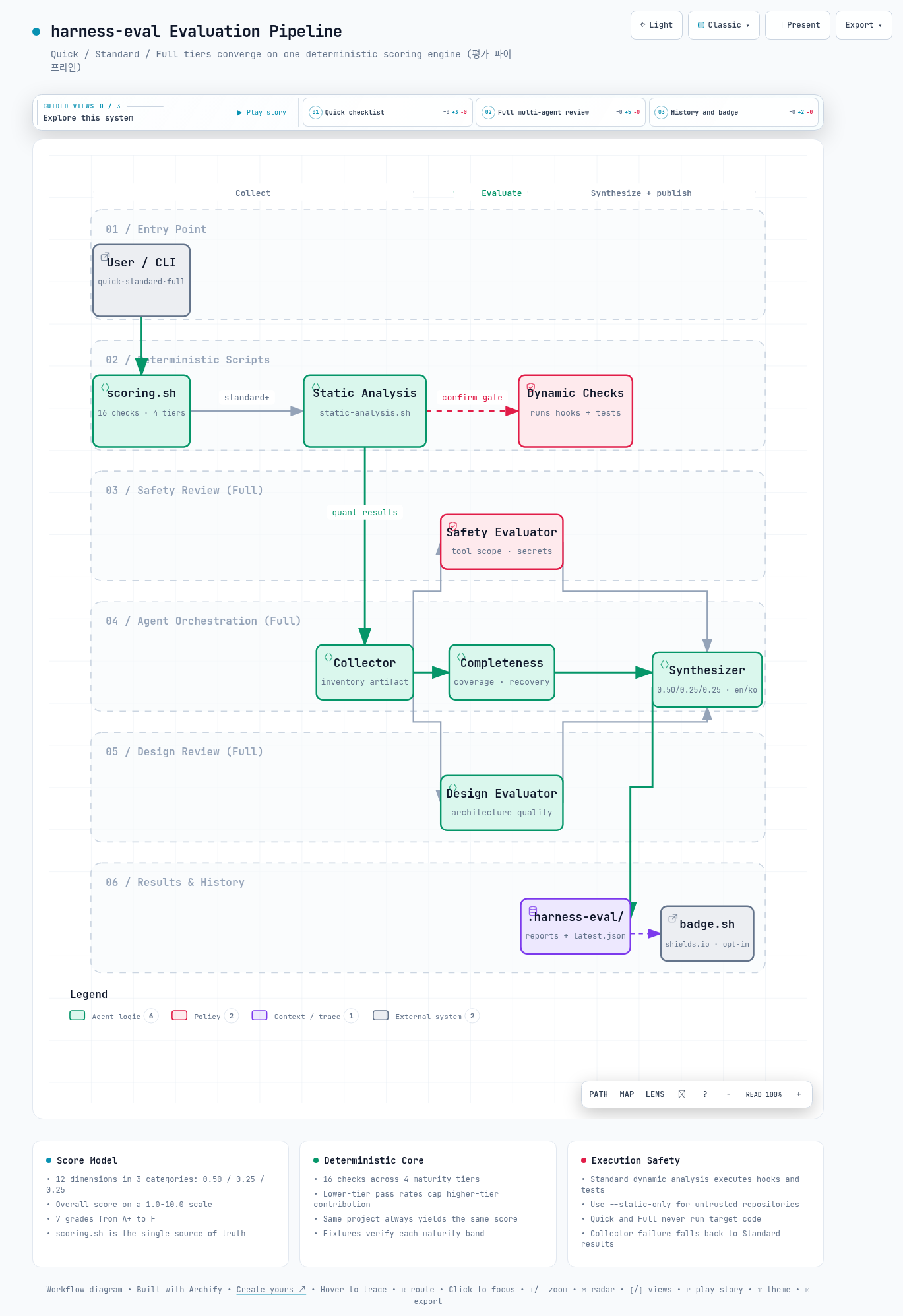
인터랙티브 아키텍처 맵 전체 이미지 - 시스템 구성 요소와 흐름을 한 화면으로 보여줍니다
그림 2. 인터랙티브 아키텍처 맵 전체 보기. 이미지를 클릭하면 노드 탐색, 경로 추적, 다크/라이트 테마를 지원하는 인터랙티브 버전 ↗이 열립니다.

--참고 자료

핵심 출처

공식 문서

AIML / Tool Deep Dive

harness-eval - A 3-Tier Evaluation Plugin That Turns Claude Code Harness Quality into a Score

An analysis of the structure and scoring mechanics of harness-eval, a plugin that grades the engineering quality of a Claude Code harness (hooks, skills, commands, agents, CLAUDE.md) through checklists, static analysis, and multi-agent review.

Written as of 2026-08-09.

The analysis covers harness-eval v0.2.0 (released 2026-07-10).

Evaluation entry points are the /harness-eval:quick, :standard, :full, and :compare slash commands.

Primary sources are the README, CHANGELOG, harness-evaluation-framework.md, and source code of the GitHub repository whchoi98/harness-eval.

TL;DR

01Problem - No Way to Measure Harness Quality

Even a good tool underperforms when its configuration is a mess. This section starts with why the quality of Claude Code configuration deserves its own measurement.

Once a team starts using Claude Code at scale, configuration files accumulate in each project's .claude/ directory. They are hooks (scripts that run automatically on specific events), skills, commands, agents, and CLAUDE.md files. This entire configuration is called the harness (the configuration layer that controls how Claude Code behaves).

The problem is that the harness has no standard tool for judging its quality. Application code has linters and tests, but the harness has no such safety net.

Breakage hides quietly. A hook script may contain a syntax error, or a hook file registered in settings.json may not actually exist, yet the session appears to run normally. The deny list (a blocklist meant to stop dangerous commands) may block nothing at all, and that too never surfaces.

harness-eval is a Claude Code plugin aimed at this gap. It divides the harness into 5 components and inspects each from a different perspective. It then synthesizes the results into a single score and grade.

In the table below, look at what gets evaluated and the perspective applied to each component.

Table 1. The 5 components under evaluation (harness-evaluation-framework.md, section 1)
ComponentControl modelEvaluation focus
Hooks (settings.json + .claude/hooks/)Event-driven automatic triggersCorrectness, safety, coverage
Skills (.claude/skills/)Instructions for how to perform a roleActionability, specificity
Commands (.claude/commands/)Automation of repetitive tasksCompleteness, error recovery
Agents (.claude/agents/)Independent parallel analysisOutput schema, tool scope
CLAUDE.md (root + per module)Project contextAccuracy, freshness, actionability
Note - What this tool measures

What harness-eval scores is not the quality of the code itself but the quality of the configuration layer that controls Claude Code. The same codebase scores low when its hooks and permission settings are weak, and high when tests and a deny list are in place.

02How It Works - The 3-Tier Evaluation Structure

You do not need a deep evaluation every time. This section explains the three evaluation modes you can choose from and how they relate to each other.

The core design of harness-eval is a 3-tier structure that lets users trade evaluation depth for time. A fast checklist (Quick), static plus dynamic analysis (Standard), and a multi-agent comprehensive review (Full) are each exposed as a separate skill and slash command. Here static analysis means inspecting files without running any code, and dynamic analysis means actually executing it.

How long does each mode take? Quick takes about 30 seconds, Standard about 2-3 minutes, and Full about 5-10 minutes, and all three modes converge on the same 1.0-10.0 scale and grading scheme. In this table, watch the duration alongside whether each mode actually executes the target project's code.

Table 2. The three evaluation modes compared (README, docs/architecture.md)
ModeCommandDurationMethodExecutes target code
Quick/harness-eval:quick~30 sChecklist-based scoring (scoring.sh)No
Standard/harness-eval:standard~2-3 minStatic + dynamic analysis (runs hooks and tests)Yes (confirmation gate)
Full/harness-eval:full~5-10 min5-agent parallel review + 12-dimension synthesisNo direct execution (deterministic scripts + read-only agents)

The three modes are layered rather than implemented separately. Standard stacks static-analysis.sh (bash syntax, JSON validity, file permissions, hook registration consistency) and dynamic analysis on top of Quick's scoring engine. Full takes Standard's output as the input to its collection phase and adds agent review on top.

In every mode, the canonical scorer (the single source of truth, the one original that settles any disagreement) is scripts/scoring.sh. So grades are never assigned by different criteria across modes.

The comparison-only mode /harness-eval:compare performs no new evaluation. It computes the delta (the difference) between the latest and the previous result from stored history. The history mechanism is covered in section 5.

03Scoring - 12 Dimensions, 16 Checks, 7 Grades

A score is hard to trust when you do not know how it is made. This section walks through how the score and the grade are calculated, step by step.

Since v0.2.0 the evaluation model has been unified into a single weighted average that groups 12 dimensions into 3 categories. The framework document as of v0.1.0 described a 6-dimension model, while the Full mode synthesizer (agents/synthesizer.md) had drifted onto a different model. 0.2.0 aligned both on the canonical 12-dimension model.

3.1 The 12 dimensions and category weights

In this table, look at which dimensions belong to which category, and note that Basic Quality carries half of the total weight.

Table 3. The 12-dimension / 3-category evaluation model (harness-evaluation-framework.md, section 2)
CategoryWeightDimensions
Basic Quality0.50Correctness, safety, completeness, consistency
Operational0.25Actionability, verifiability, cost efficiency, contract-based testing
Design Quality0.25Agent communication, context management, feedback-loop maturity, evolvability

Why give half the weight to Basic Quality? The framework document states the rationale: "if the harness is wrong or unsafe, nothing else matters."

Within a category, each dimension is averaged with equal weight. The three category averages are then combined at 0.50 / 0.25 / 0.25 and rounded to one decimal place.

3.2 Checklist scoring in Quick / Standard

Quick and Standard do not score the 12 dimensions directly. Instead they convert the pass ratio of 16 check items across 4 maturity tiers, defined in templates/checklist.json, onto the same scale by summing per-tier weights.

Along the way, a lower tier's pass ratio caps (attenuates) the contribution of higher tiers. If the foundations are weak, filling in higher-tier items does not raise the score.

The checks are deterministic: file existence, glob matches (file name pattern tests), JSON field presence, and grep patterns (text pattern searches). Deterministic means the same input always produces the same result. So the same project always receives the same score.

In this table, note that both the weight and the bar rise together as the tiers go up.

Table 4. The 4 tiers in checklist.json
TierWeightItemsRepresentative items
basic (6.0+)1.04CLAUDE.md exists, settings exist, at least 1 hook, at least 1 command
functional (7.0+)1.54PreToolUse / PostToolUse registered, secret-scanning hook, 2+ skills, 1+ agent
robust (8.0+)2.05Automated tests, command error-recovery sections, agent output schemas, deny list, 2+ module CLAUDE.md files
production (9.0+)2.53E2E / integration tests, CI/CD pipeline, migration guide
scripts/scoring.sh - overall score and grade
overall = (weighted_sum / total_weight) * 9.0 + 1.0   # range 1.0-10.0

# Grade mapping (single source of truth)
s >= 9.5  A+        s >= 8.0  B+        s >= 6.0  C
s >= 9.0  A         s >= 7.0  B         otherwise F
s >= 8.5  A-

There are 7 grades: A+, A, A-, B+, B, C, F. The single source of truth for these thresholds is scripts/scoring.sh. The copies in the synthesizer agent and the framework document are explicitly required to follow it, and both Full mode and the badge generator use these values.

Before 0.2.0, Full mode carried its own grade table, so grades could diverge across modes. That was one of the defects fixed in 0.2.0.

Then how do we know the scorer itself scores correctly? It is verified against mock projects at 4 maturity levels in tests/fixtures/ (minimal, functional, robust, production). 24 scoring tests confirm that each fixture lands in its intended score band.

A separate nested-hooks-project fixture covers nested-schema regressions.

Principle: quantitative checks (scripts) form the skeleton of the score, and qualitative review (agents) only adjusts on top of it. The single source of truth for the grade table and the scale is scoring.sh.

04Full Mode - Parallel Review by 5 Agents

Some qualities cannot be caught by automated checks alone. This section explains how Full mode works, with several AI reviewers splitting the evaluation between them.

Full mode evaluates the qualities grep cannot catch. Its targets are design qualities such as whether tool scopes really follow least privilege and whether handoffs (work transfers) between agents are clear.

To do this, it orchestrates (conducts in order) 5 subagents (auxiliary AI workers that run separately from the main session) across 3 phases. The skill (skills/full/SKILL.md) acts as the orchestrator. Each agent is dispatched through Claude Code's Task tool.

  • Phase 1 - Collection (sequential) - runs static-analysis.sh and scoring.sh to obtain quantitative results. The collector agent references them to build a project inventory artifact.
  • Phase 2 - Parallel evaluation - safety-evaluator (tool scope, secret safety), completeness-evaluator (coverage, error recovery), and design-evaluator (architecture quality) evaluate the same artifact concurrently.
  • Phase 3 - Synthesis - the synthesizer combines the three evaluators' scores with the weighted formula from section 3.1 and generates a bilingual English / Korean report.
flowchart LR U["/harness-eval:full"] --> SA["static-analysis.sh"] U --> SC["scoring.sh"] SA --> COL["collector"] SC --> COL COL --> SE["safety-evaluator"] COL --> CE["completeness-evaluator"] COL --> DE["design-evaluator"] SE --> SY["synthesizer"] CE --> SY DE --> SY SY --> R["Bilingual report en/ko"]
Figure 1. The Full mode evaluation pipeline. Output from the deterministic scripts flows through the collector to the three evaluator agents in parallel, and the synthesizer combines everything into a single score.

The fallback (a backup path taken on failure) design that decouples the phases stands out. If the collector fails, Phases 2 and 3 are skipped entirely and the report is produced from Standard results alone. The fallback is explicitly noted in the report.

Per-category scores from static analysis (categories.*.score) come back as null for categories that have no checks. The skill instructions explicitly say "do not invent values" in that case.

Note - How the read-only evaluators actually became read-only

Before 0.2.0, all 5 agents restricted their tools via an allowed-tools field in the frontmatter (the configuration block at the top of a file). But for subagents that field is ignored, and the correct field is tools. In other words, no tool restriction was in effect at all.

It was a case of the harness evaluation tool carrying a harness defect of its own. It was fixed in 0.2.0.

05History Tracking, Comparison, and Badges

A score measured once and forgotten is meaningless. This section covers the supporting features that accumulate results, compare them, and display them as a badge.

harness-eval accumulates evaluation results in the target project's .harness-eval/ directory. Report files are saved under the .harness-eval/reports/eval-{date}-{seq}-{mode}-{en|ko}.md convention. The latest score is recorded in latest.json, consumed by both the badge generator and the history manager.

5.1 history.sh - save / list / compare

scripts/history.sh provides three subcommands: save, list, and compare. By default, compare diffs the latest evaluation against the previous one. It returns the overall score delta, grade change, and per-tier passed-item deltas as JSON, and --eval-id can pin a specific history entry as the comparison baseline.

The /harness-eval:compare skill takes this output and tabulates the trend and the outlook for reaching the next grade. It reports that comparison is not possible when there are fewer than 2 history entries.

5.2 badge.sh - from score to README badge

scripts/badge.sh reads the score from latest.json and generates an A+-to-F grade badge as a Markdown block. The block contains a shields.io (a service that renders badge images) badge URL, and the badge image itself is served as SVG by shields.io. A plugin hook (post-eval-badge.sh, registered on the Stop event in hooks/hooks.json) triggers badge generation when an evaluation session ends.

Automatically writing the badge into the README, however, is opt-in (it only happens when explicitly enabled). The README is modified only when the HARNESS_EVAL_AUTO_BADGE=1 environment variable or autoBadge:true in .harness-eval/config.json is present.

Before 0.2.0 it silently rewrote the README at the end of every session. A hook that implicitly modifies user files is itself a harness anti-pattern, so it was changed to opt-in.

06Practical Usage Flow

Now it is time to install it and try it yourself. This section walks through the install commands and the recommended usage cycle.

Prerequisites are Bash 4+, jq 1.6+, Python 3.6+, Git, and the Claude Code CLI. Installation takes two steps: registering the marketplace and installing the plugin.

Terminal - install and run
claude plugin marketplace add https://github.com/whchoi98/harness-eval
claude plugin install harness-eval@harness-eval

# Inside a Claude Code session
/harness-eval:quick              # Checklist scoring (~30 s)
/harness-eval:standard           # Static + dynamic analysis (~2-3 min)
/harness-eval:full               # Multi-agent review (~5-10 min)
/harness-eval:compare            # Compare with the previous evaluation

The scoring engine can also be used without Claude Code. The scripts emit JSON to stdout, so they slot directly into a CI pipeline (an automated verification run triggered on every code change).

Run directly from plugins/harness-eval/
HARNESS_EVAL_ROOT=$(pwd) bash scripts/scoring.sh /path/to/target-project --mode quick
# {"mode":"quick","scores":{"overall":7.2,"grade":"B"},"checklist":{...},...}

HARNESS_EVAL_ROOT=$(pwd) bash scripts/history.sh /path/to/target-project list
# [{"id":"eval-2026-04-06-001","mode":"quick","overall":7.2,"grade":"B"}]
Warning - Standard mode's dynamic analysis executes target code

The dynamic analysis phase of Standard mode actually runs the target project's .claude/hooks/ scripts and test suite on your machine. The skill goes through an explicit confirmation gate before execution, but when evaluating an untrusted repository, use --static-only (or --no-dynamic) to perform only static analysis and scoring.

Quick and Full modes do not execute target code directly. The README attaches this warning to both Standard and Full, but the Full skill implementation has no dynamic analysis phase.

The recommended cycle is spelled out in section 6 of the framework document. After the initial evaluation, re-evaluate immediately once critical issues are fixed. Then re-evaluate after major feature additions and at every version release.

How much does the score actually improve? The repository's own measured convergence record shows gains of +0.6-0.7 points per round, from 7.2 in round 1 to 8.5 in round 3. Beyond 8.5, improvement slows because it requires infrastructure investment such as integration tests and CI/CD, a documented diminishing-returns pattern.

07Limitations

Every measurement tool has limits you need to know before reading its results. This section lays out three limitations to keep in mind when using harness-eval.

First, checklist scoring is a proxy measurement (an indirect stand-in metric) of quality. Most of the 16 items are file-existence and grep-pattern checks, so a perfunctory error-recovery section that merely contains the word "Error" still passes the robust-error-recovery check. The framework document itself classifies items such as least-privilege tool scope, performance benchmarks, and SLA documentation as manual review, excluding them from automated scoring.

Second, Full mode's design-quality scores are qualitative agent judgments and thus not deterministic. Evaluating the same project twice can yield identical quantitative parts but different design-category scores. A run also costs 5-10 minutes plus a corresponding token bill.

The code-execution risk of dynamic analysis is exactly as warned in section 6. The confirmation gate does not remove the execution itself.

Third, there are project-maturity caveats. 0.2.0 is a hardening release that fixed 61 confirmed defects and 5 design gaps in one pass. That is a sign the tool is stabilizing quickly, but also that outputs from the 0.1.0 era had low reliability.

The README also notes that the remote main and master branches have diverged. Contributors should verify the default branch.

08Conclusion

Finally, here is what this tool means and how to adopt it realistically.

The value of harness-eval lies less in the score itself than in turning harness quality into a repeatable measurement target. Deterministic scripts guarantee a consistent scale, and multi-agent review supplements the design quality that scripts cannot see. History plus badges then connect measurement to an improvement cycle.

Keeping the grade table in scoring.sh as the single source of truth, with every mode following it, is a pattern worth borrowing when building tools like this.

Adoption is most sensible starting with Quick, which costs almost nothing. Check within 30 seconds whether the team's harness passes the basic tier, then improve toward the robust tier (tests, deny list, error recovery). Reserving Full for pre-release checks yields the best return on time and token cost.

The unpassed items per tier in an evaluation become the improvement backlog. So progress can be tracked with compare deltas without writing a separate roadmap.

To sum it up in one sentence: harness-eval turns the Claude Code configuration quality you used to manage by gut feeling into a score and a grade within 30 seconds, and carries it into an improvement cycle.

Full image of the interactive architecture map showing the system components and flows in one view
Figure 2. Full view of the interactive architecture map. Click the image to open the interactive version ↗ with node search, route tracing, and dark/light themes.

--References

Primary source

Official documentation