AIML / Tool Deep Dive

MCP Tool Forge - MCP 서버 도구를 실행 가능한 코드로 변환하는 Python CLI

MCP 서버가 대화마다 소모하는 도구 정의 토큰 비용의 구조를 수치로 확인하고, 도구를 boto3 / AWS CLI / OpenAPI 스키마 / AgentCore Gateway / Skill 5가지 형식으로 한 번만 변환해 그 비용을 없애는 방법을 정리합니다.

작성 기준일은 2026-03-19입니다.

적용 대상은 Claude Code와 Kiro-CLI에서 MCP 서버 또는 AWS Skills를 사용하는 환경입니다.

핵심 식별자는 mcp-tool-forge CLI와 9개 aws-* 스킬입니다.

주 출처는 GitHub whchoi98/mcp-tool-forge 저장소(2026-03-19)입니다.

요약

01개요 - MCP Tool Forge란

이 절에서는 MCP Tool Forge가 어떤 도구이고 왜 만들어졌는지 소개합니다. 핵심은 하나입니다. AI가 쓰는 도구를 서버 없이 돌아가는 코드로 바꾸는 것입니다.

MCP Tool Forge는 MCP(Model Context Protocol, AI 에이전트가 외부 도구를 호출하게 해주는 표준 프로토콜) 서버의 도구(Tool)를 추출하는 Python CLI 도구입니다. 추출한 도구는 boto3, AWS CLI, OpenAPI 스키마(Schema), AgentCore Gateway, Claude Code / Kiro-CLI Skill 5가지 형식으로 변환됩니다. 바로 설치해 쓸 수 있는 9개 AWS Skills를 포함하며, Claude Code와 Kiro-CLI를 모두 지원합니다.

용어를 짧게 풀면 이렇습니다. boto3는 AWS를 코드로 다루는 Python 라이브러리이고, OpenAPI 스키마는 도구의 입력과 출력을 기술하는 표준 문서 형식입니다. AgentCore Gateway는 Amazon Bedrock의 도구 게이트웨이 서비스이고, Skill은 에이전트가 필요할 때만 읽어 들이는 마크다운 지침 파일입니다.

이 도구가 존재하는 이유는 MCP의 토큰 비용 구조에 있습니다. MCP 서버를 켜두는 것만으로 모든 도구 정의가 매 대화의 컨텍스트에 실립니다. 그래서 도구를 쓰지 않아도 비용이 발생합니다.

이 문서는 먼저 그 비용을 수치로 확인합니다(2~3장). 이어서 해법인 Skills의 설치와 구성을 다루고(4장), 변환 파이프라인의 동작 방식을 정리합니다(5~7장).

02핵심 문제 - MCP 토큰 비용

이 절에서는 MCP 서버를 켜두기만 해도 왜 비용이 생기는지 살펴봅니다. 비용의 단위는 토큰(LLM이 글을 읽고 쓰는 최소 단위이자 과금 기준)입니다.

2.1 MCP는 왜 토큰을 많이 소모하는가

MCP 프로토콜은 강력하지만, 모든 도구 정의(Tool Definition)와 요청/응답이 LLM 토큰으로 소모됩니다. MCP 서버가 로딩되면 모든 도구의 JSON Schema(도구의 입력과 출력을 기술한 명세)가 LLM 컨텍스트(모델이 대화마다 읽는 입력 전체)에 주입됩니다.

이 주입은 LLM이 어떤 도구를 쓸 수 있는지 "알기 위해" 필요한 과정입니다. 문제는 주입된 도구 대부분이 그 대화에서 사용되지 않는다는 점입니다.

그 비용은 어느 정도일까요? 도구 정의 하나가 약 2,000토큰이므로, IAM MCP 서버 하나를 로딩하면 도구 29개 × 약 2,000토큰 = 약 58,000토큰이 도구 정의만으로 소모됩니다. 여기에 도구를 호출할 때마다 JSON-RPC(원격 함수를 호출하는 메시지 규약) 요청/응답 왕복으로 호출당 약 500토큰이 추가됩니다.

주의 - 서버를 늘릴수록 비용은 선형으로 커집니다

67개 AWS MCP 서버에서 792개 도구를 전부 로딩하면, 792개 × 약 2,000토큰 = 약 1,584,000토큰(약 150만)이 도구 정의만으로 소모됩니다. 도구를 하나도 호출하지 않아도 매 대화마다 발생하는 비용입니다.

2.2 실측 결과 (Kiro-CLI 기준)

이론이 아니라 실측에서는 얼마나 차이가 날까요? 같은 작업을 MCP 서버를 켠 상태와 끈 상태(Skills만 사용)로 각각 실행해 비교했습니다. 비용 단위는 credits(Kiro-CLI의 사용량 과금 단위)입니다.

이 표에서 볼 것은 같은 작업인데도 벌어지는 credits 차이입니다.

표 1. Kiro-CLI 실측 - MCP 서버 4개 ON vs OFF
시나리오Credits토큰 사용량
MCP 서버 4개 ON0.71도구 스키마 로딩 + 응답
MCP 서버 4개 OFF (Skills만)0.27필요한 스킬만 선택 로딩
절감률(Savings)62%

2.3 MCP Tool Forge의 해법

해법은 한 번 추출 → 네이티브 코드로 변환 → MCP 없이 직접 실행입니다. MCP 방식은 Agent ↔ MCP Server ↔ AWS API 경로를 매번 거치며 토큰을 소모합니다. Skill 방식은 Agent가 boto3 / CLI 코드를 직접 실행해 AWS API로 가므로, 추가 토큰도 왕복 지연도 없습니다.

MCP - 도구 정의 (매 대화) 2,000토큰/도구
MCP - 호출 왕복 (매 호출) 500토큰/회
Skill - 코드 직접 실행 0토큰
그림 1. 방식별 토큰 소모 지점. MCP는 정의와 호출 양쪽에서 반복 과금되지만, 변환된 코드는 어느 쪽도 소모하지 않습니다.

이 표에서 볼 것은 토큰, 서버, 지연 시간 항목에서 두 방식이 어떻게 갈리는지입니다.

표 2. MCP 방식 vs Skill 방식 비교
비교 항목MCP 방식Skill 방식
도구 정의 토큰약 2,000/도구 (매 대화)0 (코드에 내장)
요청/응답 토큰JSON-RPC 왕복0 (직접 실행)
서버 의존성(Dependency)항상 실행 필요불필요
지연 시간(Latency)MCP 서버 왕복0
오프라인(Offline) 동작불가가능

03토큰 경제학 - MCP vs Skills

이 절에서는 두 방식의 비용 차이를 토큰 수와 달러 금액으로 비교합니다. 앞 절의 문제가 실제로 얼마짜리인지 확인하는 단계입니다.

3.1 Skills는 어떻게 토큰을 절약하는가

Skills는 필요한 스킬만 선택적으로 로딩(Selective Loading)합니다. 예를 들어 "IAM 사용자 목록 보여줘"라는 요청에서, MCP 방식은 IAM 서버의 29개 도구 스키마 전체(58,000토큰)를 로딩한 뒤 그중 1개만 사용합니다. Skill 방식은 aws-iam의 SKILL.md 1개(약 3,000토큰)만 로딩하고 바로 실행합니다.

이 표에서 볼 것은 초기 로딩 토큰과 호출당 토큰, 그리고 서버 개수의 차이입니다.

표 3. 초기 로딩과 호출 비용 비교
항목MCP (서버 1개)MCP (67개 전체)Skill
초기 로딩(Initial Loading)약 58,000토큰약 1,584,000토큰약 3,000토큰
도구 호출(Per Call)약 500토큰/회약 500토큰/회0토큰
서버 프로세스(Process)1개 필요67개 필요0개
콜드 스타트(Cold Start)2~5초30초+0초

3.2 비용 환산 (Claude Opus 4.6 기준)

돈으로 환산하면 얼마나 차이가 날까요? 입력 토큰 단가 $15/1M 토큰을 적용해 대화당 비용으로 바꿔 보았습니다. 이 표에서 볼 것은 MCP 서버 개수에 따라 커지는 대화당 비용과 Skill의 비용입니다.

표 4. 대화당 입력 토큰 비용 환산 - Claude Opus 4.6, $15/1M 토큰
시나리오입력 토큰(Input Tokens)비용
MCP 1개 서버/대화58,000$0.87/대화
MCP 10개 서버/대화580,000$8.70/대화
Skill 1개/대화3,000$0.045/대화
Skill 전체 9개/대화27,000$0.41/대화

한 문장으로 요약하면, Skill 방식은 MCP 대비 토큰 비용을 95% 이상 절감합니다.

04Skills 설치와 9개 AWS Skills

이 절에서는 함께 제공되는 9개 AWS Skills를 설치하고 쓰는 방법을 다룹니다. 설치는 복사 몇 줄이면 끝나고, 이후에는 평소처럼 말로 요청하면 됩니다.

참고 - 설치 전제 조건은 자격 증명뿐입니다

MCP 서버 설치, Python 패키지(Package), Bedrock 접근이 모두 불필요합니다. AWS 자격 증명(Credentials)만 있으면 바로 사용할 수 있습니다.

4.1 설치 - 3줄이면 끝

저장소를 클론하고 스킬 디렉터리로 복사하면 설치가 끝납니다. Claude Code는 .claude/skills, Kiro-CLI는 .kiro/skills를 씁니다.

프로젝트 로컬 설치 - Claude Code / Kiro-CLI
# Claude Code
git clone https://github.com/whchoi98/mcp-tool-forge.git
mkdir -p .claude/skills
cp -r mcp-tool-forge/.claude/skills/aws-* .claude/skills/

# Kiro-CLI
mkdir -p .kiro/skills
cp -r mcp-tool-forge/.claude/skills/aws-* .kiro/skills/
글로벌 설치 - 모든 프로젝트에 적용
# Claude Code
mkdir -p ~/.claude/skills
cp -r mcp-tool-forge/.claude/skills/aws-* ~/.claude/skills/

# Kiro-CLI
mkdir -p ~/.kiro/skills
cp -r mcp-tool-forge/.claude/skills/aws-* ~/.kiro/skills/

전체가 필요 없으면 특정 스킬 디렉터리만 골라 복사해도 됩니다 (예: aws-iam, aws-cost, aws-network만 설치). 설치 후에는 자연어(평소 쓰는 일상 언어)로 요청하면 스킬이 자동 활성화됩니다.

이 표에서 볼 것은 어떤 요청이 어떤 스킬을 깨우는지의 대응 관계입니다.

표 5. 요청 예시와 활성화되는 스킬
요청 예시활성화 스킬
"IAM 사용자 목록 보여줘"aws-iam
"이번 달 비용은?"aws-cost
"CloudWatch 알람 확인"aws-cloudwatch
"Lambda 함수 목록"aws-infra
"SQS 큐 목록"aws-messaging
"VPC 네트워크 확인"aws-network
"Bedrock 모델 목록"aws-ai
"DynamoDB 테이블 조회"aws-data
"보안 감사 실행"aws-security

4.2 9개 스킬 구성

9개 스킬은 각각 하나의 AWS 관리 영역을 맡습니다. 이 표에서 볼 것은 스킬별 담당 영역과 대표 작업입니다.

표 6. 9개 AWS Skills - 트리거와 주요 작업
스킬(Skill)트리거(Trigger)주요 작업(Operations)
aws-iam"IAM 사용자/역할/정책"list_users, create_role, attach_policy, simulate_policy
aws-cloudwatch"로그/메트릭/알람/감사"Logs Insights, get_metric_data, describe_alarms, CloudTrail
aws-cost"비용/청구/가격"get_cost_and_usage, cost_forecast, pricing lookup
aws-infra"리소스/스택/컨테이너"Cloud Control API, CloudFormation, EKS, ECS, Lambda
aws-messaging"큐/토픽/메시지/워크플로"SNS publish, SQS send/receive, MQ, Step Functions
aws-network"VPC/서브넷/TGW/VPN"VPC, Transit Gateway, Cloud WAN, Network Firewall, VPN, Flow Logs
aws-ai"Bedrock/SageMaker/Kendra"Bedrock Converse, Knowledge Bases, Agents, SageMaker, Kendra, Q Business
aws-data"DB/캐시/쿼리"DynamoDB, Aurora, Redshift, ElastiCache, Neptune
aws-security"계정/자격증명/보안감사"get_caller_identity, credential audit, MFA check

4.3 커버리지(Coverage)

9개 스킬로 기존 MCP 서버를 얼마나 대체할 수 있을까요? 9개 수동 스킬은 67개 MCP 서버 중 52개(78%)를 커버합니다. 나머지 15개는 특정 AWS 서비스가 아니거나 전문 영역이라 수동 스킬 대상에서 제외되었습니다.

이 표에서 볼 것은 제외된 15개 서버가 어느 카테고리이고 왜 빠졌는지입니다.

표 7. 미커버(Uncovered) 15개 서버와 사유
카테고리미커버 서버사유
Core / Essentialaws-api, core-mcp, aws-mcpMCP 프록시(Proxy)/플래닝(Planning) - 특정 서비스가 아님
Documentationaws-documentation, aws-knowledge문서 검색 전용 - boto3/CLI 대상 아님
Developer Toolsaws-diagram, aws-msk, code-doc-gen, frontend, git-repo-research, synthetic-data개발 도구 (다이어그램, Kafka, 코드 문서화 등)
Healthcareaws-healthomics, healthimaging, healthlake헬스케어(Healthcare) 전문 서비스
Cost & Operationsaws-managed-prometheusPrometheus 모니터링(Monitoring)
참고 - 미커버 서버도 쓸 수 있습니다

미커버 서버의 도구도 mcp-tool-forge convert로 자동 생성된 792개 개별 스킬을 통해 사용할 수 있습니다.

4.4 테스트 결과(Test Results)

실제 계정에서도 제대로 동작할까요? 실제 AWS 계정(서울 리전, IAM 역할 인증)에서 9개 스킬을 17개 항목으로 테스트해 17/17 통과했습니다. 모든 스킬이 표준 AWS 자격 증명만으로 동작합니다.

이 표에서 볼 것은 스킬별 테스트 항목과 각 항목의 통과 여부입니다.

표 8. Skills 테스트 결과 - 실제 AWS 계정, 서울 리전
#스킬테스트결과
1aws-securitysts get-caller-identityOK
2aws-iamlist-usersOK (2 users)
3aws-iamlist-rolesOK (13 roles)
4aws-cloudwatchdescribe-log-groupsOK
5aws-cloudwatchdescribe-alarmsOK
6aws-infraCloud Control EC2OK
7aws-infraCloud Control S3OK (1 bucket)
8aws-infraCloudFormation stacksOK
9aws-costget-cost-and-usageOK ($1,093)
10aws-costCost by service (top 5)OK
11aws-securityMFA check (boto3)OK (2 NO MFA)
12aws-securityAccess key age (boto3)OK (23 days)
13aws-securityAccount summary (boto3)OK (Root MFA: NO)
14aws-messagingSNS topicsOK
15aws-messagingSQS queuesOK
16aws-dataDynamoDB tablesOK
17aws-infraLambda functionsOK

05아키텍처 - 3단계 변환 파이프라인

이 절에서는 도구가 실제로 어떤 과정을 거쳐 코드로 바뀌는지 살펴봅니다. 변환은 스키마 추출, 정적 매핑, LLM 추론(모델에게 매핑을 추측하게 하는 단계)의 3단계로 진행됩니다. 마지막에 Jinja2(템플릿으로 코드를 찍어내는 Python 라이브러리) 생성기(Generator)가 5가지 형식의 코드를 만들어냅니다.

flowchart TB MCP["MCP Server (stdio)"] -->|"tools/list - MCP SDK"| CACHE["Schema Cache (~/.mcp-tool-forge)"] CACHE --> STATIC["Phase 2. 정적 매핑 - YAML Mappings"] STATIC -->|"미매핑 도구"| LLM["Phase 3. LLM 추론 - Bedrock Claude Opus 4.6"] STATIC --> GEN["코드 생성 - Jinja2 Generators"] LLM --> GEN GEN --> OUT["boto3 / cli / schema / agentcore / skill"]
그림 2. mcp-tool-forge 변환 파이프라인. 정적 매핑으로 해결되지 않은 도구만 LLM 추론 단계로 넘어가므로, LLM 호출은 미매핑 도구에 한정됩니다.
  1. 추출(Extract) - MCP SDK stdio_client(표준 입출력으로 서버 프로세스와 통신하는 클라이언트)로 서버에 연결하고 tools/list로 스키마를 추출합니다. 결과는 ~/.mcp-tool-forge/cache/에 캐시(Cache)됩니다.
  2. 정적 매핑(Static Map) - mappings/*.yaml에서 알려진 매핑을 조회합니다 (IAM 29 + DynamoDB 6 = 35개).
  3. LLM 매핑(LLM Map) - 미매핑(Unmapped) 도구를 Bedrock Claude Opus 4.6에 보내 boto3 매핑을 추론합니다. --llm-assist 플래그(Flag)로 켭니다.

5.1 멀티 AWS 프로필 지원(Multi-Profile Support)

--aws-profile 옵션으로 생성되는 boto3 코드에 AWS 프로필을 설정할 수 있습니다. AWS Organizations + SSO 환경에서 여러 계정을 오가는 경우 유용합니다. 호출 시점에 프로필을 오버라이드(기본값 대신 다른 값을 지정)할 수도 있습니다.

생성된 boto3 코드 - --aws-profile 옵션에 따른 차이
# --aws-profile 없이 생성 (기본)
def list_users(profile_name: str | None = None, **kwargs) -> dict:
    session = boto3.Session(profile_name=profile_name)
    client = session.client('iam')
    ...

# --aws-profile prod-account 으로 생성
def list_users(profile_name: str | None = "prod-account", **kwargs) -> dict:
    session = boto3.Session(profile_name=profile_name)
    client = session.client('iam')
    ...

# 호출 시 프로필 오버라이드 가능
list_users()                                  # 기본 프로필 사용
list_users(profile_name="staging-account")    # 다른 계정으로 전환

5.2 추출 결과(Extraction Results)

이 파이프라인을 전체 서버에 돌리면 어느 정도 규모가 나올까요? 이 표에서 볼 것은 연결 성공률, 추출된 도구 수, 생성 코드의 구문 통과율입니다.

표 9. 전체 추출 결과 지표
지표(Metric)값(Value)
등록 서버(Registered Servers)67개
연결 성공(Connected)55 / 67 (82%)
추출된 도구(Extracted Tools)792개
생성된 boto3 함수(Generated Functions)480+
생성된 스킬(Generated Skills)792개
구문 통과율(Syntax Pass Rate)91.4% (자동 수정 후)

06출력 형식과 지원 서버

이 절에서는 변환 결과물이 어떤 파일로 나오는지, 그리고 어떤 서버를 변환할 수 있는지 정리합니다. 변환 결과는 5가지 형식으로 나오며, 같은 도구라도 실행 환경에 따라 쓰는 형식이 다릅니다.

이 표에서 볼 것은 형식별 출력 파일 위치와 그 형식이 쓰이는 자리입니다.

표 10. 5가지 출력 형식(Output Formats)
형식파일용도
boto3 (.py)output/*/boto3/tools.pyAgentCore Gateway Lambda에서 직접 호출
AWS CLI (.sh)output/*/cli/tools.sh셸(Shell) 기반 에이전트, 자동화 스크립트
Schema (.json)output/*/schema/tools.jsonOpenAPI 호환 도구 정의(Tool Definition)
AgentCore (.json)output/*/agentcore/tool_config.jsonBedrock AgentCore Gateway toolSpec
Skill (.md)output/*/skill/*.mdClaude Code / Kiro-CLI 스킬(Skill)

변환 대상으로 등록된 MCP 서버는 총 67개입니다. 이 표에서 볼 것은 67개 서버가 어떤 카테고리에 몇 개씩 분포하는지입니다.

표 11. 지원 서버(Supported Servers) 67개 - 카테고리 분포
카테고리(Category)주요 서버
Data & Analytics18DynamoDB, Aurora, Redshift, ElastiCache, Neptune
Infrastructure & Deployment11EKS, ECS, CDK, CloudFormation, Terraform
AI & Machine Learning10Bedrock, SageMaker, Kendra, Nova Canvas
Cost & Operations8CloudWatch, CloudTrail, Cost Explorer
Developer Tools & Support7IAM, MSK, Diagram, Code Doc Gen
Integration & Messaging5SNS/SQS, MQ, Step Functions, Location
Healthcare & Lifesciences3HealthOmics, HealthImaging, HealthLake
Core2AWS API, Core MCP
Documentation2AWS Documentation, Knowledge
Essential Setup1AWS MCP (통합 프록시)

07빠른 시작 - CLI 도구

이 절에서는 MCP 서버를 직접 변환하고 싶은 사람을 위해 CLI 사용법을 정리합니다. 설치, 변환, 스킬 등록까지의 명령을 순서대로 담았습니다.

참고 - Skills만 쓸 거라면 이 섹션은 건너뛰어도 됩니다

4장의 설치만으로 9개 AWS Skills 사용에는 충분합니다. 이 섹션은 직접 MCP 서버를 변환하려는 경우에만 필요합니다.

mcp-tool-forge CLI - 설치부터 스킬 등록까지
# 설치(Install)
pip install -e ".[dev]"

# 서버 목록 조회(List Servers)
mcp-tool-forge list-servers
mcp-tool-forge list-servers --category "Data & Analytics"

# 도구 확인(List Tools) - 실제 MCP 서버에 연결
mcp-tool-forge list-tools --server aws-iam-mcp-server

# 모든 형식으로 변환(Convert)
mcp-tool-forge convert --server aws-iam-mcp-server --output all

# LLM 매핑(LLM Assist)
mcp-tool-forge convert --server amazon-cloudwatch-mcp-server --output all --llm-assist

# 멀티 AWS 프로필(Multi-Profile) 지원
mcp-tool-forge convert --server aws-iam-mcp-server --output boto3 --aws-profile prod-account

# Claude Code에 스킬 등록(Register)
mcp-tool-forge register --server aws-iam-mcp-server -d output

# Kiro-CLI에 스킬 등록
mcp-tool-forge register --server aws-iam-mcp-server -d output --target kiro

7.1 프로젝트 구조(Project Structure)

mcp-tool-forge/ - 저장소 구조
mcp-tool-forge/
├── .claude/skills/             # 9개 AWS Skills (이식 가능)
│   ├── aws-iam/                # IAM 사용자, 역할, 정책
│   ├── aws-cloudwatch/         # 로그, 메트릭, 알람, CloudTrail
│   ├── aws-cost/               # 비용 탐색기, 청구, 가격
│   ├── aws-infra/              # CloudFormation, EKS, ECS, Lambda
│   ├── aws-messaging/          # SNS, SQS, MQ, Step Functions
│   ├── aws-network/            # VPC, Transit Gateway, Cloud WAN, VPN
│   ├── aws-ai/                 # Bedrock, SageMaker, Kendra, Q Business
│   ├── aws-data/               # DynamoDB, Aurora, Redshift, Neptune
│   └── aws-security/           # 계정 정보, 보안 감사
├── src/mcp_to_cli/
│   ├── cli.py                  # Click CLI 진입점(Entry Point)
│   ├── pipeline.py             # 3단계 오케스트레이터(Orchestrator)
│   ├── connector.py            # MCP SDK stdio_client 연결
│   ├── registry.yaml           # 67개 서버 설정(Configuration)
│   ├── llm_mapper.py           # Bedrock Claude Opus 4.6 매핑
│   ├── validator.py            # 생성 코드 검증/자동 수정
│   ├── generators/             # 5가지 출력 생성기(Generator)
│   ├── mappings/               # 정적 YAML 매핑 (IAM, DynamoDB)
│   └── templates/              # 6개 Jinja2 템플릿(Template)
├── tests/                      # 38개 pytest 테스트
└── docs/                       # 아키텍처 및 설계 문서

7.2 요구사항(Requirements)

Skills만 쓰는 경로와 CLI 도구 전체를 쓰는 경로의 요구사항이 다릅니다. Skills 경로는 AWS 자격 증명 외에 아무것도 요구하지 않습니다. 이 표에서 볼 것은 두 경로에서 각 항목이 필요한지 여부입니다.

표 12. 요구사항 - Skills만 사용 vs CLI 도구 전체
항목Skills만 사용CLI 도구 전체
Python >= 3.11불필요필요
AWS 자격 증명(Credentials)필요필요
uvx / npx불필요필요 (MCP 서버 실행)
Bedrock 접근불필요선택 (LLM 매핑용)
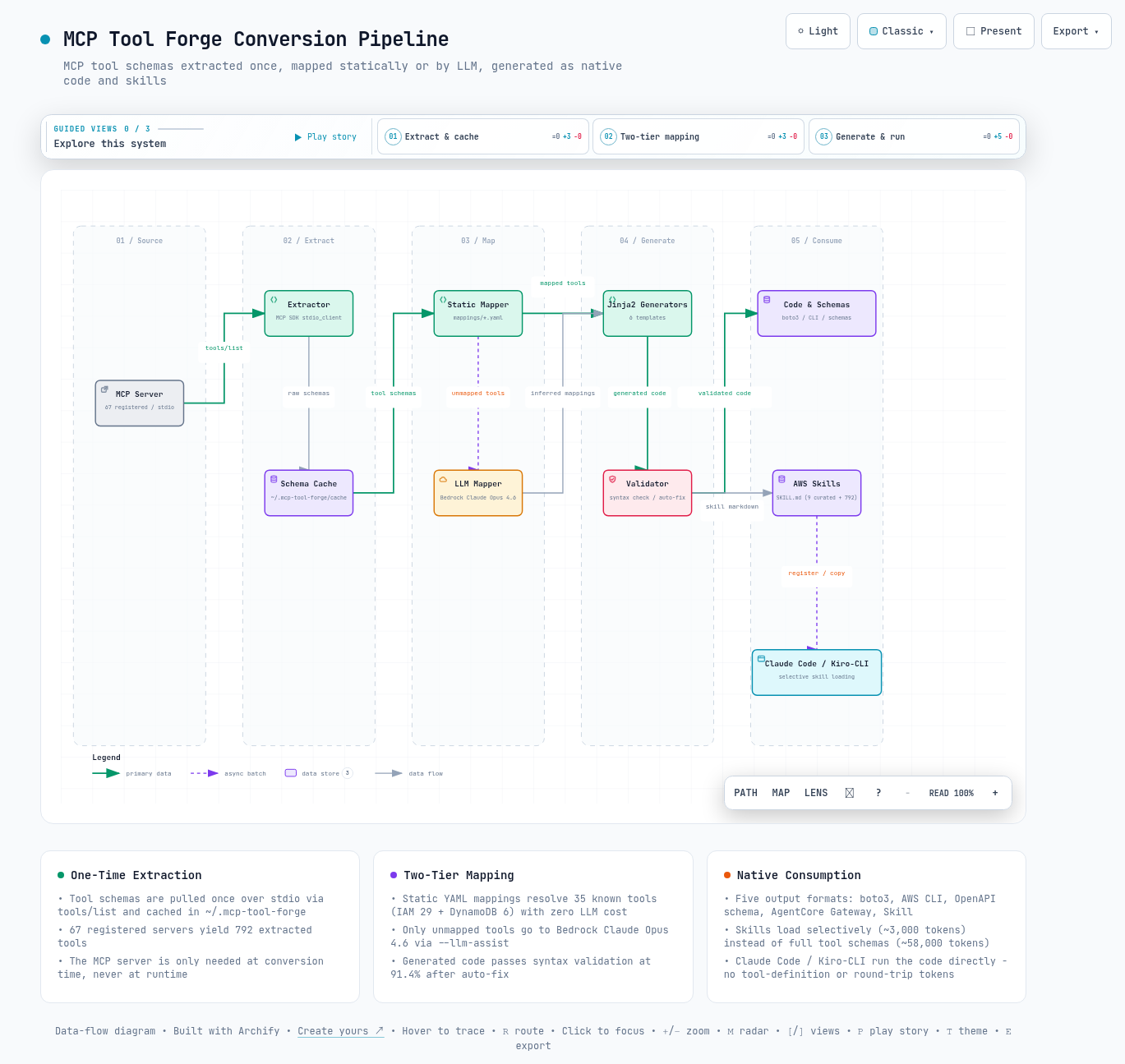
인터랙티브 아키텍처 맵 전체 이미지 - 시스템 구성 요소와 흐름을 한 화면으로 보여줍니다
그림 3. 인터랙티브 아키텍처 맵 전체 보기. 이미지를 클릭하면 노드 탐색, 경로 추적, 다크/라이트 테마를 지원하는 인터랙티브 버전 ↗이 열립니다.

--참고 자료

본문에서 인용한 출처의 원문 링크입니다. 최신 수치는 아래 저장소에서 확인할 수 있습니다.

핵심 출처

공식 문서

AIML / Tool Deep Dive

MCP Tool Forge - A Python CLI That Converts MCP Server Tools into Executable Code

We quantify the token cost that MCP servers impose on every conversation through tool definitions, and show how converting those tools once into five native formats - boto3 / AWS CLI / OpenAPI schema / AgentCore Gateway / Skill - eliminates that cost.

Written as of 2026-03-19.

Applies to environments using MCP servers or AWS Skills with Claude Code and Kiro-CLI.

Key identifiers are the mcp-tool-forge CLI and the nine aws-* skills.

Primary source is the GitHub whchoi98/mcp-tool-forge repository (2026-03-19).

TL;DR

01Overview - What Is MCP Tool Forge

This section introduces what MCP Tool Forge is and why it was built. The core idea is simple: turn the tools an AI uses into code that runs without a server.

MCP Tool Forge is a Python CLI that extracts tools from MCP (Model Context Protocol, the standard protocol that lets an AI agent call external tools) servers. The extracted tools are converted into five formats: boto3, AWS CLI, OpenAPI schema, AgentCore Gateway, and Claude Code / Kiro-CLI Skill. It ships with nine ready-to-install AWS Skills and supports both Claude Code and Kiro-CLI.

A quick glossary: boto3 is the Python library for working with AWS, and an OpenAPI schema is a standard document format describing a tool's inputs and outputs. AgentCore Gateway is Amazon Bedrock's tool gateway service. A Skill is a markdown instruction file the agent reads only when it needs it.

The reason this tool exists is MCP's token cost structure. Merely keeping an MCP server enabled puts every tool definition into the context of every conversation. That means you pay even when the tools are never used.

This document first quantifies that cost (chapters 2-3). It then covers the remedy, installing and organizing Skills (chapter 4), and walks through how the conversion pipeline works (chapters 5-7).

02The Core Problem - MCP Token Cost

This section looks at why merely keeping an MCP server enabled creates cost. The unit of that cost is the token (the smallest unit an LLM reads and writes, and the basis for billing).

2.1 Why MCP Consumes So Many Tokens

The MCP protocol is powerful, but every tool definition and every request/response is paid for in LLM tokens. When an MCP server loads, the JSON Schema (a specification describing each tool's inputs and outputs) of every tool is injected into the LLM context (everything the model reads on each conversation).

This injection is necessary for the LLM to "know" which tools are available. The problem is that most of the injected tools are never used in that conversation.

How big is that cost? One tool definition is roughly 2,000 tokens, so loading a single IAM MCP server means 29 tools × ~2,000 tokens = about 58,000 tokens consumed by tool definitions alone. On top of that, every tool call adds roughly 500 tokens for the JSON-RPC (a message convention for calling remote functions) request/response round trip.

Warning - Cost grows linearly with each server you add

Loading all 792 tools from the 67 AWS MCP servers means 792 tools × ~2,000 tokens = about 1,584,000 tokens (~1.5M) spent on tool definitions alone. This cost is incurred on every conversation even if no tool is ever called.

2.2 Measured Results (Kiro-CLI)

How large is the gap in real measurements rather than theory? The same task was run twice, once with MCP servers enabled and once disabled (Skills only). Cost is given in credits (Kiro-CLI's usage billing unit).

What to look for in this table: the credits gap for the exact same task.

Table 1. Kiro-CLI measurements - 4 MCP servers ON vs OFF
ScenarioCreditsToken usage
4 MCP servers ON0.71Tool schema load + responses
4 MCP servers OFF (Skills only)0.27Only the needed skill loaded
Savings62%

2.3 The MCP Tool Forge Remedy

The remedy is extract once → convert to native code → run directly without MCP. The MCP path travels Agent ↔ MCP Server ↔ AWS API on every call, burning tokens each time. The Skill path has the Agent execute boto3 / CLI code straight against the AWS API, with no extra tokens and no round-trip latency.

MCP - tool definitions (every conversation) 2,000 tokens/tool
MCP - call round trip (every call) 500 tokens/call
Skill - direct code execution 0 tokens
Figure 1. Where each approach spends tokens. MCP bills repeatedly on both definitions and calls; converted code consumes neither.

What to look for in this table: how the two approaches diverge on tokens, server dependency, and latency.

Table 2. MCP approach vs Skill approach
AspectMCP approachSkill approach
Tool definition tokens~2,000/tool (every conversation)0 (embedded in code)
Request/response tokensJSON-RPC round trip0 (direct execution)
Server dependencyMust always be runningNone
LatencyMCP server round trip0
Offline operationNot possiblePossible

03Token Economics - MCP vs Skills

This section compares the two approaches in token counts and in dollars. It is where we find out how expensive the previous section's problem really is.

3.1 How Skills Save Tokens

Skills use selective loading - only the skill that is needed gets loaded. For a request like "show me the IAM users", the MCP approach loads the full schema of all 29 tools on the IAM server (58,000 tokens) and then uses exactly one of them. The Skill approach loads a single SKILL.md from aws-iam (about 3,000 tokens) and executes immediately.

What to look for in this table: the gap in initial-load tokens, per-call tokens, and server processes.

Table 3. Initial load and per-call cost comparison
ItemMCP (1 server)MCP (all 67)Skill
Initial loading~58,000 tokens~1,584,000 tokens~3,000 tokens
Per call~500 tokens/call~500 tokens/call0 tokens
Server processes1 required67 required0
Cold start2-5 s30 s+0 s

3.2 Cost in Dollars (Claude Opus 4.6)

How much does the difference come to in money? We converted the token counts at an input price of $15 per 1M tokens. What to look for in this table: per-conversation cost growing with the number of MCP servers, versus the Skill cost.

Table 4. Input token cost per conversation - Claude Opus 4.6, $15/1M tokens
ScenarioInput tokensCost
1 MCP server / conversation58,000$0.87/conversation
10 MCP servers / conversation580,000$8.70/conversation
1 Skill / conversation3,000$0.045/conversation
All 9 Skills / conversation27,000$0.41/conversation

To sum it up in one sentence, the Skill approach cuts token cost by more than 95% compared to MCP.

04Installing Skills and the 9 AWS Skills

This section covers installing and using the nine bundled AWS Skills. Installation is a few copy commands, and after that you simply ask in plain language.

Note - The only prerequisite is credentials

No MCP server installation, no Python packages, no Bedrock access. AWS credentials are all you need to start using the skills.

4.1 Installation - Three Lines and Done

Clone the repository and copy into the skills directory - that is the whole install. Claude Code uses .claude/skills and Kiro-CLI uses .kiro/skills.

Project-local install - Claude Code / Kiro-CLI
# Claude Code
git clone https://github.com/whchoi98/mcp-tool-forge.git
mkdir -p .claude/skills
cp -r mcp-tool-forge/.claude/skills/aws-* .claude/skills/

# Kiro-CLI
mkdir -p .kiro/skills
cp -r mcp-tool-forge/.claude/skills/aws-* .kiro/skills/
Global install - applies to every project
# Claude Code
mkdir -p ~/.claude/skills
cp -r mcp-tool-forge/.claude/skills/aws-* ~/.claude/skills/

# Kiro-CLI
mkdir -p ~/.kiro/skills
cp -r mcp-tool-forge/.claude/skills/aws-* ~/.kiro/skills/

If you do not need the full set, copy only the skill directories you want (e.g. install just aws-iam, aws-cost, and aws-network). Once installed, skills activate automatically from natural-language requests, meaning everyday phrasing rather than commands.

What to look for in this table: which kind of request wakes up which skill.

Table 5. Example requests and the skill they activate
Example requestActivated skill
"Show me the IAM users"aws-iam
"What is this month's cost?"aws-cost
"Check the CloudWatch alarms"aws-cloudwatch
"List the Lambda functions"aws-infra
"List the SQS queues"aws-messaging
"Check the VPC network"aws-network
"List the Bedrock models"aws-ai
"Query the DynamoDB tables"aws-data
"Run a security audit"aws-security

4.2 The Nine Skills

Each of the nine skills owns one area of AWS management. What to look for in this table: each skill's area and its representative operations.

Table 6. The 9 AWS Skills - triggers and key operations
SkillTriggerKey operations
aws-iam"IAM users/roles/policies"list_users, create_role, attach_policy, simulate_policy
aws-cloudwatch"logs/metrics/alarms/audit"Logs Insights, get_metric_data, describe_alarms, CloudTrail
aws-cost"cost/billing/pricing"get_cost_and_usage, cost_forecast, pricing lookup
aws-infra"resources/stacks/containers"Cloud Control API, CloudFormation, EKS, ECS, Lambda
aws-messaging"queues/topics/messages/workflows"SNS publish, SQS send/receive, MQ, Step Functions
aws-network"VPC/subnets/TGW/VPN"VPC, Transit Gateway, Cloud WAN, Network Firewall, VPN, Flow Logs
aws-ai"Bedrock/SageMaker/Kendra"Bedrock Converse, Knowledge Bases, Agents, SageMaker, Kendra, Q Business
aws-data"DB/cache/query"DynamoDB, Aurora, Redshift, ElastiCache, Neptune
aws-security"account/credentials/security audit"get_caller_identity, credential audit, MFA check

4.3 Coverage

How much of the existing MCP server lineup can nine skills replace? The nine hand-written skills cover 52 of the 67 MCP servers (78%). The remaining 15 were excluded from hand-written skills because they either do not map to a specific AWS service or belong to a specialist domain.

What to look for in this table: which categories the 15 excluded servers fall into and why.

Table 7. The 15 uncovered servers and why
CategoryUncovered serversReason
Core / Essentialaws-api, core-mcp, aws-mcpMCP proxy/planning - not a specific service
Documentationaws-documentation, aws-knowledgeDocumentation search only - not a boto3/CLI target
Developer Toolsaws-diagram, aws-msk, code-doc-gen, frontend, git-repo-research, synthetic-dataDeveloper tooling (diagrams, Kafka, code documentation, etc.)
Healthcareaws-healthomics, healthimaging, healthlakeSpecialist healthcare services
Cost & Operationsaws-managed-prometheusPrometheus monitoring
Note - Uncovered servers are still usable

Tools from the uncovered servers are still available through the 792 auto-generated individual skills produced by mcp-tool-forge convert.

4.4 Test Results

Do the skills actually work against a real account? All nine skills were tested against a real AWS account (Seoul region, IAM role authentication) across 17 checks, passing 17/17. Every skill runs on standard AWS credentials alone.

What to look for in this table: each skill's test items and whether each one passed.

Table 8. Skills test results - real AWS account, Seoul region
#SkillTestResult
1aws-securitysts get-caller-identityOK
2aws-iamlist-usersOK (2 users)
3aws-iamlist-rolesOK (13 roles)
4aws-cloudwatchdescribe-log-groupsOK
5aws-cloudwatchdescribe-alarmsOK
6aws-infraCloud Control EC2OK
7aws-infraCloud Control S3OK (1 bucket)
8aws-infraCloudFormation stacksOK
9aws-costget-cost-and-usageOK ($1,093)
10aws-costCost by service (top 5)OK
11aws-securityMFA check (boto3)OK (2 NO MFA)
12aws-securityAccess key age (boto3)OK (23 days)
13aws-securityAccount summary (boto3)OK (Root MFA: NO)
14aws-messagingSNS topicsOK
15aws-messagingSQS queuesOK
16aws-dataDynamoDB tablesOK
17aws-infraLambda functionsOK

05Architecture - 3-Stage Conversion Pipeline

This section looks at how a tool actually becomes code. Conversion runs in three stages: schema extraction, static mapping, and LLM inference (a stage where a model is asked to guess the mapping). At the end, Jinja2 (a Python library that stamps out code from templates) generators emit code in the five formats.

flowchart TB MCP["MCP Server (stdio)"] -->|"tools/list - MCP SDK"| CACHE["Schema Cache (~/.mcp-tool-forge)"] CACHE --> STATIC["Phase 2. Static Mapping - YAML Mappings"] STATIC -->|"Unmapped tools"| LLM["Phase 3. LLM Inference - Bedrock Claude Opus 4.6"] STATIC --> GEN["Code Generation - Jinja2 Generators"] LLM --> GEN GEN --> OUT["boto3 / cli / schema / agentcore / skill"]
Figure 2. The mcp-tool-forge conversion pipeline. Only tools that static mapping cannot resolve go to the LLM inference stage, so LLM calls are limited to unmapped tools.
  1. Extract - connect to the server with the MCP SDK stdio_client (a client that talks to the server process over standard input/output) and pull schemas via tools/list. Results are cached in ~/.mcp-tool-forge/cache/.
  2. Static Map - look up known mappings in mappings/*.yaml (IAM 29 + DynamoDB 6 = 35 mappings).
  3. LLM Map - send unmapped tools to Bedrock Claude Opus 4.6 to infer boto3 mappings. Enabled with the --llm-assist flag.

5.1 Multi-Profile Support

The --aws-profile option bakes an AWS profile into the generated boto3 code. This is handy when hopping between accounts in an AWS Organizations + SSO setup. The profile can still be overridden (replaced with another value) at call time.

Generated boto3 code - effect of the --aws-profile option
# Generated without --aws-profile (default)
def list_users(profile_name: str | None = None, **kwargs) -> dict:
    session = boto3.Session(profile_name=profile_name)
    client = session.client('iam')
    ...

# Generated with --aws-profile prod-account
def list_users(profile_name: str | None = "prod-account", **kwargs) -> dict:
    session = boto3.Session(profile_name=profile_name)
    client = session.client('iam')
    ...

# Profile can be overridden at call time
list_users()                                  # uses the default profile
list_users(profile_name="staging-account")    # switch to another account

5.2 Extraction Results

What scale does the pipeline reach when run across all servers? What to look for in this table: connection success rate, extracted tool count, and the syntax pass rate of the generated code.

Table 9. Overall extraction metrics
MetricValue
Registered servers67
Connected55 / 67 (82%)
Extracted tools792
Generated boto3 functions480+
Generated skills792
Syntax pass rate91.4% (after auto-fix)

06Output Formats and Supported Servers

This section lists which files conversion produces and which servers can be converted. Conversion produces five formats, and the same tool ends up in a different format depending on where it will run.

What to look for in this table: each format's output file location and where that format is used.

Table 10. The five output formats
FormatFilePurpose
boto3 (.py)output/*/boto3/tools.pyCalled directly from AgentCore Gateway Lambda
AWS CLI (.sh)output/*/cli/tools.shShell-based agents, automation scripts
Schema (.json)output/*/schema/tools.jsonOpenAPI-compatible tool definitions
AgentCore (.json)output/*/agentcore/tool_config.jsonBedrock AgentCore Gateway toolSpec
Skill (.md)output/*/skill/*.mdClaude Code / Kiro-CLI skills

A total of 67 MCP servers are registered as conversion targets. What to look for in this table: how many of the 67 servers sit in each category.

Table 11. The 67 supported servers - category distribution
CategoryCountKey servers
Data & Analytics18DynamoDB, Aurora, Redshift, ElastiCache, Neptune
Infrastructure & Deployment11EKS, ECS, CDK, CloudFormation, Terraform
AI & Machine Learning10Bedrock, SageMaker, Kendra, Nova Canvas
Cost & Operations8CloudWatch, CloudTrail, Cost Explorer
Developer Tools & Support7IAM, MSK, Diagram, Code Doc Gen
Integration & Messaging5SNS/SQS, MQ, Step Functions, Location
Healthcare & Lifesciences3HealthOmics, HealthImaging, HealthLake
Core2AWS API, Core MCP
Documentation2AWS Documentation, Knowledge
Essential Setup1AWS MCP (unified proxy)

07Quick Start - The CLI Tool

This section is for readers who want to convert MCP servers themselves. It walks through the commands from install to conversion to skill registration, in order.

Note - Skip this section if you only need the Skills

The installation in chapter 4 is all you need to use the nine AWS Skills. This section only matters if you want to convert MCP servers yourself.

mcp-tool-forge CLI - from install to skill registration
# Install
pip install -e ".[dev]"

# List servers
mcp-tool-forge list-servers
mcp-tool-forge list-servers --category "Data & Analytics"

# List tools - connects to the live MCP server
mcp-tool-forge list-tools --server aws-iam-mcp-server

# Convert to all formats
mcp-tool-forge convert --server aws-iam-mcp-server --output all

# LLM-assisted mapping
mcp-tool-forge convert --server amazon-cloudwatch-mcp-server --output all --llm-assist

# Multi-profile support
mcp-tool-forge convert --server aws-iam-mcp-server --output boto3 --aws-profile prod-account

# Register skills with Claude Code
mcp-tool-forge register --server aws-iam-mcp-server -d output

# Register skills with Kiro-CLI
mcp-tool-forge register --server aws-iam-mcp-server -d output --target kiro

7.1 Project Structure

mcp-tool-forge/ - repository layout
mcp-tool-forge/
├── .claude/skills/             # 9 AWS Skills (portable)
│   ├── aws-iam/                # IAM users, roles, policies
│   ├── aws-cloudwatch/         # Logs, metrics, alarms, CloudTrail
│   ├── aws-cost/               # Cost Explorer, billing, pricing
│   ├── aws-infra/              # CloudFormation, EKS, ECS, Lambda
│   ├── aws-messaging/          # SNS, SQS, MQ, Step Functions
│   ├── aws-network/            # VPC, Transit Gateway, Cloud WAN, VPN
│   ├── aws-ai/                 # Bedrock, SageMaker, Kendra, Q Business
│   ├── aws-data/               # DynamoDB, Aurora, Redshift, Neptune
│   └── aws-security/           # Account info, security audit
├── src/mcp_to_cli/
│   ├── cli.py                  # Click CLI entry point
│   ├── pipeline.py             # 3-stage orchestrator
│   ├── connector.py            # MCP SDK stdio_client connection
│   ├── registry.yaml           # Configuration for 67 servers
│   ├── llm_mapper.py           # Bedrock Claude Opus 4.6 mapping
│   ├── validator.py            # Generated-code validation/auto-fix
│   ├── generators/             # 5 output generators
│   ├── mappings/               # Static YAML mappings (IAM, DynamoDB)
│   └── templates/              # 6 Jinja2 templates
├── tests/                      # 38 pytest tests
└── docs/                       # Architecture and design docs

7.2 Requirements

The Skills-only path and the full CLI path have different requirements. The Skills path needs nothing beyond AWS credentials. What to look for in this table: whether each item is required on each path.

Table 12. Requirements - Skills only vs full CLI
ItemSkills onlyFull CLI
Python >= 3.11Not requiredRequired
AWS credentialsRequiredRequired
uvx / npxNot requiredRequired (to run MCP servers)
Bedrock accessNot requiredOptional (for LLM mapping)
Full image of the interactive architecture map showing the system components and flows in one view
Figure 3. Full view of the interactive architecture map. Click the image to open the interactive version ↗ with node search, route tracing, and dark/light themes.

--References

Links to the sources cited in this document. The repository below carries the latest numbers.

Primary Source

Official Documentation