AIML / Tool Deep Dive

project-init 플러그인의 구조와 문서 자동 동기화 메커니즘

Claude Code 하네스(hooks, skills, agents, commands, CLAUDE.md)를 커맨드 한 번으로 생성하고 유지하는 project-init 플러그인의 동작 원리를 저장소 소스 기준으로 분석합니다.

작성 기준일은 2026-08-09입니다.

분석 대상은 project-init v2.2.0(2026-07-12 릴리스)입니다.

대상 저장소는 github.com/whchoi98/project-init입니다.

주 출처는 저장소의 README.md, docs/architecture.md, CHANGELOG.md와 커맨드 정의 파일 9개입니다.

요약

01문제 정의 - 하네스 수동 구성의 비용

이 절은 Claude Code용 프로젝트 설정을 사람이 손으로 만들 때 어떤 문제가 생기는지 살펴봅니다. 이 플러그인이 왜 필요한지에 대한 배경입니다.

Claude Code의 동작 품질은 하네스가 결정합니다. 하네스는 hooks(정해진 시점에 자동 실행되는 스크립트), skills, agents, commands, CLAUDE.md 파일의 조합입니다. 이 중 CLAUDE.md는 프로젝트 컨텍스트를 담는 파일로, 사실상 시스템 프롬프트 역할을 합니다.

이 조합을 갖춘 프로젝트와 그렇지 않은 프로젝트는 다릅니다. 같은 요청을 해도 결과 품질이 달라집니다.

첫 번째 비용 - 조용히 실패하는 문법

문제는 이 다섯 종류의 구성 요소를 전부 손으로 만들어야 한다는 점입니다. 각각 파일 위치와 문법이 다릅니다. 특히 settings.json의 훅 등록은 틀려도 조용히 실패합니다.

얼마나 틀리기 쉬울까요? project-init 저장소 자체가 이를 실증합니다. v2.1 이전 버전은 존재하지 않는 훅 이벤트 PreCommit과 잘못된 deny 패턴 문법을 배포했습니다.

이 두 버그는 생성된 프로젝트의 세션 시작 시 "Invalid key in record" 에러로 나타났습니다 (CHANGELOG 2.1.0의 Fixed 항목). 플러그인 제작자조차 하네스 문법에서 실수한다는 것이 수동 구성의 첫 번째 비용입니다.

두 번째 비용 - 문서 drift

두 번째 비용은 문서 drift입니다. drift는 코드는 계속 바뀌는데 문서는 처음 작성한 시점에 멈춰 서로 어긋나는 현상을 말합니다. CLAUDE.md가 낡으면 Claude는 낡은 컨텍스트를 근거로 판단합니다.

README는 이 생성과 동기화 과정을 "수동적이고 실수가 잦다"고 규정하고, 플러그인의 존재 이유를 여기에 둡니다. 그래서 project-init은 생성(스캐폴딩, 즉 뼈대 파일의 자동 생성)과 유지(자동 동기화, 점수화)를 모두 커맨드로 자동화하는 접근을 택했습니다.

참고 - 하네스라는 용어의 범위

이 문서에서 하네스는 README의 Harness Engineering 섹션 정의를 따릅니다. Claude Code 실행 환경에서 모델의 행동을 결정하는 프로젝트 측 설정 전체, 즉 .claude/ 디렉토리(hooks, skills, commands, agents, settings.json)와 루트 및 모듈별 CLAUDE.md를 가리킵니다.

02동작 원리 - 플러그인 구조와 9개 커맨드

이 절은 플러그인이 어떤 파일들로 이루어져 있고 각 커맨드가 무엇을 해 주는지 살펴봅니다. 커맨드 목록과 프로젝트 자동 감지 방식이 핵심입니다.

저장소는 마켓플레이스 구조입니다. 마켓플레이스는 플러그인을 배포하고 설치하게 해 주는 저장소 형식을 말합니다. 루트의 .claude-plugin/marketplace.json이 마켓플레이스 매니페스트이고, 실제 플러그인은 plugins/project-init/ 아래에 있습니다.

플러그인 패키지는 무엇으로 구성될까요? 세 부분입니다. 커맨드 9개(commands/), 에이전트 1개(doc-sync-checker, model: opus로 실행), 스킬 1개(project-scaffolder, 참조 파일 13개 포함)입니다.

커맨드, 에이전트, 스킬은 전부 Markdown 파일로 정의됩니다. 분량은 얼마나 될까요? 커맨드 정의 파일 9개의 합계는 1,807줄입니다.

생성물의 원본은 project-scaffolder 스킬의 references/ 디렉토리에 있는 참조 파일 13개입니다(저장소 architecture.md는 12개로 적고 있으나 실제 파일 수 기준). 훅 스크립트, settings.json, 스킬, 에이전트, 테스트, README, CHANGELOG 템플릿이 여기에 모여 있습니다. /init-project가 이를 읽어 대상 프로젝트에 맞게 구체화합니다.

즉 플러그인이 생성하는 하네스의 품질은 이 템플릿 파일들의 품질과 같습니다. 이 표에서 볼 것은 9개 커맨드가 각각 생성, 동기화, 검증 중 어떤 역할을 맡는지입니다.

표 1. 9개 커맨드와 역할 (plugins/project-init/commands/, v2.2.0)
커맨드역할
/init-project [path]17단계 프로젝트 초기화. 기존 프로젝트를 감지해 적응합니다.
/sync-docs문서 동기화. Phase 0(스타일 가이드)부터 Phase 10(리포트)까지 진행하며 품질 점수를 산정합니다.
/generate-readme이중 언어(EN/KR) README.md 생성 또는 업데이트.
/generate-changelogKeep a Changelog 규약의 이중 언어 CHANGELOG.md 생성.
/add-module <path>모듈 디렉토리와 CLAUDE.md 추가, 아키텍처 문서 갱신.
/add-runbook <name>검증, 롤백 섹션을 포함한 운영 런북 생성.
/add-adr <title>자동 번호 부여 아키텍처 결정 기록(ADR) 생성.
/add-reference-doc <layer>8개 계층(infrastructure, data, api 등) 중 하나의 구현 참조 문서 스켈레톤 추가.
/health-check프로젝트 설정 전체를 0-200점으로 검증하고 A-F 등급을 보고.

/init-project는 실행 전에 빌드 매니페스트를 읽어 프로젝트 유형을 감지합니다. package.json이면 Node.js, pyproject.toml이면 Python, go.mod면 Go, Cargo.toml이면 Rust, pom.xml / build.gradle이면 Java/Kotlin으로 판단합니다.

감지 결과는 CLAUDE.md에 반영됩니다. 각 유형의 소스 디렉토리 관례와 빌드/테스트 명령을 미리 채웁니다. 아무 매니페스트도 없으면 새 프로젝트로 보고 기본 모듈(src/api, src/persistence)을 생성합니다.

참고 - 설치 후 커맨드 네임스페이스

마켓플레이스로 설치하면 커맨드는 /project-init:init-project처럼 플러그인 이름이 접두어로 붙습니다. 이 문서 본문에서는 짧은 형태로 표기합니다.

03딥다이브 - 품질 점수와 4-layer 자동 동기화

이 절은 이 플러그인을 다른 스캐폴딩 도구와 구분 짓는 두 장치를 뜯어봅니다. 문서 상태를 점수로 만드는 품질 점수와, 문서가 코드를 따라가게 만드는 네 겹의 동기화 장치입니다.

3.1 CLAUDE.md 품질 점수 0-100

/sync-docs와 doc-sync-checker 에이전트는 각 CLAUDE.md를 채점합니다. 기준은 몇 개일까요? 6개 기준, 100점 만점입니다.

배점이 큰 두 기준은 명령어(20점)와 아키텍처 명확성(20점)입니다. 이 배점이 설계 의도를 보여줍니다. Claude가 실제로 소비하는 정보, 즉 복사해서 바로 실행할 수 있는 명령과 이 파일만으로 이해되는 구조 설명에 가장 큰 가중치를 둡니다.

이 표에서 볼 것은 6개 기준의 배점 분포와 각 기준이 무엇을 확인하는지입니다.

표 2. CLAUDE.md 품질 점수 6개 기준 (README, Quality Scoring 섹션)
기준배점평가 내용
명령어/워크플로우20빌드/테스트/배포 명령어가 복사-붙여넣기 가능한 형태로 존재하는지
아키텍처 명확성20이 파일만으로 코드베이스 구조를 이해할 수 있는지
비자명한 패턴15주의사항, 특이점, 컨벤션이 문서화되어 있는지
간결성15장황한 설명이나 자명한 정보가 없는지
최신성15현재 코드베이스 상태를 반영하는지
실행 가능성15지시사항이 모호하지 않고 실행 가능한지

등급은 A(90-100), B(70-89), C(50-69), D(30-49), F(0-29)입니다. 점수는 절대값보다 변화량으로 쓰입니다.

/sync-docs는 실행마다 Before/After 표를 출력합니다. 그래서 동기화가 문서를 실제로 개선했는지가 매번 수치로 남습니다. README의 문제 해결 섹션이 명시하듯 이 점수는 문서 완성도를 재는 것이지 코드 품질과는 무관합니다.

3.2 4-layer 자동 동기화

문서 drift를 막는 장치는 한 겹이 아니라 네 겹입니다. 트리거 시점이 서로 다른 네 메커니즘이 같은 목표(문서 최신화)를 겨냥합니다. 한 겹이 무시되거나 실패해도 다음 겹이 잡습니다.

이 표에서 볼 것은 네 계층이 각각 언제 실행되고 어디에 설치되는지입니다.

표 3. 자동 동기화 4개 계층 (README, Auto-Sync Mechanisms 섹션)
계층트리거유형위치
Auto-Sync 규칙Plan 모드 종료자동CLAUDE.md
PostToolUse 훅Write/Edit 직후자동.claude/settings.json + .claude/hooks/
/sync-docs 커맨드사용자 호출수동플러그인 커맨드
commit-msg 훅git commit자동.git/hooks/commit-msg

첫 계층은 CLAUDE.md에 심어진 규칙 텍스트입니다. Plan 모드(구현 전에 계획부터 세우는 Claude Code의 작업 모드)에서 결정된 아키텍처 변경을 구현 시작 전에 문서에 반영하도록 Claude 자신에게 지시합니다.

둘째 계층은 PostToolUse 훅, 즉 파일 편집 직후에 자동 실행되는 check-doc-sync.sh입니다. 편집된 경로의 상위 디렉토리를 거슬러 올라가며 대응하는 CLAUDE.md가 있는지 확인합니다. 저장소 테스트가 matcher(훅을 어떤 도구 호출에 적용할지 정하는 조건) Write|Edit를 검증합니다.

셋째 계층이 사용자가 직접 호출하는 전면 동기화 /sync-docs입니다. 넷째 계층인 Git commit-msg 훅은 커밋 메시지의 AI Co-Authored-By 라인을 자동 제거하는 정리 역할까지 겸합니다.

flowchart LR U["사용자"] --> INIT["/init-project"] --> DET["프로젝트 감지"] --> GEN["구조 생성"] --> HK["훅 설치"] HK --> SYNC["4-layer 자동 동기화"] SYNC --> R["CLAUDE.md 규칙 - Plan 모드"] SYNC --> P["PostToolUse 훅 - Write/Edit"] SYNC --> M["/sync-docs - 수동"] SYNC --> C["commit-msg 훅 - git commit"] R --> UP["문서 최신화"] P --> UP M --> UP C --> UP
그림 1. 초기화에서 동기화까지의 흐름(docs/architecture.md의 Data Flow Summary 재구성). 트리거 시점이 다른 네 계층이 모두 문서 최신화 한 지점으로 수렴하는 것이 핵심입니다.

원칙: 문서 동기화를 사람의 기억에 맡기지 않고, 시점이 다른 네 개의 트리거로 겹겹이 강제하는 것이 이 플러그인의 중심 설계입니다.

04딥다이브 - 시크릿 스캔과 health-check

이 절은 생성되는 프로젝트의 보안 장치와 상태 점검 커맨드를 살펴봅니다. 시크릿(API 키나 비밀번호처럼 노출되면 안 되는 값)의 유출을 막는 스캔과, 설정 전체를 채점하는 health-check입니다.

4.1 PreToolUse 시크릿 스캔 - 17개 패턴

생성되는 secret-scan.sh 훅은 PreToolUse 이벤트(도구 실행 직전에 도는 훅, matcher: Bash)에서 커밋 전 스테이징된 파일을 검사합니다. 시크릿이 발견되면 exit 1(실패를 뜻하는 종료 코드)로 차단하도록 설계되어 있습니다.

다만 실제로는 차단되지 않습니다. 생성되는 settings.json이 이 훅을 || true로 등록해 exit 코드가 삼켜지므로, 동작은 경고 출력에 그칩니다(ADR-004의 게이트 훅 정책과 등록부가 불일치하는 지점으로, 6절 한계에서 함께 다룹니다).

잡아내는 패턴은 몇 개일까요? 패턴 배열에는 17개 패턴이 정의되어 있습니다. AWS Access Key(AKIA...), OpenAI, Anthropic, GitHub(ghp/gho/fine-grained PAT), Slack(xoxb/xoxp), Stripe(sk_live/rk_live), Google(AIza, ya29), Azure 연결 문자열, 그리고 password/secret/api-key 대입문 형태입니다.

.claude/hooks/secret-scan.sh - 패턴 배열 발췌
PATTERNS=(
    'AKIA[0-9A-Z]{16}'                          # AWS Access Key ID
    '(?<=aws_secret_access_key\s{0,5}[=:]\s{0,5})[A-Za-z0-9/+=]{40}'
                                                # AWS Secret Key (context-aware)
    'sk-ant-[A-Za-z0-9-]{90,}'                  # Anthropic API Key
    'ghp_[A-Za-z0-9]{36}'                       # GitHub Personal Access Token
    'xoxb-[0-9]+-[A-Za-z0-9]+'                  # Slack Bot Token
    ...                                         # 총 17개 패턴
)
SKIP_PATTERNS=('.env.example' 'secret-scan.sh' '*.md' 'package-lock.json' 'yarn.lock')

AWS Secret Key 패턴이 주목할 지점입니다. 40자 base64 문자열을 무조건 잡는 대신, lookbehind(정규식에서 특정 문맥 뒤에 오는 경우만 잡는 기법)로 aws_secret_access_key = 문맥 뒤에 오는 경우만 잡습니다.

왜 이렇게 좁혔을까요? v2.1 CHANGELOG에 따르면 광범위한 base64 패턴이 만들던 거짓 양성(시크릿이 아닌데 시크릿으로 잘못 잡는 것으로, SHA256 해시나 URL 경로 등)을 줄이기 위한 교체였습니다. 저장소 테스트에는 이 참양성/거짓양성(TP/FP) 케이스가 픽스처로 포함되어 있습니다.

같은 맥락의 장치가 deny 목록(실행을 금지할 명령의 목록)입니다. 생성되는 settings.json은 rm -rf, git push --force, git reset --hard, eval, curl|bash 류의 위험 명령을 차단합니다.

주의 - Markdown 파일은 시크릿 스캔 대상이 아닙니다

SKIP_PATTERNS*.md가 포함되어 있어 CLAUDE.md나 README.md에 적힌 시크릿은 이 훅이 잡지 못합니다. 문서에 예시 키를 적는 습관이 있다면 이 경로가 구멍이 됩니다. 보완 장치는 /health-check의 보안 단계로, CLAUDE.md와 커밋된 파일의 시크릿 존재 여부를 별도로 확인합니다.

4.2 health-check - 0-200점 건강 점수

/health-check는 하네스가 온전한지 확인하는 커맨드입니다. 검사는 몇 단계일까요? 7개 검사 단계입니다.

순서는 핵심 파일(CLAUDE.md 존재 +20점 등), 훅 설정(PostToolUse +10, PreToolUse +10, SessionStart +5, commit-msg +10), 스킬 4종(각 +5), 문서 커버리지, 보안, CLAUDE.md 품질(500줄 미만, 섹션 구성 등 6항목 각 +5), 테스트 구조입니다. 훅이 등록만 되고 실행 권한이 없는 경우까지 find ... ! -perm -u+x로 잡아냅니다.

이 표에서 볼 것은 총점이 어느 구간일 때 어떤 등급과 상태로 판정되는지입니다.

표 4. health-check 등급 기준 (commands/health-check.md)
점수등급상태
160-200AHEALTHY - 프로젝트가 잘 구성됨
120-159BGOOD - 경미한 개선 권장
80-119CNEEDS ATTENTION - 보완할 공백 다수
40-79DPOOR - 심각한 설정 문제
0-39FCRITICAL - 초기화 필요

두 점수의 역할은 다릅니다. 품질 점수(0-100)가 문서 하나하나의 내용을 재는 미시 지표라면, 건강 점수(0-200)는 하네스 전체의 존재와 정합성을 재는 거시 지표입니다.

두 점수는 연결되어 있습니다. health-check 리포트가 CLAUDE.md 품질을 XX/100 형식으로 함께 표기합니다.

05실제 사용 흐름

이 절은 설치부터 일상 운영까지의 실제 사용 순서를 다룹니다. 어느 시점에 어떤 커맨드를 실행해야 효과가 큰지가 핵심입니다.

설치는 마켓플레이스 등록과 플러그인 설치 두 단계입니다. 설치 후에는 Claude Code 세션을 재시작해야 커맨드가 나타납니다.

터미널에서 실행 - 설치
claude plugin marketplace add https://github.com/whchoi98/project-init
claude plugin install project-init@project-init
claude plugin list    # 설치 확인

README가 권장하는 실행 순서는 반직관적입니다. /init-project를 코드 구현 전이 아니라 구현 이후에 실행하라고 안내합니다. 이유는 자동 감지의 정확도입니다.

코드가 없으면 CLAUDE.md는 사용자 입력에 기반한 추측이 됩니다. architecture.md는 빈 템플릿이 되고, 훅의 감시 경로도 불명확해집니다. 반대로 코드가 있으면 실제 디렉토리, 실제 컴포넌트, 정확한 테스트 명령이 채워집니다.

권장 전체 흐름은 brainstorm → plan → 구현 → /init-project → /sync-docs입니다.

운영 단계의 반복 루틴은 /sync-docs입니다. 실행하면 doc-sync-checker 서브에이전트(본체와 분리된 컨텍스트에서 도는 보조 에이전트)의 갭 분석부터 README/CHANGELOG 동기화까지 진행합니다. 마지막에 Before/After 리포트를 출력합니다.

/sync-docs 실행 결과 예시 (README, Example Output)
## Sync Report

### Quality Scores (Before -> After)
| File                | Before | After  | Change |
|---------------------|--------|--------|--------|
| ./CLAUDE.md         | B (82) | B (87) | +5     |
| ./src/api/CLAUDE.md | C (62) | C (69) | +7     |
| ./src/auth/CLAUDE.md| F (28) | C (58) | +30    |

### Changes Made
- Files created: 2
- Files updated: 3
- ADRs suggested: 1
- Runbooks missing: deploy-production, incident-response

생성물은 믿을 만할까요? 저장소 자체 테스트가 뒷받침합니다. bash tests/run-all.sh를 직접 실행한 결과 169개 테스트가 전부 통과했습니다(훅 스크립트 검증, 시크릿 패턴 TP/FP, 플러그인 구조, 버전 일관성).

생성되는 프로젝트에도 같은 방식의 테스트 프레임워크(README 기준 114개 이상)가 함께 설치됩니다.

06한계

이 절은 저장소를 읽으며 확인한 약점을 정리합니다. 도입 전에 미리 알아 두면 좋은 항목들입니다.

한계는 크게 네 갈래입니다. 문서 간 수치 불일치, 점수 산정의 비결정성, 시크릿 스캔 게이트의 등록부 불일치, 그리고 마이그레이션 공백입니다.

6.1 문서 간 수치 불일치

첫째, 문서 간 수치가 어긋나는 지점이 있습니다. health-check의 명목 만점은 200점이지만, 커맨드 정의 파일의 가점 항목을 전부 더하면 195점입니다. README의 카테고리별 배점 합계는 160점입니다.

또 README의 커맨드 상세는 /sync-docs를 "9-phase"로 소개하지만, 실제 커맨드 파일은 Phase 0부터 Phase 10까지 정의되어 있습니다(CHANGELOG 2.1.0은 11개 phase로 확장했다고 기록). 동작에는 영향이 없습니다. 다만 점수를 근거로 팀 정책을 세울 때는 커맨드 정의 파일을 기준으로 삼아야 합니다.

6.2 점수 산정의 비결정성

둘째, 품질 점수와 건강 점수의 산정 주체가 스크립트가 아니라 Claude 자신입니다. 커맨드 파일은 평가 기준과 배점을 지시하는 Markdown 프롬프트입니다. 따라서 같은 문서라도 실행마다 점수가 조금씩 다를 수 있다고 유추할 수 있습니다.

이는 저장소가 명시한 내용이 아니라 커맨드 구조에서 나오는 추론입니다. Before/After 변화량 중심으로 읽으면 이 변동성의 영향이 줄어듭니다.

6.3 닫히지 않는 시크릿 스캔 게이트

셋째, 시크릿 스캔의 게이트가 실제로는 닫히지 않습니다. secret-scan.sh 자체는 시크릿 발견 시 exit 1을 반환합니다. 하지만 저장소와 생성 템플릿의 settings.json이 훅을 bash .claude/hooks/secret-scan.sh 2>/dev/null || true로 등록해 exit 코드가 항상 0으로 바뀝니다.

게이트 훅은 엄격해야 한다는 ADR-004의 결정과 등록부가 불일치하는 지점입니다. 현재 동작은 차단이 아니라 경고입니다. 차단이 필요하면 || true를 제거해야 합니다.

6.4 운영상 공백

넷째, 운영상 공백이 두 가지 있습니다. doc-sync-checker는 model: opus로 실행되어, 소스 디렉토리가 50개 이상인 프로젝트에서는 타임아웃이 날 수 있습니다(README 문제 해결 섹션).

또 플러그인을 업데이트해도 settings.json은 자동으로 덮어쓰지 않습니다. 그래서 v2.1 이전에 초기화한 프로젝트는 수동 마이그레이션이 필요합니다.

주의 - v2.1 이전에 초기화한 프로젝트의 settings.json

세션 시작 시 "Invalid key in record" 에러가 보이면 v2.1에서 수정된 두 버그가 원인입니다. PreCommit 이벤트를 PreToolUse(matcher: Bash)로, deny 패턴 Bash(python3 -c:*import os*)Bash(python3 -c*import os*)로 직접 고쳐야 합니다. 플러그인을 업데이트해도 이 파일은 자동 수정되지 않습니다.

07결론

이 절은 분석 결과를 정리하고 도입할 때의 권고를 제시합니다.

project-init의 기여는 하네스 엔지니어링을 개인의 노하우에서 커맨드로 실행 가능한 절차로 바꾼 데 있습니다. 생성(17단계 스캐폴딩)만 자동화한 것이 아니라 유지(4-layer 동기화)와 측정(0-100 품질 점수, 0-200 건강 점수)까지 한 플러그인 안에 묶었습니다. 시크릿 스캔과 deny 목록으로 생성물의 보안 기본값도 강제합니다.

도입 권고는 세 가지입니다. 첫째, /init-project는 코드가 어느 정도 자리 잡은 뒤 "프로젝트 성숙화" 단계로 실행합니다. 둘째, /sync-docs의 점수는 절대값 비교보다 Before/After 변화량으로 읽습니다.

셋째, 기존 프로젝트에 도입할 때는 /health-check를 먼저 실행해 현재 하네스 상태를 파악합니다. v2.1 이전 구조가 남아 있다면 settings.json부터 수정합니다.

한 문장으로 요약하면: CLAUDE.md를 잘 쓰는 방법을 아는 것과 그 상태를 유지하는 것은 다른 문제이고, 이 플러그인은 후자를 자동화 대상으로 삼은 도구입니다.
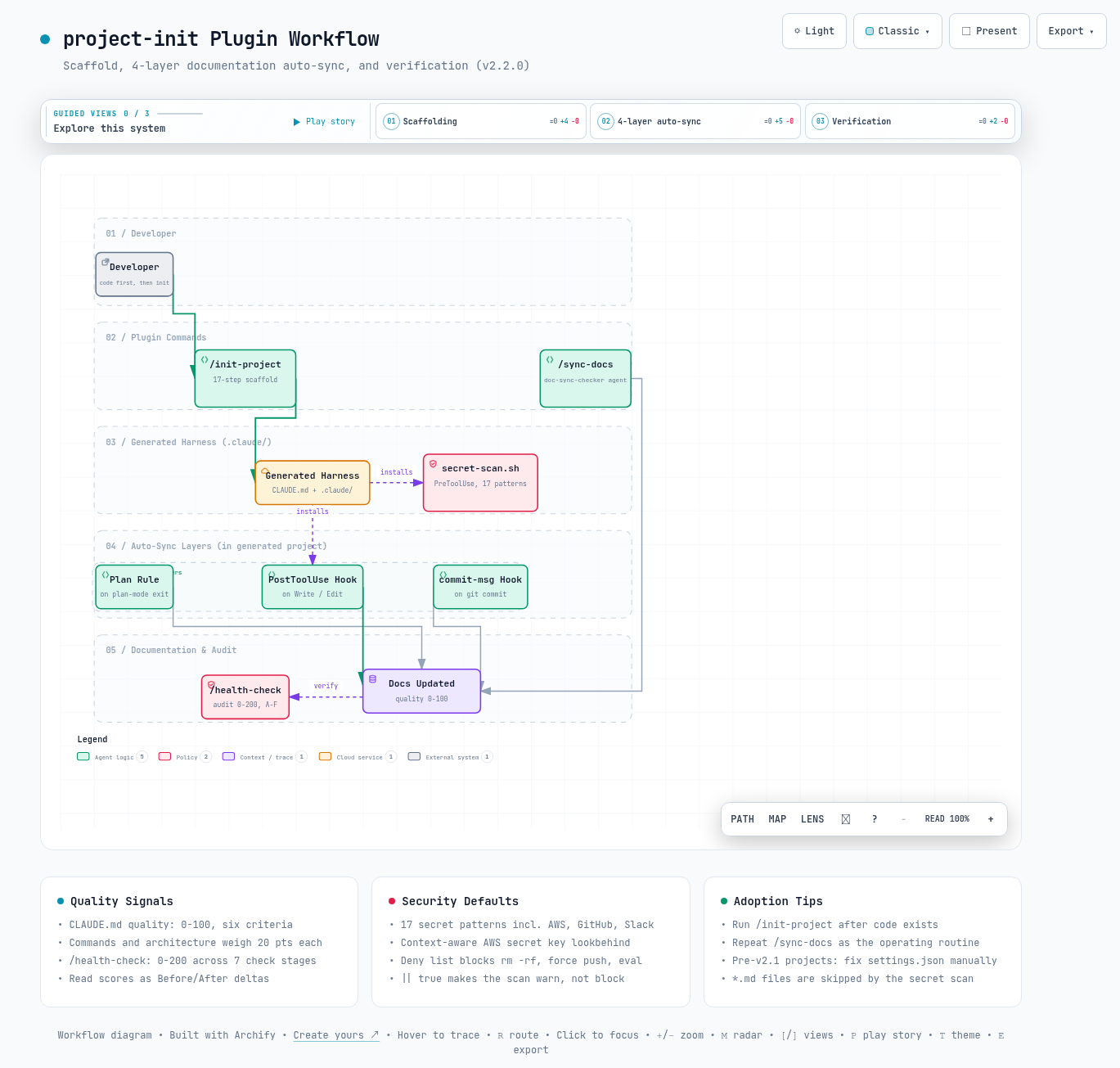
인터랙티브 아키텍처 맵 전체 이미지 - 시스템 구성 요소와 흐름을 한 화면으로 보여줍니다
그림 2. 인터랙티브 아키텍처 맵 전체 보기. 이미지를 클릭하면 노드 탐색, 경로 추적, 다크/라이트 테마를 지원하는 인터랙티브 버전 ↗이 열립니다.

--참고 자료

핵심 출처

  • project-init - GitHub 저장소 - whchoi98, v2.2.0 (2026-07-12). 본문 수치는 README.md, CHANGELOG.md, docs/architecture.md, plugins/project-init/commands/의 정의 파일에서 확인했습니다. https://github.com/whchoi98/project-init

공식 문서

AIML / Tool Deep Dive

Inside the project-init Plugin: Structure and Automatic Documentation Sync

A source-level analysis of how the project-init plugin generates and maintains the Claude Code harness (hooks, skills, agents, commands, CLAUDE.md) with a single command.

Written as of 2026-08-09.

The subject of this analysis is project-init v2.2.0 (released 2026-07-12).

Target repository: github.com/whchoi98/project-init.

Primary sources are the repository's README.md, docs/architecture.md, CHANGELOG.md, and the 9 command definition files.

TL;DR

01Problem - The Cost of Manual Harness Setup

This section looks at what goes wrong when the project configuration for Claude Code is built by hand. It is the background for why this plugin exists.

The quality of Claude Code's behavior is determined by the harness. The harness is the combination of hooks (scripts that run automatically at defined moments), skills, agents, commands, and CLAUDE.md files. Among these, CLAUDE.md carries the project context and effectively acts as a system prompt.

A project equipped with this combination and one without it are different. They produce different-quality results for the same request.

Cost one - syntax that fails silently

The problem is that all five kinds of components must be built by hand. Each has a different file location and syntax. Hook registration in settings.json in particular fails silently when it is wrong.

How easy is it to get wrong? The project-init repository itself is proof. Versions before v2.1 shipped a nonexistent hook event, PreCommit, and an invalid deny-pattern syntax.

Both bugs surfaced as "Invalid key in record" errors at session start in generated projects (the Fixed entries of CHANGELOG 2.1.0). Even the plugin's own author made harness-syntax mistakes - that is the first cost of manual setup.

Cost two - documentation drift

The second cost is documentation drift. Drift means the code keeps changing while the docs stay frozen at the time they were first written, so the two fall out of step. When CLAUDE.md goes stale, Claude reasons from stale context.

The README characterizes this creation-and-sync process as "manual and error-prone" and places the plugin's raison d'etre right there. So project-init takes the approach of automating both creation (scaffolding, that is, generating the skeleton files) and maintenance (auto-sync, scoring) as commands.

Note - Scope of the term "harness"

In this document, "harness" follows the definition in the README's Harness Engineering section: the entire set of project-side configuration that shapes the model's behavior in the Claude Code runtime - the .claude/ directory (hooks, skills, commands, agents, settings.json) plus the root and per-module CLAUDE.md files.

02How It Works - Plugin Structure and 9 Commands

This section looks at which files make up the plugin and what each command does for you. The command list and the automatic project detection are the core.

The repository is structured as a marketplace. A marketplace is a repository format for distributing and installing plugins. The root .claude-plugin/marketplace.json is the marketplace manifest, and the actual plugin lives under plugins/project-init/.

What is the plugin package made of? Three parts. 9 commands (commands/), 1 agent (doc-sync-checker, running with model: opus), and 1 skill (project-scaffolder, with 13 reference files).

Commands, agent, and skill are all defined as Markdown files. How large are they? The 9 command definition files total 1,807 lines.

The source of everything the plugin generates is the 13 reference files in the project-scaffolder skill's references/ directory (the repository's architecture.md says 12, but 13 is the actual file count). Hook scripts, settings.json, skill, agent, test, README, and CHANGELOG templates are all gathered here. /init-project reads them and specializes them for the target project.

In other words, the quality of the harness the plugin generates equals the quality of these template files. In the table below, look at which of the three roles - creation, sync, or validation - each of the 9 commands plays.

Table 1. The 9 commands and their roles (plugins/project-init/commands/, v2.2.0)
CommandRole
/init-project [path]17-step project initialization. Detects and adapts to existing projects.
/sync-docsDocumentation sync. Runs from Phase 0 (style guide) through Phase 10 (report) and computes quality scores.
/generate-readmeCreates or updates a bilingual (EN/KR) README.md.
/generate-changelogCreates a bilingual CHANGELOG.md following the Keep a Changelog convention.
/add-module <path>Adds a module directory with CLAUDE.md and updates the architecture docs.
/add-runbook <name>Creates an operational runbook with verification and rollback sections.
/add-adr <title>Creates an auto-numbered Architecture Decision Record (ADR).
/add-reference-doc <layer>Adds an implementation reference doc skeleton for one of 8 layers (infrastructure, data, api, etc.).
/health-checkValidates the entire project setup on a 0-200 scale and reports an A-F grade.

/init-project reads the build manifest before running to detect the project type. package.json means Node.js, pyproject.toml means Python, go.mod means Go, Cargo.toml means Rust, and pom.xml / build.gradle mean Java/Kotlin.

The detection result feeds CLAUDE.md. It pre-fills each type's source-directory conventions and build/test commands. With no manifest at all, it treats the project as new and creates default modules (src/api, src/persistence).

Note - Command namespace after installation

When installed via the marketplace, commands are prefixed with the plugin name, e.g. /project-init:init-project. The body of this document uses the short form.

03Deep Dive - Quality Score and 4-Layer Auto-Sync

This section takes apart the two mechanisms that set this plugin apart from other scaffolding tools. One is the quality score, which turns documentation state into a number; the other is the four-layered sync machinery that makes documentation follow the code.

3.1 CLAUDE.md quality score, 0-100

/sync-docs and the doc-sync-checker agent grade each CLAUDE.md. How many criteria? 6 criteria, out of 100 points.

The two heaviest criteria are commands (20 points) and architecture clarity (20 points). That weighting reveals the design intent. The greatest weight goes to the information Claude actually consumes - commands that can be copied and run as-is, and a structural explanation that is understandable from this file alone.

In the table below, look at how the points are distributed across the 6 criteria and what each one checks.

Table 2. The 6 CLAUDE.md quality criteria (README, Quality Scoring section)
CriterionPointsWhat it evaluates
Commands/workflows20Whether build/test/deploy commands exist in copy-pasteable form
Architecture clarity20Whether the codebase structure can be understood from this file alone
Non-obvious patterns15Whether caveats, quirks, and conventions are documented
Conciseness15Whether verbose explanations or self-evident information are absent
Freshness15Whether it reflects the current state of the codebase
Actionability15Whether instructions are unambiguous and actionable

Grades are A (90-100), B (70-89), C (50-69), D (30-49), and F (0-29). The score is used more as a delta than as an absolute value.

/sync-docs prints a Before/After table on every run. So whether a sync actually improved the documentation is recorded numerically each time. As the README's troubleshooting section makes explicit, this score measures documentation completeness and says nothing about code quality.

3.2 4-layer auto-sync

The guard against documentation drift is not one layer but four. Four mechanisms with different trigger points aim at the same goal (keeping docs current). If one layer is ignored or fails, the next one catches it.

In the table below, look at when each of the four layers fires and where it is installed.

Table 3. The 4 auto-sync layers (README, Auto-Sync Mechanisms section)
LayerTriggerTypeLocation
Auto-sync ruleExiting Plan modeAutomaticCLAUDE.md
PostToolUse hookRight after Write/EditAutomatic.claude/settings.json + .claude/hooks/
/sync-docs commandUser invocationManualPlugin command
commit-msg hookgit commitAutomatic.git/hooks/commit-msg

The first layer is rule text embedded in CLAUDE.md. It instructs Claude itself to reflect architecture changes decided in Plan mode (the Claude Code working mode that plans before implementing) into the docs before implementation begins.

The second layer is the PostToolUse hook, that is, check-doc-sync.sh running automatically right after a file edit. It walks up the edited path's parent directories checking for a corresponding CLAUDE.md. The repository's tests verify the Write|Edit matcher (the condition that decides which tool calls a hook applies to).

The third layer is the full sync the user invokes, /sync-docs. The fourth, the Git commit-msg hook, doubles as cleanup by automatically stripping AI Co-Authored-By lines from commit messages.

flowchart LR U["User"] --> INIT["/init-project"] --> DET["Project detection"] --> GEN["Structure generation"] --> HK["Hook installation"] HK --> SYNC["4-layer auto-sync"] SYNC --> R["CLAUDE.md rule - Plan mode"] SYNC --> P["PostToolUse hook - Write/Edit"] SYNC --> M["/sync-docs - manual"] SYNC --> C["commit-msg hook - git commit"] R --> UP["Docs kept current"] P --> UP M --> UP C --> UP
Figure 1. The flow from initialization to sync (reconstructed from the Data Flow Summary in docs/architecture.md). The key point is that four layers with different trigger timings all converge on the single goal of keeping documentation current.

Principle: instead of entrusting documentation sync to human memory, this plugin's central design is to enforce it in overlapping layers through four triggers with different timings.

04Deep Dive - Secret Scan and health-check

This section looks at the security machinery of generated projects and the command that checks their setup. A scan that stops secrets (values that must never leak, such as API keys or passwords) from escaping, and health-check, which grades the whole configuration.

4.1 PreToolUse secret scan - 17 patterns

The generated secret-scan.sh hook inspects staged files before commit on the PreToolUse event (a hook that runs right before a tool executes; matcher: Bash). It is designed to block with exit 1 (the exit code that means failure) when a secret is found.

In practice, however, it does not block. The generated settings.json registers the hook with || true, which swallows the exit code, so the behavior is a warning only (a mismatch between ADR-004's gate-hook policy and the registration - covered together in the limitations of section 6).

How many patterns does it catch? The pattern array defines 17 patterns: AWS Access Key (AKIA...), OpenAI, Anthropic, GitHub (ghp/gho/fine-grained PAT), Slack (xoxb/xoxp), Stripe (sk_live/rk_live), Google (AIza, ya29), Azure connection strings, and password/secret/api-key assignment forms.

.claude/hooks/secret-scan.sh - pattern array excerpt
PATTERNS=(
    'AKIA[0-9A-Z]{16}'                          # AWS Access Key ID
    '(?<=aws_secret_access_key\s{0,5}[=:]\s{0,5})[A-Za-z0-9/+=]{40}'
                                                # AWS Secret Key (context-aware)
    'sk-ant-[A-Za-z0-9-]{90,}'                  # Anthropic API Key
    'ghp_[A-Za-z0-9]{36}'                       # GitHub Personal Access Token
    'xoxb-[0-9]+-[A-Za-z0-9]+'                  # Slack Bot Token
    ...                                         # 17 patterns in total
)
SKIP_PATTERNS=('.env.example' 'secret-scan.sh' '*.md' 'package-lock.json' 'yarn.lock')

The AWS Secret Key pattern is worth noting. Instead of unconditionally matching any 40-character base64 string, it uses a lookbehind (a regex technique that matches only when a specific context precedes) to match only occurrences following an aws_secret_access_key = context.

Why narrow it down? According to the v2.1 CHANGELOG, this replaced the broad base64 pattern to cut the false positives it produced (a false positive is a non-secret flagged as a secret - SHA256 hashes, URL paths, and the like). The repository's tests include these true-positive/false-positive (TP/FP) cases as fixtures.

A device in the same vein is the deny list, a list of commands whose execution is forbidden. The generated settings.json blocks dangerous commands such as rm -rf, git push --force, git reset --hard, eval, and curl|bash.

Warning - Markdown files are excluded from the secret scan

Because SKIP_PATTERNS includes *.md, secrets written in CLAUDE.md or README.md are not caught by this hook. If you have a habit of putting example keys in documentation, this path becomes a hole. The compensating control is the security step of /health-check, which separately checks CLAUDE.md and committed files for the presence of secrets.

4.2 health-check - 0-200 health score

/health-check is the command that verifies the harness is intact. How many stages? 7 check stages.

The order is core files (CLAUDE.md present +20, etc.), hook configuration (PostToolUse +10, PreToolUse +10, SessionStart +5, commit-msg +10), the 4 skills (+5 each), documentation coverage, security, CLAUDE.md quality (under 500 lines, section structure, etc. - 6 items at +5 each), and test structure. It even catches hooks that are registered but not executable, using find ... ! -perm -u+x.

In the table below, look at which grade and status each total-score range maps to.

Table 4. health-check grading scale (commands/health-check.md)
ScoreGradeStatus
160-200AHEALTHY - project is well configured
120-159BGOOD - minor improvements recommended
80-119CNEEDS ATTENTION - several gaps to fill
40-79DPOOR - serious configuration problems
0-39FCRITICAL - initialization required

The two scores play different roles. If the quality score (0-100) is a micro metric that measures the content of each individual document, the health score (0-200) is a macro metric that measures the presence and consistency of the harness as a whole.

The two scores are linked. The health-check report also displays CLAUDE.md quality in XX/100 form.

05Usage in Practice

This section covers the actual sequence of use, from installation to daily operations. The key is knowing at which point each command pays off most.

Installation is two steps: register the marketplace, then install the plugin. After installation, the Claude Code session must be restarted for the commands to appear.

Run in a terminal - installation
claude plugin marketplace add https://github.com/whchoi98/project-init
claude plugin install project-init@project-init
claude plugin list    # verify installation

The execution order the README recommends is counterintuitive: run /init-project not before implementing the code but after the implementation. The reason is detection accuracy.

With no code, CLAUDE.md becomes guesswork based on user input. architecture.md stays an empty template, and the hooks' watch paths remain unclear. With code present, real directories, real components, and exact test commands get filled in.

The recommended overall flow is brainstorm → plan → implement → /init-project → /sync-docs.

The recurring routine in the operations phase is /sync-docs. Running it proceeds from the gap analysis of the doc-sync-checker subagent (a helper agent that runs in a context separate from the main session) through README/CHANGELOG sync. It prints a Before/After report at the end.

/sync-docs sample output (README, Example Output)
## Sync Report

### Quality Scores (Before -> After)
| File                | Before | After  | Change |
|---------------------|--------|--------|--------|
| ./CLAUDE.md         | B (82) | B (87) | +5     |
| ./src/api/CLAUDE.md | C (62) | C (69) | +7     |
| ./src/auth/CLAUDE.md| F (28) | C (58) | +30    |

### Changes Made
- Files created: 2
- Files updated: 3
- ADRs suggested: 1
- Runbooks missing: deploy-production, incident-response

Can you trust what gets generated? The repository's own test suite backs it up. Running bash tests/run-all.sh directly, all 169 tests passed (hook script verification, secret-pattern TP/FP, plugin structure, version consistency).

Generated projects also receive a test framework of the same style (114+ tests per the README).

06Limitations

This section collects the weak points confirmed while reading the repository. They are worth knowing before adopting the plugin.

The limitations fall into four groups: numeric inconsistencies between documents, non-determinism in scoring, a registration mismatch in the secret-scan gate, and a migration gap.

6.1 Numeric inconsistencies between documents

First, some numbers disagree across documents. The nominal maximum of health-check is 200 points, but summing every scoring item in the command definition file yields 195. The per-category totals in the README add up to 160.

Likewise, the README's command details introduce /sync-docs as "9-phase", while the actual command file defines Phase 0 through Phase 10 (CHANGELOG 2.1.0 records the expansion to 11 phases). None of this affects behavior. But when setting team policy based on the scores, take the command definition files as the source of truth.

6.2 Non-determinism in scoring

Second, the entity computing the quality and health scores is not a script but Claude itself. The command files are Markdown prompts that prescribe criteria and point values. So one can infer that the same document may score slightly differently across runs.

This is an inference from the command structure, not something the repository states. Reading the scores primarily as Before/After deltas reduces the impact of this variance.

6.3 A secret-scan gate that never closes

Third, the secret-scan gate does not actually close. secret-scan.sh itself returns exit 1 when a secret is found. But both the repository's and the generated template's settings.json register the hook as bash .claude/hooks/secret-scan.sh 2>/dev/null || true, which turns the exit code into an unconditional 0.

This is a mismatch between the ADR-004 decision that gate hooks must be strict and the actual registration. The current behavior is a warning, not a block. If you need blocking, remove the || true.

6.4 Operational gaps

Fourth, there are two operational gaps. doc-sync-checker runs with model: opus and may time out on projects with 50+ source directories (README troubleshooting section).

Also, plugin updates do not overwrite settings.json automatically. So projects initialized before v2.1 need manual migration.

Warning - settings.json of projects initialized before v2.1

If you see an "Invalid key in record" error at session start, the cause is the two bugs fixed in v2.1. Manually change the PreCommit event to PreToolUse (matcher: Bash), and the deny pattern Bash(python3 -c:*import os*) to Bash(python3 -c*import os*). Updating the plugin does not fix this file automatically.

07Conclusion

This section wraps up the analysis and offers adoption recommendations.

project-init's contribution is turning harness engineering from individual know-how into a procedure executable as commands. It automates not just creation (17-step scaffolding) but also maintenance (4-layer sync) and measurement (0-100 quality score, 0-200 health score) in a single plugin. It also enforces secure defaults for what it generates through the secret scan and the deny list.

Three adoption recommendations. First, run /init-project as a "project maturation" step once the code has settled to some degree. Second, read the /sync-docs scores as Before/After deltas rather than comparing absolute values.

Third, when adopting it in an existing project, run /health-check first to understand the current harness state. If pre-v2.1 structure remains, fix settings.json before anything else.

To sum it up in one sentence: knowing how to write a good CLAUDE.md and keeping it in that state are two different problems, and this plugin is a tool that made the latter its automation target.

Full image of the interactive architecture map showing the system components and flows in one view
Figure 2. Full view of the interactive architecture map. Click the image to open the interactive version ↗ with node search, route tracing, and dark/light themes.

--References

Primary source

  • project-init - GitHub repository - whchoi98, v2.2.0 (2026-07-12). Figures in the body were verified against README.md, CHANGELOG.md, docs/architecture.md, and the definition files under plugins/project-init/commands/. https://github.com/whchoi98/project-init

Official documentation