AWS Core / Tool Deep Dive

tui-aws: 22개 뷰와 로컬 연결성 검사기를 갖춘 AWS 인프라 터미널 UI

AWS 콘솔 탭 왕복과 CLI 명령 암기를 터미널 하나로 대체하는 Go 단일 바이너리 TUI를 코드 수준에서 분석합니다. 특히 SG / Route / NACL 규칙을 로컬에서 5단계로 평가하는 연결성 검사기의 동작 방식과 한계를 다룹니다.

작성 기준일은 2026-08-09입니다.

분석 대상은 tui-aws v0.1.0(2026-04-05 릴리스, Go 1.25, MIT 라이선스)입니다.

검증 기준은 저장소 코드이며, 핵심 파일은 internal/ui/tab_troubleshoot/checker.gointernal/aws/k8s.go입니다.

주 출처는 GitHub 저장소 whchoi98/tui-aws의 README, CHANGELOG, ADR 문서입니다.

요약

01왜 필요한가 - 콘솔 왕복과 CLI 암기의 비용

이 절은 tui-aws가 없애려는 반복 작업이 무엇인지 설명합니다. 같은 네트워크 문제를 콘솔과 CLI에서 풀 때 각각 어떤 비용이 드는지 먼저 봅니다.

"인스턴스 A에서 B로 왜 안 붙지"라는 질문 하나에 콘솔 화면이 몇 개나 필요할까요? 최소 네 개입니다. EC2 인스턴스 상세에서 보안 그룹(SG, 인스턴스에 붙는 방화벽)을 확인하고, VPC 콘솔로 넘어가 라우트 테이블을 찾고, 다시 NACL(네트워크 ACL, 서브넷 앞단의 방화벽) 화면에서 서브넷 연결을 대조합니다.

각 화면은 리소스 단위로 나뉘어 있습니다. 그래서 트래픽이 실제로 통과해야 하는 경로 전체를 한 화면에서 보는 방법이 없습니다.

CLI로 내려가도 비용은 형태만 바뀝니다. aws ec2 describe-security-groups, describe-route-tables, describe-network-acls--filters 문법과 함께 조합해야 합니다. 출력된 JSON을 눈으로 대조하는 일은 콘솔 왕복만큼 느립니다.

셸 접속은 또 별개의 문제입니다. SSH 키 관리를 피하려면 SSM(Systems Manager, SSH 없이 AWS 경유로 인스턴스 셸에 접속하게 해 주는 서비스)의 aws ssm start-session 명령과 인스턴스 ID를 매번 찾아 입력해야 합니다.

tui-aws는 이 반복 비용을 터미널 하나로 흡수하는 TUI(Terminal UI, 터미널 안에서 키보드로 조작하는 화면형 인터페이스)입니다. 조회는 aws-sdk-go-v2로 직접 호출하고, 셸 접속과 ECS Exec(실행 중인 ECS 컨테이너 안에서 명령을 실행하는 기능)은 AWS CLI에 위임하며, 네트워크 경로 판정은 로컬 평가기로 해결합니다. v0.1.0 기준 macOS와 Linux의 amd64 / arm64 4개 플랫폼을 지원하고, TUI 프레임워크는 Bubble Tea v2입니다.

참고 - 프로젝트 계보

이 프로젝트는 SSM 세션 관리 전용 도구였던 tui-ssm에서 출발했습니다. ADR-005(ADR는 Architecture Decision Record, 설계 결정을 남기는 문서)에 따르면 TUI와 콘솔을 오가는 마찰이 확장의 직접 동기였습니다. 탭 아키텍처 리팩터링(Phase 0)부터 VPC / 네트워킹(Phase 1~2), 연결성 검사기(Phase 3)를 거쳐 현재의 22개 탭 구성에 도달했습니다.

설정 디렉터리도 ~/.tui-ssm/에서 ~/.tui-aws/로 이관됩니다. 첫 실행 시 main.go가 자동 마이그레이션합니다.

02어떻게 동작하는가 - 단일 바이너리 TUI 구조

이 절은 도구의 내부 구조를 다룹니다. 화면이 어떻게 22개 탭으로 나뉘고, AWS 호출이 어디로 모이는지 봅니다.

2.1 RootModel과 22개 탭 패키지

구조는 Bubble Tea의 Elm 아키텍처(상태 하나와 메시지 처리 함수로 화면을 그리는 UI 패턴)를 그대로 따릅니다. RootModel이 탭 바와 전역 키를 소유하고, 22개 탭은 각각 TabModel 인터페이스를 구현하는 독립 패키지입니다.

README의 "22개 통합 탭" 서술은 코드와 일치할까요? 탭 목록은 internal/ui/shared/tab.goTabID 열거형에 TabEC2부터 TabCheck까지 정확히 22개가 정의되어 있습니다. 저장소 전체는 Go 파일 115개, 23,091줄입니다(2026-08-09 직접 계측, 테스트 포함).

AWS 호출은 internal/aws/session.go의 클라이언트 팩토리 하나로 모입니다. Clients 구조체가 EC2, SSM, STS, ELBv2, Classic ELB, ASG, CloudWatch, CloudWatch Logs, IAM, CloudFront, WAFv2, ACM, Route 53, RDS, S3, ECS, EKS, Lambda의 18개 SDK 클라이언트를 한 번에 생성합니다.

각 탭은 첫 진입 시에만 데이터를 조회하는 lazy loading(지연 로딩) 방식입니다. ADR-005는 이 구성의 바이너리 크기를 약 25MB로 기록하고 있습니다.

2.2 프로필 / 리전 전환과 캐시 격리

p 키는 ~/.aws/credentials~/.aws/config의 명명된 프로파일에 EC2 인스턴스 역할을 더해 선택기를 띄웁니다. r 키는 리전 선택기를 띄웁니다.

전환하면 현재 탭의 데이터가 리로드됩니다. 탭 캐시는 profile::region 형태의 키로 저장되므로, 프로파일이나 리전이 다른 데이터가 화면에 섞이지 않습니다. 자격 증명은 사용 전에 sts:GetCallerIdentity로 검증하고, 실패하면 인스턴스 역할로 폴백합니다.

검색과 탐색도 전 탭 공통입니다. /로 이름, ID, IP를 검색하고, EC2 탭에서는 한 번의 키 입력으로 해당 인스턴스의 VPC, Subnet, Route Table, Security Group 탭으로 건너뜁니다. 이 크로스 리소스 탐색이 콘솔에서 URL을 오가던 동선을 대체합니다.

03연결성 검사기 - 5단계 로컬 평가

이 절은 이 도구의 핵심 기능인 연결성 검사기를 다룹니다. 두 인스턴스 사이가 통하는지를 어떤 순서로 판정하는지 단계별로 봅니다.

Check 탭에서 Source / Destination 인스턴스와 프로토콜(tcp / udp / all), 포트를 지정하면 CheckConnectivity 함수가 5단계 평가를 수행합니다. 이 함수는 라우트 테이블, 보안 그룹, NACL, 서브넷 목록을 인자로 받는 순수 함수(외부 호출 없이 입력만으로 결과를 내는 함수)입니다. 그래서 평가 자체는 네트워크 왕복 없이 즉시 끝납니다.

그러면 평가에 쓸 데이터는 어디서 올까요? 검사 실행 시점에 DescribeRouteTables, DescribeSecurityGroups, DescribeNetworkAcls, DescribeSubnets의 Describe 계열 호출 4회로 읽어옵니다.

참고 - "AWS API 호출 없이"의 정확한 의미

README는 이 기능을 "AWS API 호출 없이 SG + Route + NACL 규칙을 검증"이라고 서술합니다. 코드 기준으로 정확히 말하면 규칙 평가 로직이 로컬에서 돈다는 뜻입니다. 평가 대상 데이터의 수집은 위의 Describe 호출로 이뤄집니다.

Reachability Analyzer처럼 검사마다 분석 리소스를 만들고 비용이 발생하는 구조가 아니라는 것이 실질적인 차이입니다.

flowchart TD L["검사 데이터 로드 - Describe 호출 4회"] --> S1["1단계 Source SG Outbound"] S1 -->|"통과"| S2["2단계 Source NACL Outbound"] S2 -->|"통과"| S3["3단계 Source Route"] S3 -->|"통과"| S4["4단계 Dest NACL Inbound"] S4 -->|"통과"| S5["5단계 Dest SG Inbound"] S5 -->|"통과"| R["Reachable"] S1 -->|"실패"| B["BLOCKED - 차단 규칙과 수정 제안 출력, 이후 단계 Skipped"] S2 -->|"실패"| B S3 -->|"실패"| B S4 -->|"실패"| B S5 -->|"실패"| B
그림 1. 연결성 검사 흐름. 한 단계라도 실패하면 이후 단계는 Skipped로 표시되고, 차단 지점과 수정 제안이 결과에 남습니다.

이 표에서 볼 것은 각 단계가 무엇을 검사하는지, 그리고 실패했을 때 어떤 수정을 제안하는지입니다.

표 1. 연결성 검사 5단계 (checker.go 기준)
단계검사 내용실패 시 수정 제안
1. Source SG Outbound출발지 인스턴스에 연결된 SG의 아웃바운드 규칙 중 프로토콜, 포트, 목적지 IP를 모두 허용하는 규칙 탐색출발지 SG에 목적지 /32 아웃바운드 규칙 추가
2. Source NACL Outbound출발지 서브넷에 연결된 NACL의 아웃바운드 규칙을 번호 오름차순으로 평가, 첫 매치의 ALLOW / DENY 판정아웃바운드 NACL 허용 규칙 추가
3. Source Route출발지 서브넷의 라우트 테이블(명시 연결 우선, 없으면 main)에서 목적지 IP를 포함하는 active 라우트 탐색출발지 라우트 테이블에 경로 추가
4. Dest NACL Inbound목적지 서브넷 NACL의 인바운드 규칙을 같은 방식으로 평가인바운드 NACL 허용 규칙 추가
5. Dest SG Inbound목적지 인스턴스 SG의 인바운드 규칙에서 출발지 IP 허용 여부 탐색목적지 SG에 출발지 /32 인바운드 규칙 추가

단계 순서가 실제 패킷의 이동 순서를 재현한다는 점이 이 검사기의 요지입니다. NACL 평가는 규칙 번호 오름차순으로 정렬한 뒤 첫 번째로 매치되는 규칙의 ALLOW / DENY를 그대로 판정에 씁니다. 이는 AWS가 NACL을 평가하는 first-match(번호순으로 처음 매치된 규칙 하나로 판정하는 방식)와 같습니다.

라우트 평가는 local 라우트의 VPC CIDR 포함 여부를 먼저 봅니다. 그 외 라우트는 상태가 active인 경우에만 인정합니다. 따라서 TGW(Transit Gateway)나 피어링을 경유하는 크로스 VPC 경로도 라우트 단계에서 걸러집니다.

Check 탭 실행 결과 예시 (README 발췌)
Connectivity: web-server → db-primary  TCP/443
══════════════════════════════════════════════

✓ Source SG Outbound     sg-0abc: TCP 443 → 0.0.0.0/0 ALLOW
✓ Source NACL Outbound   acl-xxx: Rule 100 All ALLOW
✓ Source Route           rtb-xxx: 10.2.0.0/16 → tgw-xxx (active)
✗ Dest SG Inbound        sg-0def: TCP 443 ← 10.1.0.0/16 NOT FOUND

Result: ✗ BLOCKED at Destination SG Inbound
Suggestion: Add inbound rule TCP 443 from 10.1.88.66/32

검사기와 별도로 EC2 탭에는 네트워크 경로 시각화가 있습니다. 인스턴스 액션 메뉴의 Network Path를 선택하면 해당 인스턴스의 VPC, Subnet, Route Table, Security Group, NACL을 하나의 스크롤 오버레이로 렌더링합니다. 검사기가 "두 지점 사이의 판정"이라면 이 오버레이는 "한 인스턴스의 네트워크 문맥 전체"를 보여주는 조회 도구입니다.

주의 - R 키는 로컬 검사가 아닙니다

Check 탭에서 R을 누르면 AWS Reachability Analyzer(AWS가 네트워크 경로를 대신 분석해 주는 유료 관리형 기능)가 실행됩니다. 이 경로는 CreateNetworkInsightsPath와 분석 실행 API를 실제로 호출하므로 비용이 발생할 수 있고, 별도의 IAM 권한 4개가 필요합니다.

tui-aws는 실행 전에 비용 확인 프롬프트를 띄웁니다.

원칙: 연결성 검사기는 AWS의 평가 규칙을 로컬에서 재현하는 도구입니다. 재현 범위는 SG 허용 탐색, NACL first-match, 목적지 IP를 포함하는 active 라우트 존재 여부(최장 일치가 아닌 목록 순 첫 매치)입니다. 판정의 정확도는 재현된 규칙의 범위를 넘지 못합니다.

04세션은 위임하고 EKS는 직접 호출한다

이 절은 서버 셸 접속과 쿠버네티스 조회를 어떻게 처리하는지 다룹니다. 직접 구현 대신 택한 두 가지 선택, CLI 위임과 REST 직접 호출을 봅니다.

4.1 SSM 세션과 ECS Exec: TUI를 멈추고 CLI에 넘긴다

tui-aws는 SSM 세션 프로토콜을 직접 구현하지 않습니다. EC2 탭에서 SSM Session을 선택하면 EC2ModelSSMExecRequest 메시지를 발행하고, RootModel이 이를 가로채 tea.Exec으로 aws ssm start-session을 실행합니다.

이 순간 TUI는 일시 중지되고, 터미널 제어가 AWS CLI와 Session Manager Plugin으로 넘어갑니다. 세션이 끝나면 TUI가 복귀합니다. ECS Exec도 같은 경로로 aws ecs execute-command를 위임합니다.

위임 방식의 대가는 터미널 상태 오염입니다. SSM 세션이 raw mode(키 입력을 가공 없이 그대로 받는 터미널 상태)를 흐트러뜨린 채 끝나는 경우가 있어, tui-aws는 세션 종료 후 stty sane과 stdin flush를 수행합니다.

stdin flush에 쓰는 TCIFLUSH는 Linux 전용입니다. 그래서 Go 빌드 태그로 flush_linux.go와 no-op인 flush_other.go를 분리했습니다(ADR-002). 이 때문에 AWS CLI v2와 Session Manager Plugin은 빌드가 아닌 실행 시점의 필수 의존성입니다.

4.2 EKS: kubectl 없이 K8s REST API 직접 호출

EKS 탭은 Pods, Deployments, Services, Nodes, Pod 로그를 보여주지만 kubectl(쿠버네티스 표준 CLI)도 client-go(쿠버네티스 공식 Go 라이브러리)도 쓰지 않습니다. 왜 뺐을까요? ADR-001의 판단은 REST 호출 몇 개를 위해 client-go의 대규모 의존성 트리를 들이면 바이너리가 약 25MB에서 40MB 이상으로 커진다는 것이었습니다.

대신 net/http로 EKS API 서버를 직접 호출합니다. TLS는 DescribeCluster 응답의 클러스터 CA 인증서로 검증합니다.

인증 토큰은 aws eks get-tokenos/exec으로 실행해 얻고, 클러스터 + 프로파일 + 리전을 키로 14분간 캐싱합니다. 왜 14분일까요? 토큰 자체가 15분에 만료되므로 1분의 여유를 둔 값입니다.

캐시의 목적은 탭을 오가며 Pod 목록을 새로 고칠 때마다 외부 프로세스를 띄우지 않게 하는 것입니다.

internal/aws/k8s.go - 토큰 캐시 (발췌)
// GetEKSToken obtains a bearer token for K8s API authentication via
// `aws eks get-token`. The token is cached for 14 minutes (expires at 15).
tokenCache[key] = &cachedToken{
    token:   resp.Status.Token,
    expires: time.Now().Add(14 * time.Minute),
}

0522개 뷰 한눈에 보기

이 절은 22개 탭이 각각 무엇을 다루는지 정리합니다. 개별 동작보다 도구가 커버하는 전체 범위를 확인하는 것이 목적입니다.

22개 탭은 컴퓨트에서 시작해 네트워킹, 엣지, 데이터, 컨테이너 / 서버리스, 운영 순으로 배치되어 있습니다. 마지막 Check 탭이 연결성 검사기입니다.

이 표에서 볼 것은 탭이 여섯 영역으로 어떻게 묶이는지와 각 묶음의 대표 기능입니다. 묶음은 AllTabs()의 표시 순서를 기준으로 했습니다.

표 2. 22개 탭 분류 (AllTabs 표시 순서 기준)
영역주요 기능
컴퓨트 (3)EC2, ASG, EBSSSM 세션, 포트 포워딩, Network Path, 즐겨찾기, 스케일링 정책, 볼륨 암호화 상태
VPC 네트워킹 (6)VPC, Subnet, Routes, SG, VPCE, TGWIGW / NAT / Peering / EIP 상세, ENI 뷰어, 라우트 엔트리, SG와 NACL 듀얼 모드(f로 전환), TGW 어태치먼트와 라우트
엣지 / DNS (4)ELB, CF, WAF, ACMALB / NLB / CLB 타겟 그룹 상세, CloudFront 배포, WAFv2 규칙과 연결 리소스, 인증서 만료일과 SANs
DNS / 데이터 (3)R53, RDS, S3호스팅 존 레코드(온디맨드 로드), DB 인스턴스 엔드포인트, 버킷 버전관리 / 암호화 / 퍼블릭 접근
컨테이너 / 서버리스 (3)ECS, EKS, LambdaClusters > Services > Tasks > Containers > Logs > ECS Exec 드릴다운, K8s 리소스 직접 조회, 함수 런타임과 VPC 설정
운영 (3)CW, IAM, CheckCloudWatch 알람 상태, IAM 사용자 / 그룹 / 정책, 연결성 검사기 + Reachability Analyzer

ECS와 EKS 탭은 다른 탭과 달리 계층 드릴다운(상위 목록에서 하위 항목으로 파고드는 탐색) 구조입니다. ECS는 컨테이너 단계에서 CloudWatch Logs 조회와 대화형 셸(ECS Exec)까지 내려갑니다. 컨테이너 로그를 ECS API가 아닌 CloudWatch Logs에서 읽는 선택은 ADR-006에 기록되어 있습니다.

06실제 사용 흐름과 IAM 권한

이 절은 실제 장애 대응에서 이 도구를 어떤 순서로 쓰는지 다룹니다. 이어서 도입에 필요한 IAM 권한을 용도별로 정리합니다.

전형적인 트러블슈팅 흐름은 이렇게 이어집니다. p로 대상 계정 프로파일, r로 리전을 맞추고, EC2 탭에서 /로 문제 인스턴스를 검색합니다. Network Path 오버레이로 인스턴스의 네트워크 문맥을 훑은 뒤, Check 탭에서 상대 인스턴스와의 5단계 검사를 돌립니다.

차단 규칙이 나오면 제안된 /32 규칙을 반영합니다. 마지막으로 같은 화면에서 SSM 세션으로 접속해 애플리케이션 레벨을 확인합니다. RDS나 내부 웹 서버라면 SSM 포트 포워딩으로 로컬 포트를 터널링합니다.

즐겨찾기(F)와 세션 이력은 ~/.tui-aws/ 아래 favorites.jsonhistory.json에 저장됩니다. 이력은 최대 100개의 FIFO(가장 오래된 항목부터 밀려나는 방식)입니다. 즐겨찾기는 인스턴스 ID + 프로파일 + 리전으로 키가 잡히므로 계정을 오가도 섞이지 않습니다.

권한은 얼마나 필요할까요? 용도에 따라 세 단계입니다. EC2 조회와 SSM 세션만 쓴다면 ec2:Describe 3종과 SSM 세션 액션, sts:GetCallerIdentity의 7개 액션이면 충분합니다.

22개 탭 전부를 쓰려면 README의 전체 정책이 필요하고, Reachability Analyzer는 별도 4개 액션을 추가로 요구합니다. 대부분의 탭이 Describe / List 계열의 읽기 전용 권한으로 동작한다는 점이 도입 장벽을 낮춥니다.

참고 - 권한 부족은 탭 단위로 격리됩니다

특정 탭에서 AccessDenied가 나면 그 탭만 에러를 표시하고 나머지 탭은 계속 동작합니다. 최소 권한으로 시작해 필요한 탭의 권한을 점진적으로 추가하는 운영이 가능한 구조입니다.

07한계와 결론

이 절은 검사기가 판정하지 못하는 영역과 도구 전체의 한계를 정리합니다. 마지막에 어떤 운영자에게 맞는 도구인지 결론을 내립니다.

7.1 연결성 검사기의 판정 범위

검사기의 한계는 코드에서 직접 확인됩니다. 첫째, CIDR 매칭 함수 cidrContains는 소스가 sg-pl-로 시작하는 규칙(SG 참조, 그리고 여러 CIDR을 이름 하나로 묶는 prefix list)을 매치 불가로 처리합니다. 따라서 실제로는 SG 참조 규칙으로 허용된 트래픽이 검사에서는 차단으로 판정될 수 있다고 유추할 수 있습니다.

둘째, NACL은 stateless(요청과 응답을 별개의 트래픽으로 취급하는 방식)인데, 검사는 요청 방향(출발지 아웃바운드, 목적지 인바운드)만 봅니다. 응답이 돌아올 때 쓰는 임시 포트인 ephemeral 포트의 리턴 경로는 평가하지 않습니다.

셋째, 라우트는 출발지에서 목적지로 가는 방향만 확인하고, 목적지 서브넷의 리턴 라우트는 확인하지 않습니다. 검사 대상도 EC2 인스턴스 쌍으로 한정됩니다.

주의 - 검사 결과가 통과여도 통신이 실패할 수 있습니다

위의 미평가 영역(SG 참조 규칙, NACL 리턴 경로, 리턴 라우트) 때문에 로컬 검사의 판정과 실제 통신 결과가 어긋나는 경우가 있습니다.

로컬 검사로 후보를 좁힌 뒤, 판정이 실측과 다르면 R의 Reachability Analyzer로 교차 확인하는 것이 이 도구가 설계한 사용 순서입니다.

7.2 도구 차원의 한계

  • 조회 중심 도구입니다. 쓰기 작업은 세션 접속과 Reachability Analyzer 실행 정도이며, 리소스 생성 / 변경은 다루지 않습니다.
  • SSM 세션과 ECS Exec은 AWS CLI v2 + Session Manager Plugin에 위임하므로, 두 도구가 없는 환경에서는 해당 기능이 동작하지 않습니다.
  • ADR-005가 스스로 기록한 위험처럼, SDK 클라이언트가 늘수록 바이너리 크기(약 25MB)와 유지보수 표면이 함께 커집니다.

7.3 결론

tui-aws의 가치는 개별 기능보다 배치에 있습니다. 네트워크 트러블슈팅에 필요한 조회(22개 탭), 판정(로컬 검사기), 조치 후 확인(SSM / ECS Exec 접속)이 한 터미널의 키 몇 번 거리 안에 놓여 있습니다. 콘솔이라면 화면 왕복으로 흩어졌을 작업이 하나의 흐름이 됩니다.

VPC, TGW, SG / NACL을 자주 들여다보는 운영자라면 로컬 검사기 하나만으로도 도입을 검토할 이유가 됩니다. 검사기의 미평가 영역은 Reachability Analyzer가 보완재 역할을 합니다.

같은 메인테이너의 자매 도구로 ECS 특화 TUI인 ecs9s가 있습니다. ecs9s의 README는 k9s, e1s와 함께 tui-aws에서 영감을 받았다고 명시하며, 태스크 정의와 메트릭 등 ECS 운영을 더 깊게 다룹니다. 인프라 전반의 커버리지와 연결성 검사가 필요하면 tui-aws, ECS 운영 화면이 주 업무라면 ecs9s로 역할이 나뉩니다.

한 문장으로 요약하면, tui-aws는 네트워크 트러블슈팅의 조회와 판정과 확인을 터미널 하나의 흐름으로 묶고, 정밀 판정만 Reachability Analyzer에 맡기는 도구입니다.
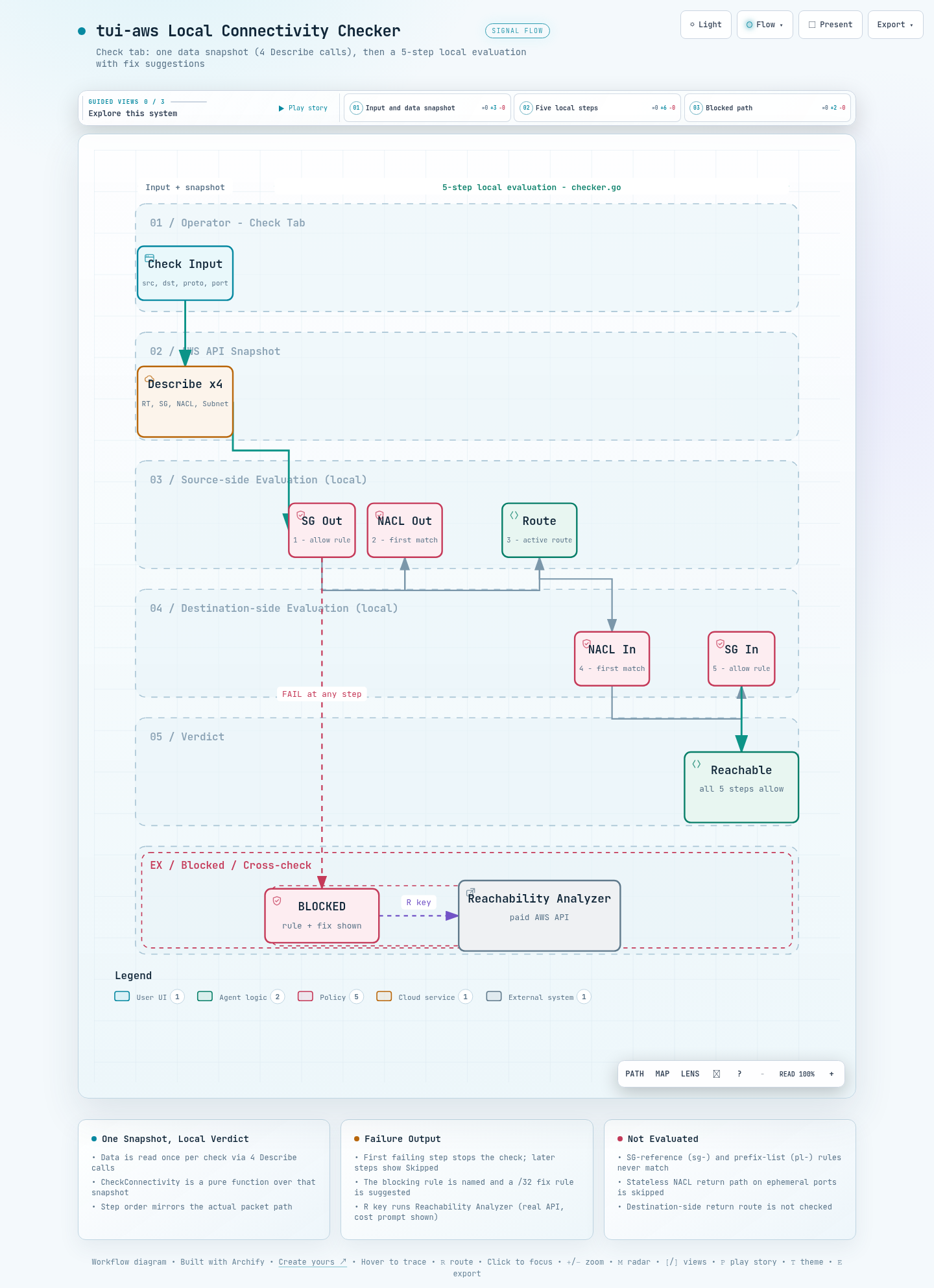
인터랙티브 아키텍처 맵 전체 이미지 - 시스템 구성 요소와 흐름을 한 화면으로 보여줍니다
그림 2. 인터랙티브 아키텍처 맵 전체 보기. 이미지를 클릭하면 노드 탐색, 경로 추적, 다크/라이트 테마를 지원하는 인터랙티브 버전 ↗이 열립니다.

--참고 자료

핵심 출처

공식 문서

관련 저장소

AWS Core / Tool Deep Dive

tui-aws: An AWS Infrastructure Terminal UI with 22 Views and a Local Connectivity Checker

A code-level analysis of a single-binary Go TUI that replaces AWS console tab hopping and CLI command memorization with a single terminal. In particular, we cover how the connectivity checker evaluates SG / Route / NACL rules locally in five steps, and where its limits are.

Written as of 2026-08-09.

The subject of this analysis is tui-aws v0.1.0 (released 2026-04-05, Go 1.25, MIT license).

Verification is based on the repository code; the key files are internal/ui/tab_troubleshoot/checker.go and internal/aws/k8s.go.

Primary sources are the README, CHANGELOG, and ADR documents in the GitHub repository whchoi98/tui-aws.

TL;DR

01Why it exists - the cost of console hopping and CLI memorization

This section explains which repetitive chores tui-aws is built to remove. We first look at what the same network problem costs you in the console and in the CLI.

How many console screens does a single question like "why can't instance A reach B" take? At least four. You check the security group (SG, the firewall attached to an instance) on the EC2 instance detail page, switch to the VPC console to find the route table, then cross-reference subnet associations on the NACL (network ACL, the firewall in front of a subnet) screen.

Each screen is organized per resource. So there is no way to see the entire path the traffic must traverse on one screen.

Dropping down to the CLI only changes the shape of the cost. You have to combine aws ec2 describe-security-groups, describe-route-tables, and describe-network-acls with --filters syntax. Eyeballing the JSON output is as slow as console hopping.

Shell access is yet another problem. To avoid SSH key management you use SSM (Systems Manager, a service that opens an instance shell through AWS without SSH), which means looking up and typing the aws ssm start-session command and the instance ID every time.

tui-aws absorbs this recurring cost into a single TUI (Terminal UI, a screen-like interface you drive with the keyboard inside a terminal). Queries are made directly with aws-sdk-go-v2, shell access and ECS Exec (a feature that runs commands inside a running ECS container) are delegated to the AWS CLI, and network path verdicts are handled by a local evaluator. As of v0.1.0 it supports 4 platforms - amd64 / arm64 on macOS and Linux - and the TUI framework is Bubble Tea v2.

Note - project lineage

The project started as tui-ssm, a tool dedicated to SSM session management. According to ADR-005 (an ADR is an Architecture Decision Record, a document that captures a design decision), the friction of bouncing between the TUI and the console directly motivated the expansion. It moved through the tab architecture refactor (Phase 0), VPC / networking (Phases 1-2), and the connectivity checker (Phase 3) to reach the current 22-tab layout.

The configuration directory also migrated from ~/.tui-ssm/ to ~/.tui-aws/. main.go migrates it automatically on first run.

02How it works - the single-binary TUI structure

This section covers the tool's internals. We look at how the screen splits into 22 tabs and where all AWS calls converge.

2.1 RootModel and 22 tab packages

The structure follows Bubble Tea's Elm architecture (a UI pattern that renders the screen from one state and a message-handling function) directly. RootModel owns the tab bar and global keys, and each of the 22 tabs is an independent package implementing the TabModel interface.

Does the README's "22 integrated tabs" claim match the code? The tab list is defined in the TabID enum in internal/ui/shared/tab.go, with exactly 22 entries from TabEC2 to TabCheck. The repository totals 115 Go files and 23,091 lines (measured directly on 2026-08-09, tests included).

All AWS calls converge on a single client factory in internal/aws/session.go. The Clients struct creates 18 SDK clients at once: EC2, SSM, STS, ELBv2, Classic ELB, ASG, CloudWatch, CloudWatch Logs, IAM, CloudFront, WAFv2, ACM, Route 53, RDS, S3, ECS, EKS, and Lambda.

Each tab lazy-loads its data, meaning it queries AWS only on first entry. ADR-005 records the binary size of this configuration at about 25MB.

2.2 Profile / region switching and cache isolation

The p key opens a picker listing the named profiles from ~/.aws/credentials and ~/.aws/config plus the EC2 instance role. The r key opens a region picker.

Switching reloads the current tab's data. Tab caches are keyed as profile::region, so data from different profiles or regions never mixes on screen. Credentials are validated with sts:GetCallerIdentity before use, falling back to the instance role on failure.

Search and navigation are shared across all tabs. / searches by name, ID, or IP, and from the EC2 tab a single keystroke jumps to the instance's VPC, Subnet, Route Table, or Security Group tab. This cross-resource navigation replaces the URL hopping you would do in the console.

03The connectivity checker - 5 local evaluation steps

This section covers the tool's flagship feature, the connectivity checker. We walk through the order in which it decides whether two instances can talk to each other.

In the Check tab, you specify Source / Destination instances, a protocol (tcp / udp / all), and a port, and the CheckConnectivity function runs a five-step evaluation. The function is pure (it produces its result from its inputs alone, with no external calls), taking route tables, security groups, NACLs, and subnet lists as arguments. So the evaluation itself completes instantly with no network round trips.

Then where does the data being evaluated come from? It is read at check time with 4 Describe-family calls: DescribeRouteTables, DescribeSecurityGroups, DescribeNetworkAcls, and DescribeSubnets.

Note - what "without AWS API calls" precisely means

The README describes the feature as "verifying SG + Route + NACL rules without AWS API calls". To be precise about what the code does: the rule evaluation logic runs locally. The data being evaluated is collected via the Describe calls above.

The practical difference is that, unlike Reachability Analyzer, it does not create an analysis resource and incur cost for every check.

flowchart TD L["Load check data - 4 Describe calls"] --> S1["Step 1 Source SG Outbound"] S1 -->|"pass"| S2["Step 2 Source NACL Outbound"] S2 -->|"pass"| S3["Step 3 Source Route"] S3 -->|"pass"| S4["Step 4 Dest NACL Inbound"] S4 -->|"pass"| S5["Step 5 Dest SG Inbound"] S5 -->|"pass"| R["Reachable"] S1 -->|"fail"| B["BLOCKED - prints blocking rule and fix suggestion, later steps Skipped"] S2 -->|"fail"| B S3 -->|"fail"| B S4 -->|"fail"| B S5 -->|"fail"| B
Figure 1. Connectivity check flow. If any step fails, the remaining steps are marked Skipped, and the blocking point plus a fix suggestion are recorded in the result.

What to look for in this table: what each step checks, and what fix it suggests on failure.

Table 1. The 5 connectivity check steps (per checker.go)
StepWhat it checksFix suggestion on failure
1. Source SG OutboundSearch the outbound rules of the SGs attached to the source instance for one that allows the protocol, port, and destination IP all at onceAdd a /32 outbound rule for the destination to the source SG
2. Source NACL OutboundEvaluate the outbound rules of the NACL associated with the source subnet in ascending rule-number order; the first match's ALLOW / DENY decidesAdd an outbound NACL allow rule
3. Source RouteIn the source subnet's route table (explicit association first, main otherwise), search for an active route covering the destination IPAdd a route to the source route table
4. Dest NACL InboundEvaluate the destination subnet NACL's inbound rules the same wayAdd an inbound NACL allow rule
5. Dest SG InboundSearch the destination instance SG's inbound rules for one allowing the source IPAdd a /32 inbound rule for the source to the destination SG

The point of this checker is that the step order reproduces the order a real packet travels. NACL evaluation sorts rules in ascending number order and takes the first matching rule's ALLOW / DENY as the verdict. This matches AWS's first-match NACL semantics (the single first rule that matches, in number order, decides).

Route evaluation first checks whether the local route's VPC CIDR covers the destination. Other routes count only when their state is active. So cross-VPC paths through a TGW (Transit Gateway) or peering are also filtered at the route step.

Example Check tab output (excerpt from the README)
Connectivity: web-server → db-primary  TCP/443
══════════════════════════════════════════════

✓ Source SG Outbound     sg-0abc: TCP 443 → 0.0.0.0/0 ALLOW
✓ Source NACL Outbound   acl-xxx: Rule 100 All ALLOW
✓ Source Route           rtb-xxx: 10.2.0.0/16 → tgw-xxx (active)
✗ Dest SG Inbound        sg-0def: TCP 443 ← 10.1.0.0/16 NOT FOUND

Result: ✗ BLOCKED at Destination SG Inbound
Suggestion: Add inbound rule TCP 443 from 10.1.88.66/32

Separate from the checker, the EC2 tab has a network path visualization. Selecting Network Path from the instance action menu renders the instance's VPC, Subnet, Route Table, Security Group, and NACL in a single scrollable overlay. Where the checker gives "a verdict between two endpoints", this overlay is a read-only view of "one instance's entire network context".

Caution - the R key is not a local check

Pressing R in the Check tab runs AWS Reachability Analyzer (a paid managed feature where AWS analyzes the network path for you). This path actually calls CreateNetworkInsightsPath and the analysis-run APIs, so it can incur cost and requires 4 additional IAM permissions.

tui-aws shows a cost confirmation prompt before running it.

Principle: the connectivity checker locally reproduces AWS's evaluation rules. The reproduced scope is the SG allow search, NACL first-match, and the existence of an active route covering the destination IP (first match in list order, not longest-prefix match). The accuracy of its verdict cannot exceed the scope of the rules it reproduces.

04Sessions are delegated, EKS is called directly

This section covers how the tool handles server shell access and Kubernetes queries. Instead of implementing either itself, it makes two choices: CLI delegation and direct REST calls.

4.1 SSM sessions and ECS Exec: suspend the TUI, hand over to the CLI

tui-aws does not implement the SSM session protocol itself. When you select SSM Session in the EC2 tab, EC2Model emits an SSMExecRequest message, which RootModel intercepts and runs aws ssm start-session via tea.Exec.

At that moment the TUI suspends, and terminal control passes to the AWS CLI and the Session Manager Plugin. The TUI resumes when the session ends. ECS Exec delegates aws ecs execute-command through the same path.

The price of delegation is terminal state pollution. SSM sessions sometimes exit leaving raw mode (the terminal state that passes keystrokes through unprocessed) disturbed, so tui-aws runs stty sane and a stdin flush after each session.

TCIFLUSH, used for the stdin flush, is Linux-only. So the code splits flush_linux.go from a no-op flush_other.go using Go build tags (ADR-002). This is why AWS CLI v2 and the Session Manager Plugin are hard runtime dependencies, not build dependencies.

4.2 EKS: direct K8s REST API calls without kubectl

The EKS tab shows Pods, Deployments, Services, Nodes, and Pod logs, yet uses neither kubectl (the standard Kubernetes CLI) nor client-go (the official Kubernetes Go library). Why leave them out? ADR-001's judgment was that pulling in client-go's massive dependency tree for a handful of REST calls would grow the binary from about 25MB to over 40MB.

Instead it calls the EKS API server directly with net/http. TLS is verified against the cluster CA certificate from the DescribeCluster response.

Auth tokens are obtained by running aws eks get-token via os/exec, and are cached for 14 minutes keyed by cluster + profile + region. Why 14 minutes? The token itself expires at 15 minutes, so the value leaves a 1-minute margin.

The cache exists so that refreshing the Pod list while hopping between tabs does not spawn an external process every time.

internal/aws/k8s.go - token cache (excerpt)
// GetEKSToken obtains a bearer token for K8s API authentication via
// `aws eks get-token`. The token is cached for 14 minutes (expires at 15).
tokenCache[key] = &cachedToken{
    token:   resp.Status.Token,
    expires: time.Now().Add(14 * time.Minute),
}

05The 22 views at a glance

This section summarizes what each of the 22 tabs covers. The goal is to confirm the tool's overall range rather than individual behaviors.

The 22 tabs are arranged starting with compute, then networking, edge, data, containers / serverless, and operations. The last tab, Check, is the connectivity checker.

What to look for in this table: how the tabs group into six areas, and each group's representative features. The grouping follows the display order of AllTabs().

Table 2. The 22 tabs by category (AllTabs display order)
AreaTabsKey features
Compute (3)EC2, ASG, EBSSSM sessions, port forwarding, Network Path, favorites, scaling policies, volume encryption status
VPC networking (6)VPC, Subnet, Routes, SG, VPCE, TGWIGW / NAT / Peering / EIP details, ENI viewer, route entries, SG and NACL dual mode (toggle with f), TGW attachments and routes
Edge / DNS (4)ELB, CF, WAF, ACMALB / NLB / CLB target group details, CloudFront distributions, WAFv2 rules and associated resources, certificate expiry and SANs
DNS / data (3)R53, RDS, S3Hosted zone records (loaded on demand), DB instance endpoints, bucket versioning / encryption / public access
Containers / serverless (3)ECS, EKS, LambdaClusters > Services > Tasks > Containers > Logs > ECS Exec drill-down, direct K8s resource queries, function runtime and VPC config
Operations (3)CW, IAM, CheckCloudWatch alarm states, IAM users / groups / policies, connectivity checker + Reachability Analyzer

Unlike the other tabs, ECS and EKS are hierarchical drill-downs (navigation that digs from a parent list into its children). ECS goes all the way down to CloudWatch Logs viewing and an interactive shell (ECS Exec) at the container level. The choice to read container logs from CloudWatch Logs rather than the ECS API is recorded in ADR-006.

06Everyday workflow and IAM permissions

This section covers the order in which you use the tool during real incident response. It then lays out the IAM permissions you need, tier by tier.

A typical troubleshooting flow goes like this. Set the target account profile with p and the region with r, then search for the problem instance with / in the EC2 tab. Skim the instance's network context with the Network Path overlay, then run the 5-step check against the peer instance in the Check tab.

When a blocking rule appears, apply the suggested /32 rule. Finally, connect over an SSM session from the same screen to verify at the application level. For RDS or an internal web server, tunnel a local port with SSM port forwarding.

Favorites (F) and session history are stored under ~/.tui-aws/ in favorites.json and history.json. History is a FIFO (oldest entries fall off first) capped at 100 entries. Favorites are keyed by instance ID + profile + region, so they never mix even when you move between accounts.

How many permissions do you need? They come in three tiers by usage. If you only use EC2 viewing and SSM sessions, 7 actions suffice: 3 ec2:Describe actions, the SSM session actions, and sts:GetCallerIdentity.

Using all 22 tabs requires the full policy in the README, and Reachability Analyzer demands 4 additional actions. The fact that most tabs run on read-only Describe / List permissions keeps the adoption barrier low.

Note - missing permissions are isolated per tab

If a tab hits AccessDenied, only that tab shows an error while the rest keep working. The structure supports starting with minimal permissions and incrementally granting only the tabs you need.

07Limitations and conclusion

This section lays out what the checker cannot judge and the limits of the tool as a whole. It closes with a verdict on which operators the tool fits.

7.1 The connectivity checker's verdict scope

The checker's limits are visible directly in the code. First, the CIDR matching function cidrContains treats rules whose source starts with sg- or pl- (SG references, and prefix lists, which bundle multiple CIDRs under one name) as non-matching. It follows that traffic actually allowed by an SG-reference rule can be judged blocked by the check.

Second, NACLs are stateless (they treat request and response as separate traffic), yet the check only looks at the request direction (source outbound, destination inbound). It does not evaluate the return path over ephemeral ports, the temporary ports the response comes back on.

Third, routes are checked only from source to destination; the destination subnet's return route is not verified. The check targets are also limited to pairs of EC2 instances.

Caution - a passing check does not guarantee working traffic

Because of the unevaluated areas above (SG-reference rules, NACL return paths, return routes), the local check's verdict can disagree with actual traffic.

The intended usage order of this tool is to narrow candidates with the local check, and when the verdict differs from observed behavior, cross-check with Reachability Analyzer via R.

7.2 Tool-level limitations

  • It is a read-oriented tool. Write operations are limited to session access and running Reachability Analyzer; it does not create or modify resources.
  • SSM sessions and ECS Exec are delegated to AWS CLI v2 + Session Manager Plugin, so those features do not work where the two tools are absent.
  • As ADR-005 itself records, every added SDK client grows both the binary size (about 25MB) and the maintenance surface.

7.3 Conclusion

The value of tui-aws lies less in any single feature than in the arrangement. The viewing (22 tabs), the verdict (local checker), and the post-fix verification (SSM / ECS Exec access) needed for network troubleshooting all sit within a few keystrokes of one terminal. Work that would scatter across console screens becomes a single flow.

For operators who look at VPCs, TGWs, and SGs / NACLs often, the local checker alone justifies an evaluation. Reachability Analyzer complements the checker's unevaluated areas.

A sister tool by the same maintainer is ecs9s, an ECS-focused TUI. Its README credits k9s, e1s, and tui-aws as inspirations, and it goes deeper into ECS operations such as task definitions and metrics. The roles split cleanly: tui-aws for infrastructure-wide coverage and connectivity checking, ecs9s when ECS operations are your main screen.

To sum it up in one sentence: tui-aws binds the viewing, the verdict, and the verification of network troubleshooting into one terminal flow, leaving only precision verdicts to Reachability Analyzer.

Full image of the interactive architecture map showing the system components and flows in one view
Figure 2. Full view of the interactive architecture map. Click the image to open the interactive version ↗ with node search, route tracing, and dark/light themes.

--References

Primary sources

Official documentation

Related repositories