NETWORK FIREWALL / VERIFICATION REPORT

AWS Network Firewall 컨테이너 속성 기반 규칙 실측 검증

EKS와 ECS 두 트랙에 container association을 직접 만들어 허용/차단 12개 케이스와 IP set 전파 지연을 실측하고, 공식 문서가 답하지 않은 커스텀 속성 필터 지원 여부와 서비스 내부 동작 경로를 확인한 기록입니다.

작성 기준일은 2026-08-12입니다.

적용 대상은 EKS 또는 ECS 워크로드를 AWS Network Firewall로 검사하는 구성입니다.

검증 리전은 ap-northeast-2이고 대상 방화벽은 DMZVPC-nfw 한 대입니다.

검증 대상 기능은 2026-06-30에 출시된 container attribute-based rules입니다.

주 출처는 Network Firewall Developer Guide, AWS Security 블로그(2026-07-01), 그리고 실측 데이터입니다.

요약

01기능 소개

Container attribute-based rules는 2026-06-30에 출시된 Network Firewall 기능으로, EKS/ECS 클러스터의 컨테이너 라이프사이클 이벤트를 구독해 속성에 매칭되는 컨테이너 IP를 동적 IP set으로 유지합니다. 운영자는 IP를 직접 나열하지 않고 "이 label을 가진 pod" 또는 "이 속성을 가진 container instance 위의 task"라는 조건만 선언하며, Suricata 룰은 그 집합을 별칭으로 참조합니다.

중심 리소스는 container-association입니다. 하나의 association은 타입(ECS 또는 EKS, 생성 후 변경 불가)과 최대 5개의 monitoring configuration을 가지며, 각 configuration은 클러스터 ARN 하나와 선택적인 속성 필터 목록으로 구성됩니다. 클러스터는 association과 같은 리전, 같은 계정이어야 하므로 크로스 계정 구성은 지원되지 않습니다.

1.1 API 5종

기존 Network Firewall API에 다섯 개 오퍼레이션이 추가되었습니다. 태깅 관련 오퍼레이션도 이 리소스 타입을 지원합니다.

표 1. Container association API 5종과 주요 파라미터
오퍼레이션 역할 주의할 점
CreateContainerAssociation association 생성 이름은 ^[a-zA-Z0-9-]+$, 타입과 이름은 생성 후 변경 불가
DescribeContainerAssociation 상태 조회 응답의 ResolvedCidrCount가 IP 수집 여부를 보는 유일한 지표
UpdateContainerAssociation 모니터링 대상 변경 UpdateToken 필수, 불일치 시 InvalidTokenException
DeleteContainerAssociation 삭제 비동기로 DELETING 반환, 룰 그룹이 참조 중이면 실패
ListContainerAssociations 목록 조회 이름과 ARN만 반환하므로 상태는 Describe로 다시 조회

1.2 룰 그룹에서 참조하는 방법

stateful 룰 그룹의 ReferenceSets.IPSetReferences에 변수 이름과 association ARN을 매핑하면, Suricata 룰 문자열에서 @변수명으로 그 집합을 가리킬 수 있습니다. 이 검증에서 만든 ECS 룰 그룹은 필터형 association과 필터 없는 association 두 개를 동시에 참조합니다.

AWS CLI - create-rule-group (abi-ecs-rg 발췌)
{
  "RulesSource": { "RulesString": "
    reject tls @abi_ec2_tasks any -> any any (msg:\"abi ecs-ec2 block amazon.com\";
      flow:to_server; tls.sni; dotprefix; content:\".amazon.com\"; endswith; nocase; sid:3001; rev:1;)
    alert  tls @abi_all_tasks any -> any any (msg:\"abi ecs-all allow checkip\";
      ... content:\".checkip.amazonaws.com\"; sid:3101; rev:1;)
    reject tls @abi_all_tasks any -> any any (msg:\"abi ecs-all block wikipedia\";
      ... content:\".wikipedia.org\"; sid:3102; rev:1;)" },
  "ReferenceSets": { "IPSetReferences": {
    "abi_ec2_tasks": { "ReferenceArn": "arn:aws:network-firewall:ap-northeast-2:...:container-association/abi-ecs-ec2" },
    "abi_all_tasks": { "ReferenceArn": "arn:aws:network-firewall:ap-northeast-2:...:container-association/abi-ecs-all" }
  } }
}    // ConsumedCapacity 3 / 100

1.3 쿼터와 제약

쿼터는 대부분 고정값입니다. 특히 룰 그룹당 참조 30개는 기존 IP set reference의 5개 제한과 별개로 적용되므로, association을 세분화해서 운영하는 설계가 쿼터 때문에 막히는 경우는 드뭅니다.

표 2. 쿼터와 구조적 제약
항목 조정
계정, 리전당 association100개가능
association당 monitoring configuration5개불가
룰 그룹당 container association 참조30개불가
ResolvedCidrCount 상한1,000,000개불가
EKS 필터 키namespace, pod, cluster, 커스텀 label 키SNAT 비활성화 전제
ECS 필터 키container instance 속성, EC2 launch type 전용awsvpc 모드 전용
IaC 지원CloudFormation 미지원, Terraform은 병합 완료CLI/SDK 필요
참고 - 이 기능은 트래픽 경로를 바꾸지 않습니다

Developer Guide는 "Network Firewall은 라이프사이클 이벤트에서 IP 정보만 수집하며 클러스터의 데이터 패스와 상호작용하지 않는다"고 명시합니다. 클러스터 안에 에이전트나 컨트롤러를 설치하지 않고, 검사는 기존 방화벽 엔드포인트가 그대로 수행합니다. 추가 요금도 없습니다. 즉 이 기능이 바꾸는 것은 규칙이 대상을 지목하는 방식뿐이며, 트래픽이 방화벽을 지나가도록 만드는 책임은 여전히 라우팅 설계에 있습니다.

02내부 동작 원리

같은 API, 같은 리소스 타입인데 EKS와 ECS의 내부 구현은 대칭이 아닙니다. 이 검증에서 CloudTrail, EventBridge, EKS access entry, 서비스 연결 역할 정책을 교차 조회한 결과 ECS는 고객 계정에 관측 가능한 자원과 호출을 남기고, EKS는 거의 아무것도 남기지 않습니다. 이 차이는 뒤에서 다루는 전파 지연 차이와 그대로 이어집니다.

flowchart LR P["pod 생성, 삭제"] --> PULSE["EKS Pulse Event Service (내부 채널)"] T["task 상태 변경"] --> EB["EventBridge Managed Rule (고객 계정)"] EB -. "폴링 트리거(추정)" .-> SLR["서비스 연결 역할 폴링 (ecs:List, Describe)"] PULSE --> NF["Network Firewall 동적 IP set"] SLR --> NF NF --> RULE["패킷 평가 시 @참조 확장"]
그림 1. IP 수집 경로. 위쪽 EKS 경로는 고객 계정에 리소스도 API 호출도 남기지 않고, 아래쪽 ECS 경로는 계정 안의 EventBridge 규칙과 서비스 연결 역할 호출로 관측됩니다. 두 경로가 같은 IP set으로 수렴합니다.

2.1 EKS 경로는 Kubernetes 인증을 거치지 않습니다

EKS 쪽에서 확인한 것은 세 가지 부재입니다. 첫째, 클러스터의 access entry 7건 가운데 방화벽 관련 항목은 0건입니다. container association을 갖지 않은 대조군 클러스터의 access entry 5건에도 없으므로, 지워진 것이 아니라 애초에 만들어지지 않습니다. 둘째, 서비스 연결 역할 정책에 eks:* 권한이 하나도 없습니다. 셋째, eks:DescribeCluster 호출은 association 생성 1초 전에 딱 한 번 나타나고 이후 반복되지 않습니다.

그 한 번의 호출에는 특이한 점이 있습니다. sourceIPAddressuserAgentnetwork-firewall.amazonaws.com인데 호출 주체는 association을 만든 사용자 본인의 세션입니다. 즉 이 단계는 서비스가 자기 권한으로 클러스터를 읽는 것이 아니라, 호출자가 그 클러스터를 볼 권한이 있는지 호출자 자격증명으로 확인하는 검증입니다. 서비스 연결 역할 정책에 eks:*가 없다는 사실과 정확히 맞습니다.

참고 - EKS Pulse Event Service의 정체

Developer Guide는 EKS 타입 association이 "Amazon EKS Pulse Event Service"를 통해 pod 라이프사이클 이벤트를 구독한다고 적습니다. 이 이름은 다른 공개 문서 어디에도 설명이 없습니다. 이번 검증으로 access entry 경로가 아니라는 점은 위 세 가지 부재로 확정했지만, 실제 채널이 무엇인지는 고객에게 보이는 API 표면 밖에 있어 읽기 전용 조회로는 규명할 수 없었습니다. 이는 추론이 아니라 관측 한계입니다.

2.2 ECS 경로는 계정 안에 규칙을 만들고 주기적으로 폴링합니다

ECS 타입 association을 만들면 Network Firewall이 사용자 계정에 EventBridge 규칙을 자동으로 프로비저닝합니다. 이번 검증에서 우리가 만들지 않은 규칙 한 건이 생성되었고, 대상 클러스터로 스코프가 좁혀져 있어 클러스터 단위로 규칙이 만들어지는 구조임을 알 수 있습니다. 타깃은 Lambda나 SQS 같은 사용자 리소스가 아니라 계정 ID도 리소스 경로도 없는 서비스 소유 ARN입니다.

AWS CLI - events describe-rule / list-targets-by-rule
Name        : NetworkFirewallManagedRule-abi-ecs-f95002052a4bc1e8
Description : This rule is used to route ECS Task Events to AWS Network Firewall
ManagedBy   : network-firewall.amazonaws.com
State       : ENABLED
EventPattern: {"source":["aws.ecs"],"detail-type":["ECS Task State Change"],
               "detail":{"clusterArn":["arn:aws:ecs:ap-northeast-2:********6239:cluster/abi-ecs"]}}
Target      : NetworkFirewallTarget -> arn:aws:network-firewall:ap-northeast-2:::
                                       # 계정 ID와 리소스 경로가 없는 서비스 소유 ARN

이벤트를 받은 뒤의 처리도 CloudTrail에 그대로 남습니다. 서비스 연결 역할이 스스로 assume한 세션으로 세 종류의 ECS 읽기 API를 순서대로 호출하며, association 생성 직후와 약 9분 뒤 두 차례 웨이브가 관측되었습니다. 이 검증에서 가장 결정적인 증거는 첫 번째 호출의 필터 문자열입니다. 우리가 속성 필터에 넣은 커스텀 키가 ECS의 서버측 attribute 필터 문법으로 그대로 번역되어 전달됩니다.

CloudTrail - AWSServiceRoleForNetworkFirewall 세션의 호출 순서
08:15:21Z  ecs:ListContainerInstances  cluster=abi-ecs  filter="attribute:abi-env == lab"
08:15:21Z  ecs:ListTasks               cluster=abi-ecs  containerInstance=d0bc521b...  desiredStatus=RUNNING
08:15:22Z  ecs:DescribeTasks           cluster=abi-ecs  tasks=[task/abi-ecs/ad040da6...]
08:15:25Z  ecs:ListTasks               cluster=abi-ecs  desiredStatus=RUNNING   # 필터 없는 association 용
08:15:25Z  ecs:DescribeTasks           cluster=abi-ecs  tasks=[task/abi-ecs/3fa22e0b..., task/abi-ecs/ad040da6...]

08:24:01Z  # 약 9분 뒤 동일 순서로 두 번째 웨이브

다만 이 웨이브 간격을 고정 폴링 주기로 읽는 것은 이릅니다. 관측 윈도우(생성 -2분에서 +15분) 안에서 간격은 8분 38초였지만 재발이 한 번뿐이어서 주기가 고정인지 확인할 수 없습니다. 실제 반영 속도를 결정하는 것도 폴링이 아니라 이벤트 경로입니다. 무필터 association의 반영이 1초로 나온 것이 그 증거이고, 폴링은 이벤트를 놓쳤을 때를 보정하는 안전망으로 해석하는 편이 관측과 부합합니다.

2.3 EKS 트랙은 고객 계정 밖의 내부 채널로 동작합니다

ECS 트랙과 달리 EKS 트랙은 고객 계정에 아무 리소스도 만들지 않습니다. 생성 1초 전에 호출자 세션으로 서비스 프린시펄 표시가 붙은 DescribeCluster 한 번이 기록될 뿐이고, 이후 CloudTrail에는 어떤 지속 조회도 나타나지 않습니다.

Kubernetes 표준 인증 경로도 쓰지 않습니다. 방화벽 관련 access entry는 0건이고, 서비스 연결 역할에는 eks:* 권한이 전혀 없습니다. 결국 pod 라이프사이클 이벤트는 문서가 언급하는 EKS Pulse Event Service 내부 구독으로 서비스 쪽에서 직접 받고, IP 수집은 고객 계정에서 보이지 않는 내부 채널에서 일어나는 구조입니다.

고객 계정 어디에도 주기적 폴링의 흔적이 없으므로, EKS 트랙은 폴링이 아니라 이벤트 구독 방식으로 보는 것이 관측과 부합합니다. 폴링 주기라는 개념 자체가 EKS 쪽에는 성립하지 않습니다.

namespace 필터를 쓴 7월 association(트레일 S3 로그로 확인)과 커스텀 label 필터를 쓴 8월 association 모두 같은 패턴이었습니다. 조회 방법의 함정은 5장에서 다룹니다.

표 3. EKS와 ECS 내부 동작 비교
EKS ECS
이벤트 수신 경로 고객 계정에 리소스를 만들지 않음, 문서상 EKS Pulse Event Service 내부 구독 고객 계정에 EventBridge Managed Rule 생성, 타깃은 서비스 소유 ARN
생성 시 클러스터 검증 eks:DescribeCluster, 호출자 세션으로 1회 ecs:DescribeClusters, 호출자 세션으로 1회
이후 지속 조회 없음, CloudTrail에 나타나지 않음 서비스 연결 역할 권한으로 주기적 폴링, 관측 간격 약 9분
Kubernetes 인증 경로 access entry 미사용, 방화벽 관련 항목 0건 / 7건 해당 없음
서비스 연결 역할 권한 eks:* 전혀 없음 ECS 읽기 4종, 정책 v4에서 추가
관측된 반영 지연 6초에서 40초 필터 없음 1초, 필터형 39초에서 45초

원칙: ECS 트랙은 고객 계정에서 감사할 수 있고 EKS 트랙은 그럴 수 없습니다. EKS 쪽 동작을 검증해야 한다면 CloudTrail이 아니라 ResolvedCidrCount와 실제 트래픽 결과로 확인해야 합니다.

03테스트 설계

설계 원칙은 두 가지였습니다. 첫째, 이미 검증에 쓰이던 방화벽과 EKS 클러스터는 읽기만 하고 수정하지 않습니다. 기존 룰 그룹과 association을 그대로 남겨 베이스라인 비교군으로 쓰고, 방화벽 정책에는 신규 룰 그룹 참조를 추가만 합니다. 둘째, 신규 리소스는 모두 abi- Prefix를 붙여 정리 대상을 이름만으로 식별할 수 있게 합니다.

핵심은 음성 대조군입니다. "속성이 매칭된 컨테이너가 차단된다"만 확인하면 규칙이 실제로 선택적인지 알 수 없습니다. 같은 클러스터, 같은 서브넷, 같은 이미지에서 속성만 없는 워크로드를 나란히 두고 그것이 통과하는지까지 봐야 필터가 동작한다고 말할 수 있습니다. 그래서 트랙마다 대조군을 하나씩 배치했습니다.

flowchart LR A1["abi-curl pod (label 보유)"] --> AS1["association abi-eks-label"] A2["abi-free pod (label 없음)"] -. 대상 아님 .-> AS1 E1["EC2 task (속성 abi-env=lab)"] --> AS2["association abi-ecs-ec2"] F1["Fargate task (속성 없음)"] -. 필터 밖 .-> AS2 E1 --> AS3["association abi-ecs-all (무필터)"] F1 --> AS3 AS1 --> RG["룰 그룹 abi-eks-rg, abi-ecs-rg"] AS2 --> RG AS3 --> RG RG --> POL["DMZVPC-fw-policy 참조 추가"]
그림 2. 검증 구성과 음성 대조군. 점선은 의도적으로 매칭되지 않아야 하는 경로입니다. Fargate task는 필터형 association에서는 제외되지만 필터 없는 association에는 포함되므로, 같은 태스크가 한 규칙에는 걸리고 다른 규칙에는 걸리지 않는 대비를 한 세트로 관측할 수 있습니다.

3.1 두 도메인 판정 체계

판정은 도메인 두 개로 단순화했습니다. .checkip.amazonaws.comalert로 두어 허용되면서 로그 증적을 남기고, 차단 대상 도메인은 reject로 두어 TLS 핸드셰이크 단계에서 끊습니다. 클라이언트에서 보이는 결과는 허용이면 HTTP 상태 코드, 차단이면 연결 실패이므로 컨테이너 안의 curl 결과만으로 1차 판정이 가능합니다.

ECS 룰 그룹은 두 참조의 의미론을 구분하도록 세 규칙으로 구성했습니다. 필터형 참조로 차단하는 도메인, 필터 없는 참조로 허용하는 도메인, 필터 없는 참조로 차단하는 도메인을 각각 하나씩 두면 EC2 task와 Fargate task의 결과 조합만으로 어느 association이 어느 IP를 수집했는지 역산할 수 있습니다.

표 4. 대상별 기대 결과 설계
대상 checkip amazon.com wikipedia.org
EKS abi-curl (label 보유)허용차단해당 없음
EKS abi-free (대조군)허용허용해당 없음
ECS EC2 task (속성 보유)허용차단차단
ECS Fargate task (대조군)허용허용차단

판정 근거는 세 층으로 교차 확인했습니다. 클라이언트의 응답 코드, association의 ResolvedCidrCount, 그리고 방화벽 alert 로그입니다. 한 층만 보면 오판할 수 있습니다. 예를 들어 IP set이 아직 갱신되지 않아 통과한 것과 필터 밖이어서 통과한 것은 클라이언트에서 똑같이 보이므로, 반드시 카운트와 로그를 함께 봐야 합니다.

주의 - 전제가 깨지면 규칙이 조용히 무력화됩니다

EKS에서 VPC CNI의 SNAT가 켜져 있으면 pod IP가 노드 IP로 바뀌어 방화벽에 도착하므로 규칙이 매칭되지 않습니다. 차단 규칙이 통과되는 형태로 나타나기 때문에 설정 오류가 아니라 기능 미동작으로 오인하기 쉽습니다. 이 검증 환경은 AWS_VPC_K8S_CNI_EXTERNALSNAT=true로 pod IP가 보존됨을 먼저 확인했습니다.

라우팅 순서도 같습니다. 서브넷 트래픽이 NAT Gateway를 먼저 지나면 방화벽은 NAT IP만 보게 되어 컨테이너 IP 기반 참조가 전부 빗나갑니다. 이 환경은 프라이빗 서브넷의 기본 경로가 방화벽 엔드포인트를 먼저 지나고 그 다음 NAT로 나가는 순서임을 라우트 테이블에서 확인한 뒤 시작했습니다.

04실측 결과

결과는 네 갈래입니다. 허용/차단 매트릭스, 초기 해석 시간, 동적 추적 지연, 로그 메타데이터입니다. 이 장의 모든 수치는 results/에 저장된 JSON 다섯 개에서 그대로 인용했습니다.

4.1 허용/차단 매트릭스 12건 전부 PASS

12개 케이스를 두 번 실행해 24건 모두 기대값과 일치했습니다. 주목할 것은 PASS 개수가 아니라 음성 대조군 3건입니다. label이 없는 pod, 커스텀 속성 필터 밖의 Fargate task, 그리고 같은 Fargate task가 필터 없는 참조에는 걸리는 케이스가 모두 설계한 대로 나왔습니다.

표 5. 허용/차단 12케이스 결과, 2회 실행 동일
case 대상 기대 실측 판정
T1-checkip-allowEKS 베이스라인ALLOWEDALLOWEDPASS
T1-amazon-blockEKS 베이스라인BLOCKEDBLOCKEDPASS
T2-restricted-checkip-allowEKS label 보유ALLOWEDALLOWEDPASS
T2-restricted-amazon-blockEKS label 보유BLOCKEDBLOCKEDPASS
T2-free-amazon-allowEKS 대조군ALLOWEDALLOWEDPASS
T2-free-checkip-allowEKS 대조군ALLOWEDALLOWEDPASS
T4-ec2-amazon-blockECS EC2 taskBLOCKEDBLOCKEDPASS
T4-ec2-checkip-allowECS EC2 taskALLOWEDALLOWEDPASS
T4-ec2-wikipedia-blockECS EC2 taskBLOCKEDBLOCKEDPASS
T5-fg-amazon-allowECS Fargate 대조군ALLOWEDALLOWEDPASS
T5-fg-checkip-allowECS FargateALLOWEDALLOWEDPASS
T5-fg-wikipedia-blockECS FargateBLOCKEDBLOCKEDPASS

가장 설명력이 높은 원본 증거는 두 컨테이너의 로그를 나란히 놓은 것입니다. 같은 클러스터, 같은 이미지, 30초 주기의 같은 curl 루프인데 www.amazon.com에 대한 결과가 정반대입니다. Fargate 쪽의 HTTP:503은 차단 실패가 아니라 TCP와 TLS 연결이 정상 성립해서 원 서버 응답까지 도달했다는 증거입니다.

CloudWatch Logs - /ecs/abi, 30초 주기 curl 루프
ec2/curl/ad040da6...                      fg/curl/25cc5746...
  checkip.amazonaws.com HTTP:200            checkip.amazonaws.com HTTP:200
  www.amazon.com        FAIL                www.amazon.com        HTTP:503
  en.wikipedia.org      FAIL                en.wikipedia.org      FAIL

# EC2 task 는 커스텀 속성 필터에 매칭되어 amazon.com 이 차단된다
# Fargate task 는 필터 밖이므로 연결이 성립하고, 무필터 참조가 걸린 wikipedia 만 차단된다

4.2 커스텀 속성 필터의 초기 해석 시간

검증의 출발 질문이었던 커스텀 속성 지원 여부는 두 트랙 모두 지원으로 확정되었습니다. EKS는 label 키를 label: 같은 Prefix 없이 그대로 쓰는 것이 정답이었고, ECS는 put-attributes가 아니라 인스턴스 user-data의 ECS_INSTANCE_ATTRIBUTES로 붙인 속성이 바로 인식되었습니다. 문서가 예시로 제시한 빌트인 키로 내려가는 폴백은 양쪽 모두 실행할 필요가 없었습니다.

표 6. association 생성 후 초기 해석 시간
association 필터 해석 시간 검증 내용
abi-eks-label 커스텀 pod label 23초 pod 2개 중 label 보유 1개만 해석, 카운트로 선택성 확인
abi-ecs-ec2 커스텀 인스턴스 속성 18초 서버측 필터 문자열로 번역되어 전달됨을 CloudTrail로 확인
abi-ecs-all 없음 0초 생성 시점에 이미 존재하던 task ENI를 즉시 수집

4.3 동적 추적 지연은 필터 유무가 갈라놓습니다

스케일 변경과 태스크 기동, 중지에 대한 반영 지연 8건을 5초 간격 폴링으로 측정했습니다. 문서는 "near real-time"이라고만 적고 수치나 목표치를 제시하지 않으므로 이 값들이 문서 공백을 메우는 부분입니다. 같은 클러스터, 같은 이벤트인데 필터가 없으면 1초, 커스텀 속성 필터형이면 39초에서 45초가 걸립니다.

표 7. 동적 추적 지연 8건, 폴링 간격 5초
트랙 이벤트 지연 관측 대상
EKSeks-scale-out-1to323초카운트 1에서 3으로
EKSeks-newpod-enforcement6초신규 pod에서 차단 실제 발효
EKSeks-scale-in-3to140초카운트 3에서 1로
EKSeks-pod-recreate-enforcement29초재생성 후 차단 재발효
ECSecs-runtask-ec2filter39초필터형 카운트 증가
ECSecs-runtask-allfilter1초무필터 카운트 증가
ECSecs-stoptask-ec2filter45초필터형 카운트 감소
ECSecs-stoptask-allfilter1초무필터 카운트 감소

세 가지를 읽어낼 수 있습니다. 첫째, 필터형 경로는 이벤트를 받은 뒤 인스턴스 목록 조회, 태스크 목록 조회, 태스크 상세 조회를 순서대로 거치므로 왕복이 늘어납니다. 2장에서 관측한 호출 순서와 지연 차이가 일치하므로 추가 조회가 지연의 주된 원인으로 보입니다. 이는 관측에 근거한 추론입니다.

둘째, EKS에서는 카운트 반영보다 실제 차단 발효가 더 빨랐습니다. 스케일아웃 카운트는 23초에 반영되었지만 신규 pod에서 차단이 걸리기까지는 6초였습니다. ResolvedCidrCount는 API 표면의 최종 일관성 지표이고 데이터 패스 반영은 그와 독립적으로 더 이르게 일어날 수 있습니다.

셋째, 감소 방향이 증가 방향보다 느립니다. EKS는 증가 23초에 감소 40초, ECS 필터형은 증가 39초에 감소 45초입니다. 보안 관점에서 이 방향성은 불리합니다. 허용 범위가 늦게 좁아진다는 뜻이므로 종료된 컨테이너의 IP가 수십 초간 IP set에 남아 있습니다.

4.4 로그 메타데이터는 참조 그룹 이름 하나뿐입니다

alert 로그에서 7개 시그니처를 모두 찾았고, 컨테이너 관련 정규식으로 스키마 전체를 스캔한 결과 매칭되는 경로는 정확히 하나였습니다. 값은 룰을 쓸 때 사용한 @변수명을 그대로 되돌려주는 것입니다. 공식 Developer Guide의 로그 콘텐츠 페이지는 작성 시점 기준 이 필드의 JSON 키를 문서화하지 않았으므로, 아래 경로는 실측으로 확정한 값입니다.

표 8. alert 로그에서 확인한 시그니처와 container_association 값
sid 트랙 container_association action
1001EKS 베이스라인nfw_test_podsallowed
1002EKS 베이스라인nfw_test_podsblocked
2001EKS label 필터abi_restricted_podsallowed
2002EKS label 필터abi_restricted_podsblocked
3001ECS 속성 필터abi_ec2_tasksblocked
3101ECS 무필터abi_all_tasksallowed
3102ECS 무필터abi_all_tasksblocked
CloudWatch Logs - /aws/network-firewall/DMZVPC/alert, sid 3001 발췌
{
  "firewall_name": "DMZVPC-nfw",
  "availability_zone": "ap-northeast-2a",
  "event": {
    "src_ip": "10.11.37.87", "src_port": 57922,
    "dest_ip": "184.29.45.254", "dest_port": 443,
    "alert": {
      "signature_id": 3001, "rev": 1,
      "metadata": { "container_association": ["abi_ec2_tasks"] },   // 유일한 컨테이너 필드
      "signature": "abi ecs-ec2 block amazon.com",
      "action": "blocked"
    },
    "verdict": { "action": "drop", "reject-target": "to_client", "reject": ["tcp-reset"] },
    "tls": { "sni": "www.amazon.com", "version": "TLS 1.3" },
    "aws_metadata": { "resource_arn": ".../stateful-rulegroup/abi-ecs-rg" },  // 룰 그룹 ARN, 컨테이너 아님
    "timestamp": "2026-08-12T13:53:34.086401+0000", "direction": "to_server"
  }
}
참고 - 로그만으로는 어느 pod인지 특정할 수 없습니다

pod 이름, 네임스페이스, ECS task ARN, 태스크 정의, 컨테이너 ID와 이미지, 클러스터 이름, 매칭에 사용된 속성 값은 어느 필드에도 없습니다. 혼동하기 쉬운 두 필드가 있는데 aws_metadata.resource_arn은 매칭된 룰 그룹의 ARN이고, endpoint는 방화벽 엔드포인트 UUID로 7개 시그니처에서 모두 같은 값이 나옵니다.

결과적으로 감사나 사고 대응에서는 src_ip와 시각을 EKS 또는 ECS API와 교차 조회해야 합니다. 컨테이너 IP는 수명이 짧아 사후에는 이미 회수된 IP를 되짚을 수 없으므로, 실시간으로 IP와 컨테이너를 잇는 인벤토리를 따로 적재해 두는 것이 사실상 필수입니다.

05제한사항과 권장사항

제한사항은 두 종류로 나뉩니다. 기능 자체의 구조적 제약과, 이 기능이 잘 동작하는지 확인하려 할 때 검증 절차가 만들어내는 착오입니다. 앞쪽은 설계 단계에서 결정해야 하고 뒤쪽은 검증 스크립트를 쓸 때마다 되풀이됩니다.

5.1 구조적 제약과 확인 지점

표 9. 제한사항과 도입 전 확인 지점
제한 왜 문제가 되는가 조치
SNAT 비활성화 필수 pod IP가 노드 IP로 바뀌면 참조가 빗나가고, 차단이 통과되는 형태로 조용히 실패한다 VPC CNI의 SNAT 설정을 먼저 확인하고, 클러스터 전체 영향이므로 별도 승인 절차를 둔다
라우팅 순서 NAT를 먼저 지나면 방화벽은 NAT IP만 본다 대상 서브넷의 기본 경로가 방화벽 엔드포인트를 먼저 지나는지 라우트 테이블로 확인한다
awsvpc 모드 전용 ECS의 bridge, host 모드는 지원되지 않고 task 단위 IP가 없다 태스크 정의의 네트워크 모드를 점검하고, 아니면 이 기능의 대상이 아니라고 판단한다
Fargate 속성 필터 불가 container instance가 없어 필터 매칭 자체가 성립하지 않는다 Fargate를 포함하려면 필터 없는 association을 별도로 두고 두 참조를 같은 룰 그룹에서 함께 쓴다
IP set 참조 혼용 금지 한 룰 그룹에서 일반 IP set과 container association을 섞으면 요청이 거부된다 기존 prefix list 기반 룰 그룹과 컨테이너 기반 룰 그룹을 분리해 유지한다
동일 노드 east-west 미검사 방화벽 엔드포인트를 지나지 않는 트래픽은 통제 대상이 아니다 같은 노드 안의 pod 사이 통신은 네트워크 정책 등 별도 수단으로 다룬다
반영 지연 종료된 컨테이너 IP가 수십 초간 허용 집합에 남는다 지연을 전제로 규칙을 설계하고, 즉시 격리가 필요한 시나리오에는 이 기능만 의존하지 않는다
로그 메타데이터 한계 참조 그룹 이름만 남아 어느 pod나 task였는지 사후 특정이 불가능하다 IP와 컨테이너를 잇는 인벤토리를 실시간으로 적재해 로그와 조인할 준비를 둔다
CloudFormation 미지원 리소스 타입이 없어 CDK L1과 L2 구성도 없다 CLI 또는 SDK로 만들거나 Terraform 리소스를 쓴다, 커스텀 리소스로 우회할 수도 있다
삭제 순서 고정 룰 그룹이 참조하는 동안 association을 삭제할 수 없다 정책에서 룰 그룹 참조 제거, 룰 그룹 삭제, association 삭제 순서로 진행한다
주의 - 검증 절차가 거짓 음성을 만듭니다

cloudtrail lookup-events--max-results를 주면 AWS CLI가 그 오퍼레이션의 자동 페이지네이션을 끄고 최신 50건 이하만 반환합니다. 상시 백그라운드 API 트래픽이 있는 계정에서는 몇 시간 전 이벤트가 그 페이지 밖으로 밀려나므로, 실제로는 존재하는 호출이 0건으로 보입니다. 이 검증에서도 처음에는 EKS와 ECS 모두 0건이었고, --start-time--max-items로 바꾸자 EKS 1건과 ECS 12건이 나왔습니다.

비슷한 함정이 둘 더 있습니다. logs filter-log-events--query를 페이지마다 적용해 결과를 이어붙이므로 단일 JSON 값을 기대하는 파이프라인이 깨집니다. ecs list-tasks --desired-status RUNNING은 desired 상태이지 실제 상태가 아니므로, 기동에 실패한 태스크를 정상으로 통과시킵니다.

5.2 권장 순서

도입 순서에는 우선순위가 있습니다. 아래 1번을 확인하지 않은 상태에서 2번 이후를 진행하면 규칙이 동작하지 않는 이유를 규칙 문법에서 찾게 되고, 원인은 네트워크 계층에 있습니다.

  1. SNAT와 라우팅 순서를 먼저 확정합니다. 이 두 가지가 이 기능의 전제이고, 나머지 모든 설계는 그다음입니다. 검증은 pod에서 나간 트래픽의 원본 IP가 방화벽 로그의 src_ip로 보이는지 확인하는 것으로 충분합니다.
  2. association을 용도별로 나눕니다. 필터형과 무필터를 하나로 합치려 하지 말고, EC2 워크로드용과 Fargate 포함 전체용을 분리해 같은 룰 그룹에서 두 참조를 함께 씁니다. 반영 지연이 다르기 때문에 운영 중 관측값을 해석할 때도 분리해 두는 편이 낫습니다.
  3. 새 규칙은 alert로 먼저 넣고 로그를 본 뒤 차단으로 바꿉니다. 이 계정의 7월 구성도 처음에는 두 규칙을 모두 alert로 만들고 나중에 하나를 reject로 바꾼 흔적이 남아 있습니다. 필터가 의도한 집합을 잡는지 확인하기 전에 차단부터 켜면 대상 밖 워크로드까지 끊을 위험이 있습니다.
  4. 음성 대조군을 상시로 남깁니다. 속성이 없는 워크로드가 통과하는지 계속 확인할 수 있어야 필터가 조용히 넓어진 상황을 잡아낼 수 있습니다. 이번 검증에서 대조군이 판정의 절반을 담당했습니다.
  5. IP와 컨테이너를 잇는 인벤토리를 준비합니다. alert 로그의 참조 그룹 이름만으로는 사고 대응이 되지 않고, IP는 짧은 시간 안에 재사용되므로 사후 조회로는 복원할 수 없습니다.

결론: 컨테이너 IP가 바뀔 때마다 규칙을 고치던 일을 이 기능이 대신해 줍니다. 도입 전에 챙길 것은 세 가지입니다. SNAT를 끄고 방화벽을 지나도록 라우팅을 먼저 맞추고, 컨테이너 변화가 반영되기까지 수십 초의 지연을 설계에 넣고, 로그의 그룹 이름을 IP와 컨테이너를 잇는 인벤토리로 보완하면 됩니다. 셋 다 미리 알고 시작하면 설계 단계에서 풀 수 있는 항목입니다.
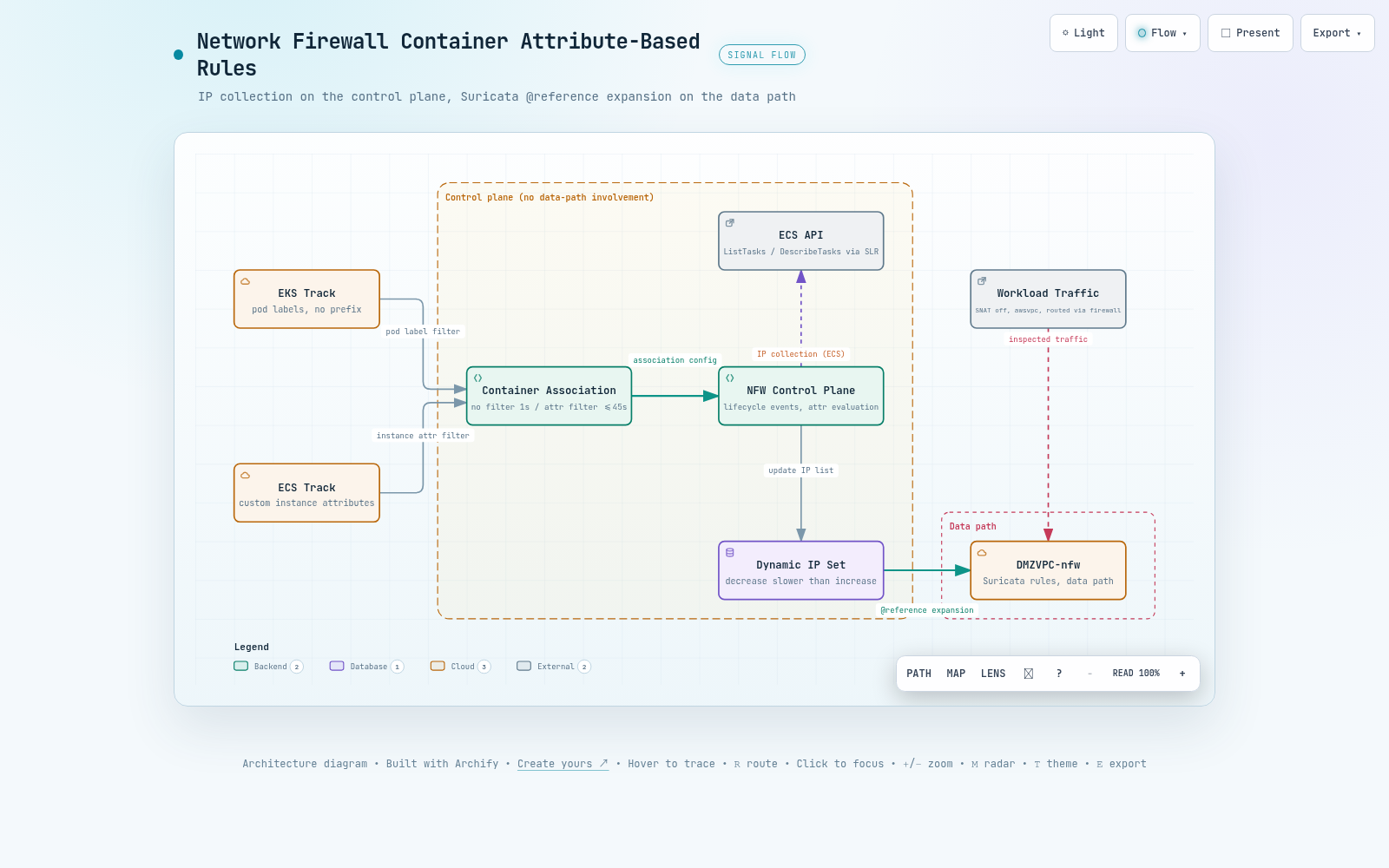
인터랙티브 아키텍처 맵 전체 이미지 - Network Firewall 컨테이너 속성 규칙의 수집/평가 경로
그림 3. 인터랙티브 아키텍처 맵 전체 보기. 이미지를 클릭하면 노드 탐색, 경로 추적, 다크/라이트 테마를 지원하는 인터랙티브 버전 ↗이 열립니다.

--참고 자료

핵심 출처

공식 문서

외부 자료

  • terraform-provider-aws PR #49321 - aws_networkfirewall_container_association 리소스 병합 (2026-08-06) https://github.com/hashicorp/terraform-provider-aws/pull/49321

실측 데이터

  • 이 문서의 4장 수치 원본 - results/test-basic-*.json, test-dynamic-*.json, test-logging-*.json, internals-*.jsonresults/summary.md results/summary.md

NETWORK FIREWALL / VERIFICATION REPORT

AWS Network Firewall Container Attribute-Based Rules, Verified Hands-On

We built container associations on both EKS and ECS tracks, measured 12 allow/block cases and IP set propagation delays, and pinned down what the official documentation does not answer: whether custom attribute filters are supported, and how the service behaves internally.

Written as of 2026-08-12.

This applies to configurations that inspect EKS or ECS workloads with AWS Network Firewall.

The verification region is ap-northeast-2 and the target is a single firewall, DMZVPC-nfw.

The feature under verification is container attribute-based rules, released on 2026-06-30.

Primary sources are the Network Firewall Developer Guide, the AWS Security blog (2026-07-01), and measured data.

TL;DR

01Feature overview

Container attribute-based rules is a Network Firewall feature released on 2026-06-30. It subscribes to container lifecycle events from EKS/ECS clusters and maintains the IPs of attribute-matched containers as a dynamic IP set. Instead of listing IPs by hand, operators declare only a condition such as "pods with this label" or "tasks on container instances with this attribute", and Suricata rules reference that set by an alias.

The central resource is container-association. One association has a type (ECS or EKS, immutable after creation) and up to 5 monitoring configurations; each configuration consists of one cluster ARN and an optional list of attribute filters. The cluster must be in the same region and the same account as the association, so cross-account configurations are not supported.

1.1 The 5 APIs

Five operations were added to the existing Network Firewall API. Tagging operations also support this resource type.

Table 1. The 5 container association APIs and key parameters
Operation Role Watch out for
CreateContainerAssociation Creates an association Name must match ^[a-zA-Z0-9-]+$; type and name are immutable after creation
DescribeContainerAssociation Queries status ResolvedCidrCount in the response is the only indicator of whether IPs are being collected
UpdateContainerAssociation Changes monitoring targets UpdateToken required; a mismatch raises InvalidTokenException
DeleteContainerAssociation Deletes Returns DELETING asynchronously; fails while a rule group still references it
ListContainerAssociations Lists associations Returns only names and ARNs, so query status again with Describe

1.2 How rule groups reference the set

Map a variable name to an association ARN in the stateful rule group's ReferenceSets.IPSetReferences, and the Suricata rule string can point to that set with @variable-name. The ECS rule group built in this verification references a filtered association and a filter-less association at the same time.

AWS CLI - create-rule-group (abi-ecs-rg excerpt)
{
  "RulesSource": { "RulesString": "
    reject tls @abi_ec2_tasks any -> any any (msg:\"abi ecs-ec2 block amazon.com\";
      flow:to_server; tls.sni; dotprefix; content:\".amazon.com\"; endswith; nocase; sid:3001; rev:1;)
    alert  tls @abi_all_tasks any -> any any (msg:\"abi ecs-all allow checkip\";
      ... content:\".checkip.amazonaws.com\"; sid:3101; rev:1;)
    reject tls @abi_all_tasks any -> any any (msg:\"abi ecs-all block wikipedia\";
      ... content:\".wikipedia.org\"; sid:3102; rev:1;)" },
  "ReferenceSets": { "IPSetReferences": {
    "abi_ec2_tasks": { "ReferenceArn": "arn:aws:network-firewall:ap-northeast-2:...:container-association/abi-ecs-ec2" },
    "abi_all_tasks": { "ReferenceArn": "arn:aws:network-firewall:ap-northeast-2:...:container-association/abi-ecs-all" }
  } }
}    // ConsumedCapacity 3 / 100

1.3 Quotas and constraints

Most quotas are fixed values. In particular, the 30-references-per-rule-group limit applies separately from the existing 5-reference limit on IP set references, so a design that splits associations into fine-grained units is rarely blocked by quotas.

Table 2. Quotas and structural constraints
Item Value Adjustable
Associations per account, per region100Yes
Monitoring configurations per association5No
Container association references per rule group30No
ResolvedCidrCount ceiling1,000,000No
EKS filter keysnamespace, pod, cluster, custom label keysRequires SNAT disabled
ECS filter keysContainer instance attributes, EC2 launch type onlyawsvpc mode only
IaC supportCloudFormation unsupported; Terraform mergedCLI/SDK required
Note - this feature does not change the traffic path

The Developer Guide states that "Network Firewall only collects IP information from lifecycle events and does not interact with the cluster's data path". It installs no agent or controller inside the cluster, and inspection is still performed by the existing firewall endpoints. There is no additional charge, either. In other words, what this feature changes is only how rules name their targets; the responsibility for making traffic pass through the firewall still rests with the routing design.

02How it works internally

Same API, same resource type - yet the internal implementations for EKS and ECS are not symmetric. Cross-checking CloudTrail, EventBridge, EKS access entries, and the service-linked role policy in this verification showed that ECS leaves observable resources and calls in the customer account, while EKS leaves almost nothing. This difference carries straight into the propagation delay difference covered later.

flowchart LR P["pod created, deleted"] --> PULSE["EKS Pulse Event Service (internal channel)"] T["task state change"] --> EB["EventBridge Managed Rule (customer account)"] EB -. "polling trigger (presumed)" .-> SLR["service-linked role polling (ecs:List, Describe)"] PULSE --> NF["Network Firewall dynamic IP set"] SLR --> NF NF --> RULE["@reference expanded at packet evaluation"]
Figure 1. IP collection paths. The upper EKS path leaves neither resources nor API calls in the customer account, while the lower ECS path is observable through the EventBridge rule in the account and the service-linked role calls. Both paths converge on the same IP set.

2.1 The EKS path does not go through Kubernetes authentication

What we confirmed on the EKS side is three absences. First, among the cluster's 7 access entries, the number of firewall-related entries is zero. The control cluster without a container association also has none among its 5 access entries, so they were never created in the first place rather than deleted afterwards. Second, the service-linked role policy contains no eks:* permission at all. Third, the eks:DescribeCluster call appears exactly once, 1 second before association creation, and never repeats.

That single call has one peculiarity. Its sourceIPAddress and userAgent are network-firewall.amazonaws.com, yet the caller is the session of the very user who created the association. In other words, this step is not the service reading the cluster with its own permissions - it is a validation that checks, with the caller's credentials, whether the caller is allowed to see that cluster. This matches exactly the fact that the service-linked role policy has no eks:*.

Note - what the EKS Pulse Event Service actually is

The Developer Guide writes that EKS-type associations subscribe to pod lifecycle events through the "Amazon EKS Pulse Event Service". This name is explained nowhere else in public documentation. This verification established, via the three absences above, that the channel is not the access entry path, but what the actual channel is lies outside the customer-visible API surface and could not be determined with read-only queries. This is an observation limit, not an inference.

2.2 The ECS path creates a rule in the account and polls periodically

When you create an ECS-type association, Network Firewall automatically provisions an EventBridge rule in the user's account. In this verification, one rule we did not create appeared, scoped down to the target cluster, which shows that rules are provisioned per cluster. The target is not a user resource such as Lambda or SQS but a service-owned ARN with neither an account ID nor a resource path.

AWS CLI - events describe-rule / list-targets-by-rule
Name        : NetworkFirewallManagedRule-abi-ecs-f95002052a4bc1e8
Description : This rule is used to route ECS Task Events to AWS Network Firewall
ManagedBy   : network-firewall.amazonaws.com
State       : ENABLED
EventPattern: {"source":["aws.ecs"],"detail-type":["ECS Task State Change"],
               "detail":{"clusterArn":["arn:aws:ecs:ap-northeast-2:********6239:cluster/abi-ecs"]}}
Target      : NetworkFirewallTarget -> arn:aws:network-firewall:ap-northeast-2:::
                                       # service-owned ARN with no account ID or resource path

What happens after the event is received is also fully visible in CloudTrail. A session the service-linked role assumed by itself calls three kinds of ECS read APIs in order, and two waves were observed - right after association creation and about 9 minutes later. The most decisive piece of evidence in this verification is the filter string of the first call: the custom key we put in the attribute filter is passed on translated verbatim into ECS's server-side attribute filter syntax.

CloudTrail - call sequence of the AWSServiceRoleForNetworkFirewall session
08:15:21Z  ecs:ListContainerInstances  cluster=abi-ecs  filter="attribute:abi-env == lab"
08:15:21Z  ecs:ListTasks               cluster=abi-ecs  containerInstance=d0bc521b...  desiredStatus=RUNNING
08:15:22Z  ecs:DescribeTasks           cluster=abi-ecs  tasks=[task/abi-ecs/ad040da6...]
08:15:25Z  ecs:ListTasks               cluster=abi-ecs  desiredStatus=RUNNING   # for the filter-less association
08:15:25Z  ecs:DescribeTasks           cluster=abi-ecs  tasks=[task/abi-ecs/3fa22e0b..., task/abi-ecs/ad040da6...]

08:24:01Z  # second wave in the same order, about 9 minutes later

Reading this wave gap as a fixed polling interval would be premature, though. Within the observation window (creation -2 minutes to +15 minutes) the gap was 8 minutes 38 seconds, but it recurred only once, so we cannot confirm the interval is fixed. What actually determines propagation speed is the event path, not the polling: the filter-less association propagating in 1 second is the evidence, and the polling is better read as a reconciliation safety net for missed events.

2.3 The EKS track operates through an internal channel outside the customer account

Unlike the ECS track, the EKS track creates no resources in the customer account. The only record is a single DescribeCluster call marked with the service principal on the caller's session, 1 second before creation, and no recurring queries appear in CloudTrail afterwards.

It does not use the standard Kubernetes authentication path either. There are zero firewall-related access entries, and the service-linked role has no eks:* permissions at all. Pod lifecycle events therefore reach the service directly through the EKS Pulse Event Service subscription the documentation mentions, and IP collection happens on an internal channel invisible to the customer account.

Since no trace of periodic polling exists anywhere in the customer account, the EKS track is best understood as event subscription rather than polling. The very notion of a polling interval does not apply on the EKS side.

The July association with a namespace filter (confirmed from the trail's S3 logs) and the August one with a custom label filter both showed the same pattern. Chapter 5 covers the query traps.

Table 3. EKS vs ECS internal behavior
Axis EKS ECS
Event delivery path Creates no resources in the customer account; documented as an internal EKS Pulse Event Service subscription Creates an EventBridge Managed Rule in the customer account; the target is a service-owned ARN
Cluster validation at creation eks:DescribeCluster, once with the caller's session ecs:DescribeClusters, once with the caller's session
Ongoing queries afterwards None; does not appear in CloudTrail Periodic polling with service-linked role permissions; observed gap of about 9 minutes
Kubernetes auth path Access entries unused; firewall-related entries 0 of 7 Not applicable
Service-linked role permissions No eks:* at all 4 ECS read actions, added in policy v4
Observed propagation delay 6 to 40 seconds Filter-less 1 second; filtered 39 to 45 seconds

Principle: the ECS track can be audited inside the customer account; the EKS track cannot. If you must verify EKS-side behavior, check ResolvedCidrCount and actual traffic results, not CloudTrail.

03Test design

There were two design principles. First, the firewall and EKS cluster already in use for verification are read-only - never modified. The existing rule groups and associations were left intact to serve as a baseline comparison group, and the firewall policy only had references to the new rule groups added. Second, every new resource carries the abi- prefix so cleanup targets can be identified by name alone.

The heart of the design is the negative control. Confirming only that "attribute-matched containers get blocked" cannot tell you whether the rule is actually selective. Only by placing, side by side, a workload in the same cluster, same subnet, and same image but without the attribute - and seeing it pass - can you say the filter works. So we placed one control group per track.

flowchart LR A1["abi-curl pod (has label)"] --> AS1["association abi-eks-label"] A2["abi-free pod (no label)"] -. not a target .-> AS1 E1["EC2 task (attribute abi-env=lab)"] --> AS2["association abi-ecs-ec2"] F1["Fargate task (no attribute)"] -. outside the filter .-> AS2 E1 --> AS3["association abi-ecs-all (filter-less)"] F1 --> AS3 AS1 --> RG["rule groups abi-eks-rg, abi-ecs-rg"] AS2 --> RG AS3 --> RG RG --> POL["reference added to DMZVPC-fw-policy"]
Figure 2. Verification layout and negative controls. Dotted lines are paths that must intentionally not match. The Fargate task is excluded from the filtered association but included in the filter-less one, so the same task being caught by one rule and missed by another can be observed as a single paired contrast.

3.1 The two-domain verdict scheme

Verdicts were simplified down to two domains. .checkip.amazonaws.com is set to alert, so it is allowed while leaving log evidence, and the domains to block are set to reject, cutting the connection at the TLS handshake stage. From the client's side the outcome is an HTTP status code when allowed and a connection failure when blocked, so the curl result inside the container alone gives a first-pass verdict.

The ECS rule group was built with three rules so the semantics of the two references can be told apart. With one domain blocked via the filtered reference, one allowed via the filter-less reference, and one blocked via the filter-less reference, the combination of EC2 task and Fargate task results alone lets you work backwards to which association collected which IPs.

Table 4. Expected results by target
Target checkip amazon.com wikipedia.org
EKS abi-curl (has label)AllowBlockN/A
EKS abi-free (control)AllowAllowN/A
ECS EC2 task (has attribute)AllowBlockBlock
ECS Fargate task (control)AllowAllowBlock

Evidence was cross-checked across three layers: the client's response code, the association's ResolvedCidrCount, and the firewall alert logs. Any single layer can mislead. For example, traffic that passes because the IP set has not been updated yet and traffic that passes because it is outside the filter look identical from the client, so the count and the logs must always be read together.

Warning - when a precondition breaks, rules are silently neutralized

On EKS, if the VPC CNI's SNAT is on, pod IPs are rewritten to the node IP before reaching the firewall, so the rules never match. Because it manifests as block rules being passed, it is easy to misread as the feature not working rather than as a configuration error. This verification environment first confirmed that pod IPs are preserved via AWS_VPC_K8S_CNI_EXTERNALSNAT=true.

The same goes for routing order. If subnet traffic passes the NAT Gateway first, the firewall sees only the NAT IP and every container-IP-based reference misses. This environment started only after confirming in the route tables that the private subnets' default route passes the firewall endpoint first and exits through NAT afterwards.

04Measured results

The results fall into four strands: the allow/block matrix, initial resolution time, dynamic tracking delay, and log metadata. Every number in this chapter is quoted verbatim from the five JSON files stored under results/.

4.1 All 12 allow/block matrix cases PASS

The 12 cases were run twice and all 24 runs matched expectations. What deserves attention is not the PASS count but the 3 negative controls. The pod without the label, the Fargate task outside the custom attribute filter, and the same Fargate task being caught by the filter-less reference all came out exactly as designed.

Table 5. The 12 allow/block cases, identical across 2 runs
case Target Expected Measured Verdict
T1-checkip-allowEKS baselineALLOWEDALLOWEDPASS
T1-amazon-blockEKS baselineBLOCKEDBLOCKEDPASS
T2-restricted-checkip-allowEKS with labelALLOWEDALLOWEDPASS
T2-restricted-amazon-blockEKS with labelBLOCKEDBLOCKEDPASS
T2-free-amazon-allowEKS controlALLOWEDALLOWEDPASS
T2-free-checkip-allowEKS controlALLOWEDALLOWEDPASS
T4-ec2-amazon-blockECS EC2 taskBLOCKEDBLOCKEDPASS
T4-ec2-checkip-allowECS EC2 taskALLOWEDALLOWEDPASS
T4-ec2-wikipedia-blockECS EC2 taskBLOCKEDBLOCKEDPASS
T5-fg-amazon-allowECS Fargate controlALLOWEDALLOWEDPASS
T5-fg-checkip-allowECS FargateALLOWEDALLOWEDPASS
T5-fg-wikipedia-blockECS FargateBLOCKEDBLOCKEDPASS

The most explanatory raw evidence is the two containers' logs laid side by side. Same cluster, same image, the same curl loop on a 30-second cycle - yet the results for www.amazon.com are the exact opposite. The HTTP:503 on the Fargate side is not a blocking failure; it is proof that the TCP and TLS connections were established normally and the request reached the origin server's response.

CloudWatch Logs - /ecs/abi, curl loop on a 30-second cycle
ec2/curl/ad040da6...                      fg/curl/25cc5746...
  checkip.amazonaws.com HTTP:200            checkip.amazonaws.com HTTP:200
  www.amazon.com        FAIL                www.amazon.com        HTTP:503
  en.wikipedia.org      FAIL                en.wikipedia.org      FAIL

# the EC2 task matches the custom attribute filter, so amazon.com is blocked
# the Fargate task is outside the filter, so connections succeed; only wikipedia, caught by the filter-less reference, is blocked

4.2 Initial resolution time for custom attribute filters

The opening question of this verification - whether custom attributes are supported - was settled as supported on both tracks. On EKS the right answer was to use the label key as-is, with no prefix such as label:, and on ECS the attributes attached through the instance user-data's ECS_INSTANCE_ATTRIBUTES - not put-attributes - were recognized immediately. The fallback to the built-in keys the documentation offers as examples never had to be executed on either track.

Table 6. Initial resolution time after association creation
association Filter Resolution time What it verified
abi-eks-label Custom pod label 23 sec Of 2 pods, only the 1 with the label resolved; selectivity confirmed via the count
abi-ecs-ec2 Custom instance attribute 18 sec Confirmed via CloudTrail that it is passed on translated into the server-side filter string
abi-ecs-all None 0 sec Immediately collected the task ENIs that already existed at creation time

4.3 Dynamic tracking delay splits on filter presence

We measured 8 propagation delays for scale changes and task start/stop, polling at 5-second intervals. The documentation says only "near real-time" and offers no figures or targets, so these values fill that documentation gap. Same cluster, same events - yet 1 second without a filter and 39 to 45 seconds with a custom attribute filter.

Table 7. 8 dynamic tracking delays, 5-second polling interval
Track Event Delay What was observed
EKSeks-scale-out-1to323 secCount from 1 to 3
EKSeks-newpod-enforcement6 secBlocking actually in effect on the new pod
EKSeks-scale-in-3to140 secCount from 3 to 1
EKSeks-pod-recreate-enforcement29 secBlocking re-established after recreation
ECSecs-runtask-ec2filter39 secFiltered count increase
ECSecs-runtask-allfilter1 secFilter-less count increase
ECSecs-stoptask-ec2filter45 secFiltered count decrease
ECSecs-stoptask-allfilter1 secFilter-less count decrease

Three things can be read from this. First, the filtered path makes more round trips: after receiving an event it walks through listing instances, listing tasks, and describing tasks in order. The call sequence observed in Chapter 2 lines up with the delay difference, so the extra queries appear to be the main cause of the delay. This is an inference grounded in observation.

Second, on EKS the actual blocking took effect faster than the count updated. The scale-out count was reflected in 23 seconds, but blocking on the new pod kicked in within 6 seconds. ResolvedCidrCount is an eventually consistent indicator on the API surface, and the data-path update can happen earlier, independently of it.

Third, shrinking is slower than growing. EKS grew in 23 seconds and shrank in 40; the ECS filtered path grew in 39 seconds and shrank in 45. From a security standpoint this direction is unfavorable. It means the allowed range narrows late, so a terminated container's IP stays in the IP set for tens of seconds.

4.4 Log metadata is a single referenced group name

We found all 7 signatures in the alert logs, and scanning the entire schema with container-related regular expressions matched exactly one path. Its value simply echoes back the @variable-name used when the rule was written. The official Developer Guide's log contents page did not document this field's JSON key as of this writing, so the path below is a value pinned down by measurement.

Table 8. Signatures confirmed in the alert logs and their container_association values
sid Track container_association action
1001EKS baselinenfw_test_podsallowed
1002EKS baselinenfw_test_podsblocked
2001EKS label filterabi_restricted_podsallowed
2002EKS label filterabi_restricted_podsblocked
3001ECS attribute filterabi_ec2_tasksblocked
3101ECS filter-lessabi_all_tasksallowed
3102ECS filter-lessabi_all_tasksblocked
CloudWatch Logs - /aws/network-firewall/DMZVPC/alert, sid 3001 excerpt
{
  "firewall_name": "DMZVPC-nfw",
  "availability_zone": "ap-northeast-2a",
  "event": {
    "src_ip": "10.11.37.87", "src_port": 57922,
    "dest_ip": "184.29.45.254", "dest_port": 443,
    "alert": {
      "signature_id": 3001, "rev": 1,
      "metadata": { "container_association": ["abi_ec2_tasks"] },   // the only container field
      "signature": "abi ecs-ec2 block amazon.com",
      "action": "blocked"
    },
    "verdict": { "action": "drop", "reject-target": "to_client", "reject": ["tcp-reset"] },
    "tls": { "sni": "www.amazon.com", "version": "TLS 1.3" },
    "aws_metadata": { "resource_arn": ".../stateful-rulegroup/abi-ecs-rg" },  // rule group ARN, not the container
    "timestamp": "2026-08-12T13:53:34.086401+0000", "direction": "to_server"
  }
}
Note - the log alone cannot identify which pod it was

The pod name, namespace, ECS task ARN, task definition, container ID and image, cluster name, and the attribute value used for matching appear in no field. Two fields are easy to confuse: aws_metadata.resource_arn is the ARN of the matched rule group, and endpoint is the firewall endpoint UUID, which comes out identical across all 7 signatures.

As a result, audits and incident response must cross-reference src_ip and the timestamp against the EKS or ECS APIs. Container IPs are short-lived, and an already-reclaimed IP cannot be traced back after the fact, so loading a separate real-time inventory that links IPs to containers is practically mandatory.

05Limitations and recommendations

The limitations come in two kinds: structural constraints of the feature itself, and the mistakes the verification procedure produces when you try to confirm the feature is working. The former must be settled at design time; the latter recurs every time you run a verification script.

5.1 Structural constraints and checkpoints

Table 9. Limitations and pre-adoption checkpoints
Limitation Why it matters Action
SNAT must be disabled If pod IPs are rewritten to the node IP, references miss and blocking silently fails - in the form of traffic passing Check the VPC CNI SNAT setting first; since it affects the whole cluster, put a separate approval step around it
Routing order If NAT comes first, the firewall sees only the NAT IP Confirm in the route tables that the target subnets' default route passes the firewall endpoint first
awsvpc mode only ECS bridge and host modes are unsupported and have no per-task IP Inspect the task definitions' network mode; otherwise judge the workload out of this feature's scope
No attribute filters for Fargate With no container instance, filter matching cannot even be formed To include Fargate, keep a separate filter-less association and use the two references together in the same rule group
No mixing of IP set references Mixing plain IP sets and container associations in one rule group gets the request rejected Keep existing prefix-list-based rule groups and container-based rule groups separate
Same-node east-west not inspected Traffic that does not pass a firewall endpoint is outside its control Handle pod-to-pod traffic within the same node with separate means such as network policies
Propagation delay A terminated container's IP stays in the allowed set for tens of seconds Design rules with the delay as a given; do not rely on this feature alone for scenarios that need instant isolation
Log metadata limits Only the referenced group name remains, so identifying which pod or task it was is impossible after the fact Load a real-time inventory linking IPs to containers, ready to be joined with the logs
CloudFormation unsupported With no resource type, there is no CDK L1 or L2 construct either Create it with the CLI or SDK, or use the Terraform resource; a custom resource is another workaround
Fixed deletion order An association cannot be deleted while a rule group references it Proceed in order: remove the rule group reference from the policy, delete the rule group, then delete the association
Warning - the verification procedure creates false negatives

Passing --max-results to cloudtrail lookup-events makes the AWS CLI turn off that operation's automatic pagination and return at most the latest 50 events. In an account with constant background API traffic, events from a few hours earlier get pushed off that page, so calls that actually exist show up as 0 events. In this verification too, both EKS and ECS came back as 0 at first; switching to --start-time and --max-items yielded 1 EKS event and 12 ECS events.

There are two more similar traps. logs filter-log-events applies --query per page and concatenates the results, breaking pipelines that expect a single JSON value. ecs list-tasks --desired-status RUNNING is the desired state, not the actual state, so it passes tasks that failed to start as healthy.

5.2 Recommended order

The adoption steps have a priority. If you proceed to step 2 and beyond without confirming step 1, you will hunt for the reason your rules do not work in the rule syntax, when the cause is in the network layer.

  1. Settle SNAT and routing order first. These two are the preconditions of this feature; every other design decision comes after them. Verifying them is as simple as confirming that traffic leaving a pod shows its original IP as src_ip in the firewall logs.
  2. Split associations by purpose. Do not try to merge the filtered and the filter-less into one; separate the one for EC2 workloads from the one covering everything including Fargate, and use both references together in the same rule group. Because their propagation delays differ, keeping them separate also makes operational observations easier to interpret.
  3. Put new rules in as alert first, watch the logs, then switch them to blocking. This account's July setup also left traces of both rules being created as alert first and one being changed to reject later. Turning on blocking before confirming the filter captures the intended set risks cutting off workloads outside the target.
  4. Keep negative controls in place permanently. Being able to keep confirming that attribute-less workloads pass is what lets you catch a filter that has quietly widened. In this verification the controls carried half of the verdicts.
  5. Prepare an inventory linking IPs to containers. The referenced group name in the alert logs alone does not support incident response, and IPs are reused within a short time, so they cannot be reconstructed by after-the-fact queries.

Bottom line: this feature takes over the work of rewriting rules every time a container IP changes. Three things to line up before adopting it: disable SNAT and route traffic through the firewall first, budget tens of seconds for container changes to reach the rules, and complement the group name in the logs with an inventory linking IPs to containers. All three are items you can solve at the design stage once you know them upfront.

Full interactive architecture map - collection and evaluation path of Network Firewall container attribute rules
Figure 3. Full view of the interactive architecture map. Click the image to open the interactive version ↗ with node exploration, path tracing, and dark/light themes.

--References

Primary sources

Official documentation

External resources

  • terraform-provider-aws PR #49321 - aws_networkfirewall_container_association resource merged (2026-08-06) https://github.com/hashicorp/terraform-provider-aws/pull/49321

Measured data