VPC LATTICE / MIGRATION GUIDE

App Mesh에서 VPC Lattice로 - EOL 5주 앞의 실측 마이그레이션

App Mesh EOL(2026-09-30)을 앞두고 EKS 1.33 클러스터에서 Envoy 사이드카 + Cloud Map 구성을 VPC Lattice(Gateway API Controller + SigV4)로 전환하는 전 단계를 직접 실행하고 측정한 기록입니다. 무중단 병행 구축, 전환 지점의 DNS stale 함정, mTLS 대체, TCP 서비스의 한계와 롤백까지 실측 수치로 정리했습니다.

01. 작성 기준일 - 2026-08-24

02. 적용 대상 - App Mesh(Envoy 사이드카 + Cloud Map)를 쓰는 EKS 워크로드의 VPC Lattice 전환

03. 검증 환경 - EKS 1.33, ap-northeast-2, Gateway API CRD v1.2.0 experimental + Controller v1.1.6, 검증일 2026-08-20~21

04. 주 출처 - 직접 수행한 전 단계 실측과 AWS 공식 문서

요약

01왜 지금, 무엇으로 바뀌나

AWS App Mesh는 2026-09-30에 지원이 종료됩니다. 이 문서는 EOL을 약 6주 앞둔 실측 시점에 실제 EKS 클러스터에서 App Mesh를 VPC Lattice로 전환하는 전 과정을 직접 실행하고 측정한 기록입니다(작성 기준일 2026-08-24 기준으로는 EOL 약 5주 전). 문서의 수치는 추정이 아니라 2026-08-20~21 이틀에 걸쳐 두 차례 실측한 값입니다.

VPC Lattice는 사이드카 없이 동작하는 관리형 애플리케이션 네트워킹 서비스입니다. Kubernetes에서는 AWS Gateway API Controller가 표준 Gateway API 리소스(Gateway, HTTPRoute)를 Lattice의 Service Network, Service, Target Group으로 변환합니다. 데이터플레인을 AWS가 관리하므로 Envoy 사이드카가 Pod 스펙에서 사라집니다.

1.1 개념 매핑

기존 App Mesh 리소스는 Lattice에서 각각 무엇이 될까요? 아래 표는 이번 전환에서 실제로 적용한 매핑입니다.

표 1. App Mesh 개념과 VPC Lattice 대응
App MeshVPC Lattice비고
MeshService NetworkGateway 리소스로 표현
Virtual ServiceLattice ServiceHTTPRoute 1개 = Service 1개
Virtual NodeTarget GroupK8s Service를 backendRef로 지정
Virtual Router / RouteListener / Listener RuleHTTPRoute의 rules
Virtual GatewayNLB / ALBLattice는 외부 유입을 직접 받지 않음
Envoy 사이드카없음 (관리형 데이터플레인)Pod 스펙에서 제거
Cloud Map DNSLattice DNS (또는 커스텀 도메인)전환 시 DNS stale 주의 (04)
mTLS관리형 TLS + SigV4 / IAM Auth Policy암호화와 인증이 분리, ACM 불필요

1.2 핵심 차이 - 신원의 표현 방식

표에서 가장 주의할 행은 mTLS입니다. App Mesh mTLS는 전송 암호화와 상호 신원 검증을 겸했지만, Lattice에서는 이 두 역할이 분리됩니다. 암호화는 관리형 TLS(HTTPS 리스너)가, 인증은 SigV4 서명과 IAM Auth Policy가 맡습니다.

SigV4(AWS Signature Version 4)는 AWS API 호출에 쓰이는 요청 서명 방식입니다. Lattice는 서비스 간 HTTP 요청에도 이 서명을 요구할 수 있고, 서명한 주체가 곧 호출자의 신원이 됩니다.

따라서 핵심 차이는 신원의 표현 방식입니다. App Mesh mTLS는 인증서의 SAN(Subject Alternative Name)이 서비스 신원이었으나, Lattice는 Pod의 IAM Role이 신원입니다. Pod마다 IAM Role을 부여하는 IRSA(IAM Roles for Service Accounts) 또는 Pod Identity가 전제 조건입니다.

이 구조 변화의 실질적 이득은 인증서 운영 부담의 소멸입니다. SPIRE나 ACM Private CA로 인증서를 발급하고 순환하던 작업이 사라지고, 그 자리를 이미 운영 중인 IAM 신원 관리가 대신합니다.

02테스트 환경과 전환 설계

결과를 해석하려면 무엇을 어디서 측정했는지부터 확정해야 합니다. 검증은 2026-08-20 1차, 2026-08-21 2차(템플릿 구조로 전 단계 재실행)로 두 번 수행했고, 무엇이 되고 무엇이 안 되는가라는 결론은 두 차례 모두 동일했습니다.

2.1 검증 대상 애플리케이션

demo 네임스페이스에 HTTP 서비스와 TCP 서비스를 하나씩 두었습니다. 두 프로토콜의 전환 경로가 완전히 다르기 때문입니다(06). frontend가 backend(nginx)를 HTTP:80으로, cache(redis)를 TCP:6379로 호출하고, 서비스 디스커버리는 Cloud Map(appmesh-test.local)입니다.

검증 대상 애플리케이션 (demo 네임스페이스)
frontend ──HTTP:80──▶ backend (nginx)
         └─TCP:6379─▶ cache   (redis)
서비스 디스커버리: Cloud Map (appmesh-test.local)

클러스터는 appmesh-lattice-mig(EKS 1.33, eksctl 0.224.0)이고, 노드는 t3.xlarge 2대(AL2023)로 전부 프라이빗 서브넷에 있습니다. VPC는 GWLB 이그레스 방화벽과 인터페이스 엔드포인트를 쓰는 lab-dmzvpc(vpc-xxxx)이며, 이 구조가 만드는 함정은 03에서 다룹니다.

2.2 전환 설계 - 단계 분리와 blue/green

전환은 Phase 0~6으로 나눕니다. Phase 2까지는 기존 App Mesh 경로와 Lattice 경로가 병행되는 무중단 구간이고, Phase 3의 사이드카 제거가 유일한 전환 지점입니다. TCP 서비스는 본선과 분리해 Phase 5에서 별도로 검증했습니다.

flowchart LR P0["Phase 0
사전 준비
SG / IRSA"] --> P1["Phase 1
AS-IS 기준선
실측"] P1 --> P2["Phase 2
Lattice 병행 구축
무중단"] P2 --> P3["Phase 3
사이드카 제거
전환 지점"] P3 --> P4["Phase 4
SigV4 + IAM
인증 강제"] P4 --> P6["Phase 6
App Mesh 정리"] P2 -.-> P5["Phase 5
TCP / TLSRoute
별도 검증"]
그림 1. 전환 단계 흐름. Phase 2까지는 두 경로가 동시에 동작해 롤백이 자유로운 무중단 구간이고, Phase 3이 유일한 전환 지점입니다. 이 지점을 어떻게 지나는지가 04의 주제입니다.

전환 지점을 지나는 방식은 두 가지입니다. in-place는 demo 네임스페이스에서 사이드카를 직접 제거하는 방식이고, blue/green은 사이드카 없는 사본(demo-green)을 옆에 세우고 진입점만 옮기는 방식입니다. green 네임스페이스에 Mesh 라벨을 붙이지 않는 것만으로 사이드카 주입과 Cloud Map 등록이 모두 일어나지 않아 blue와 완전히 분리됩니다.

어느 쪽이 안전할까요? 실측에서 in-place는 DNS stale 실패 구간을 만들었고(04), blue/green은 전환과 롤백 269 요청에서 실패 0건이었습니다. 이 문서는 in-place 경로를 단계별로 실측해 함정을 드러내되, 선택이 가능하다면 blue/green을 권장합니다.

2.3 재현 전제 조건 4건

이 검증에는 공식 문서만으로는 알기 어려운 전제 조건이 4건 있습니다. 하나라도 빠지면 이 문서의 결과가 재현되지 않습니다.

  1. Gateway API CRD는 experimental 채널이어야 합니다. standard 채널에는 TLSRoute가 없어 Phase 5가 no matches for kind TLSRoute로 실패합니다.
  2. GatewayClass는 수동 생성해야 합니다. Helm 차트가 만들어주지 않으며, 누락 시 Gateway가 PROGRAMMED 되지 않고 원인 파악이 어렵습니다.
  3. Phase 5 대조군의 tlsbackend-cert Secret을 먼저 만들어야 대조군 Pod가 기동합니다.
  4. Pod별 IRSA를 먼저 만들어야 합니다. App Mesh의 Envoy XDS 접근과 Lattice의 SigV4 신원이 같은 역할을 씁니다.
재현 전제 조건 확인
kubectl get crd tlsroutes.gateway.networking.k8s.io \
  -o jsonpath='{.metadata.annotations.gateway\.networking\.k8s\.io/channel}'   # → experimental
kubectl get gatewayclass
kubectl -n demo get secret tlsbackend-cert
kubectl -n demo get sa frontend -o jsonpath='{.metadata.annotations.eks\.amazonaws\.com/role-arn}'

03무중단 병행 구축 (Phase 0~2)

Phase 0~2의 목표는 기존 App Mesh 트래픽을 건드리지 않은 채 Lattice 경로를 옆에 완성하는 것입니다. 실측에서 이 구간은 실제로 무중단이었고, 두 경로가 동시에 200을 반환하는 것까지 확인했습니다. 다만 시작 전에 네트워크 계층에서 넘어야 할 관문이 두 개 있습니다.

3.1 Lattice prefix list를 클러스터 SG에 허용 (Phase 0)

Lattice는 link-local 주소(라우팅되지 않고 같은 링크 안에서만 유효한 특수 대역)에서 Pod로 트래픽을 보냅니다. 클러스터 보안 그룹이 이 대역을 허용하지 않으면 모든 요청이 타임아웃되므로, AWS 관리형 prefix list를 먼저 허용합니다.

Lattice prefix list 허용 (IPv4 + IPv6)
CLUSTER_SG=$(aws eks describe-cluster --name <cluster> \
  --query 'cluster.resourcesVpcConfig.clusterSecurityGroupId' --output text)

for PL in "com.amazonaws.${REGION}.vpc-lattice" "com.amazonaws.${REGION}.ipv6.vpc-lattice"; do
  PL_ID=$(aws ec2 describe-managed-prefix-lists \
    --filters "Name=prefix-list-name,Values=${PL}" \
    --query 'PrefixLists[0].PrefixListId' --output text)
  aws ec2 authorize-security-group-ingress --group-id "$CLUSTER_SG" \
    --ip-permissions "IpProtocol=-1,PrefixListIds=[{PrefixListId=${PL_ID}}]"
done

IPv6 쪽도 정말 필요할까요? 실측에서 Lattice DNS는 IPv6 link-local (fd00:ec2:80::a9fe:ab00)로 해석되었습니다. ap-northeast-2에서는 pl-0cd842b438fee3b4b(IPv4)와 pl-06da045b37607c8a5(IPv6) 2개를 허용했고, IPv6 prefix list를 빠뜨리면 안 됩니다.

3.2 프라이빗 서브넷 환경의 함정 - 실제로 겪은 이슈

검증 클러스터는 노드가 전부 프라이빗 서브넷에 있고, AWS API 통신은 인터페이스 VPC 엔드포인트를 경유합니다. 이 구조에서는 신규 클러스터의 SG가 엔드포인트 SG에 허용되어 있지 않아 노드 부트스트랩이 실패합니다.

부트스트랩 실패 노드의 nodeadm 로그
nodeadm[2321]: SDK ... retrying request EC2/DescribeInstances, attempt 14
[FAILED] Failed to start nodeadm-config.service - EKS Nodeadm Config.
fatal: operation error EC2: DescribeInstances, context deadline exceeded

증상이 모호해서 원인을 찾기 어렵습니다. 노드 인스턴스는 running인데 클러스터에 조인하지 않고, 노드그룹은 20분 이상 CREATING에 머뭅니다. 해결은 ec2, sts, ecr.api, ecr.dkr, logs 등 인터페이스 엔드포인트 SG에 신규 클러스터 SG의 443 인바운드를 허용한 뒤, 실패한 인스턴스를 종료해 ASG가 교체하게 하는 것입니다.

인터페이스 엔드포인트 SG에 신규 클러스터 SG 허용
aws ec2 authorize-security-group-ingress --group-id <endpoint-sg> \
  --ip-permissions "IpProtocol=tcp,FromPort=443,ToPort=443,\
UserIdGroupPairs=[{GroupId=<new-cluster-sg>}]"
참고 - 이 VPC에 클러스터를 추가할 때마다 반복됩니다

blue/green 전략으로 마이그레이션용 신규 클러스터를 만드는 경우라면, 이 작업을 사전 체크리스트에 반드시 포함해야 합니다.

3.3 AS-IS 기준선 (Phase 1)

병행 구축 전에 App Mesh 기준선을 수치로 남깁니다. 전환 후 회귀 여부를 판단할 근거가 되기 때문입니다. 실측 기준선은 HTTP(frontend → backend)가 200에 3.4~6.4ms(10회), TCP(frontend → cache)가 +PONG, Cloud Map 등록이 backend 2 / cache 1 / frontend 1이었습니다.

3.4 Lattice 병행 구축과 검증 (Phase 2)

컨트롤러는 Helm 차트에 defaultServiceNetwork를 주면 Service Network 생성과 VPC 연결까지 자동으로 처리합니다. 02의 전제 조건대로 GatewayClass를 수동 생성하고, App Mesh 리소스는 표 1의 매핑대로 HTTPRoute와 TargetGroupPolicy로 옮깁니다.

이때 Gateway는 한 파일에서만 정의해야 합니다. 라우트 파일이 Gateway를 다시 선언하면 재적용 순서에 따라 리스너가 사라집니다.

변환 결과는 어땠을까요? HTTPRoute는 Accepted=True, Lattice Service backend-demo는 ACTIVE, Target Group(IP 타입)은 타겟 2개가 HEALTHY였습니다. 아래 표는 병행 운영 상태에서 두 경로를 호출해 비교한 결과입니다.

표 2. 병행 운영 구간 실측 (1차, 2026-08-20) - 두 경로가 동시에 동작
항목App Mesh 경로Lattice 경로
HTTP 응답200200
지연3.4~6.4ms4.1~10.2ms
첫 요청-1.03초 (1차 실측, 2차 재검증에서는 19.3ms로 미재현)

Envoy 사이드카가 살아 있는 상태에서 두 경로가 동시에 200을 반환합니다. 따라서 이 단계까지는 롤백이 자유롭고, 서비스 단위로 천천히 진행할 수 있습니다.

Lattice 경로의 첫 요청 1.03초는 1차 실측에서 관찰된 연결 수립 오버헤드로 보이지만, 2차 재검증에서는 재현되지 않았습니다(19.3ms). 첫 요청 지연은 재현성이 낮으므로 "첫 요청이 느릴 수 있다" 정도로만 대비하고, 이 수치를 고정 값으로 SLO에 반영하지 마세요. 워밍업 없이 지연에 민감한 서비스라면 전환 직후 첫 요청 지연을 감안해야 합니다.

04전환 지점 최대 함정 - DNS stale (Phase 3)

Phase 3은 demo 네임스페이스의 사이드카 주입을 끄고 Deployment를 재기동하는 유일한 전환 지점입니다. Lattice 경로 자체는 무중단이었지만, 기존 Cloud Map 경로가 수 분간 실패하는 구간이 여기서 발생했습니다. 이 실측이 이 문서에서 가장 중요한 부분입니다.

Phase 3 - 사이드카 주입 비활성화와 재기동
kubectl label ns demo appmesh.k8s.aws/sidecarInjectorWebhook=disabled --overwrite
kubectl -n demo rollout restart deploy/backend deploy/frontend

4.1 Lattice 경로는 무중단

재기동 후 Pod 구성은 2/2(nginx, envoy)에서 1/1(nginx)로 바뀌었습니다. 컨트롤러가 신규 Pod IP를 Target Group에 HEALTHY로 자동 등록하고 구 IP를 DRAINING으로 빼 주었기 때문에, Lattice 경유 호출은 200(5.7~9.2ms)을 유지했습니다.

4.2 구 경로는 4.5~5분 블랙홀 - 원인은 Cloud Map TTL 300초

문제는 기존 Cloud Map 경로였습니다. 사이드카 제거 직후 backend.appmesh-test.local 호출이 약 4.5~5분간 완전히 실패했습니다(HTTP 000, exit code 7, connection refused).

어느 계층이 낡아 있었을까요? Cloud Map API, Route 53 PHZ 레코드, VPC resolver 직접 조회까지는 모두 신규 IP를 반환했습니다. Pod가 실제로 쓰는 CoreDNS 경유 조회만 종료된 구 Pod의 IP를 반환하고 있었습니다. 이렇게 캐시에 낡은(stale) 레코드가 남아 구 경로가 실패하는 시간을 이 문서에서는 DNS stale 구간이라고 부릅니다.

CoreDNS 응답 시간대별 실측 (Pod 재기동 ≈ 00:42:30)
00:45:47  10.11.71.147, 10.11.53.173   # 구 IP (종료된 Pod)
00:46:31  10.11.53.173, 10.11.71.147   # 구 IP
00:47:14  10.11.40.24,  10.11.76.115   # 신규 IP로 전환
00:47:58  10.11.76.115, 10.11.40.24    # 정상

원인은 Cloud Map A 레코드의 TTL 300초입니다. TTL(Time To Live)은 DNS 응답을 캐시해도 되는 유효 시간으로, 컨트롤 플레인이 즉시 갱신되어도 resolver 계층의 캐시는 TTL이 만료될 때까지 구 IP를 돌려줍니다. CoreDNS 자체 캐시는 30초였지만 상위 레코드의 TTL 300초가 지배적이었습니다.

4.3 완화책 실측 - TTL 하향으로 36초까지 단축

선택지는 세 가지이고 우선순위가 있습니다. in-place 전환이라면 1번이 필수이고, 실패 구간 자체를 없애려면 2번을 택합니다.

  1. 마이그레이션 전에 Cloud Map 서비스의 DNS TTL을 하향합니다(300초 → 15~30초). 최소 TTL의 2배만큼 기다린 뒤 전환을 시작합니다.
  2. blue/green 전략을 씁니다. 사이드카 없는 사본을 새 네임스페이스에 배포하고 호출 측을 전환하면 이 구간이 발생하지 않습니다. 실제 구현과 측정에서 실패 요청 0건을 확인했습니다.
  3. in-place가 불가피하면 점검 시간대에 수행합니다.

1번은 코드 변경도 재배포도 필요 없는 단일 API 호출입니다.

Cloud Map DNS TTL 하향 (300초 → 30초)
aws servicediscovery update-service --id <service-id> \
  --service '{"DnsConfig":{"DnsRecords":[{"Type":"A","TTL":30}]}}'

효과는 얼마나 될까요? 같은 클러스터에서 TTL만 30초로 낮추고 전환을 재실행했습니다. 관측은 마이그레이션 대상 밖의 별도 Pod(메시 미참여)에서 3초 간격으로 수행했습니다.

TTL 30초 상태의 전환 관측 (rollout restart = 02:08:17)
02:08:20  dns=10.11.56.196,10.11.87.65  http=200   # 구 IP, 정상
02:08:23  dns=10.11.56.196,10.11.87.65  http=503   # 구 Pod 종료 시작 (Envoy draining)
  ...       (503 지속)
02:08:51  dns=10.11.56.196,10.11.87.65  http=503
02:08:54  dns=10.11.56.196,10.11.87.65  http=000   # 구 Pod 소멸
02:08:59  dns=10.11.40.24,10.11.85.13   http=200   # 신규 IP로 전환, 회복

아래 표는 TTL 하향 전후의 구 경로 실패 구간을 비교한 것입니다.

표 3. Cloud Map TTL 하향 전후의 구 경로 실패 구간 (실측)
항목TTL 300초TTL 30초
구 경로 실패 구간 약 4.5~5분 약 36초 (02:08:23 → 02:08:59)
실패 양상 연결 거부 (exit 7 / HTTP 000) 대부분 503, 마지막 수초만 000

실패 구간이 TTL 값에 거의 선형으로 비례합니다. in-place 전환을 택한다면 TTL 하향은 반드시 선행해야 하는 조치입니다.

AWS 블로그가 in-place 방식을 "다운타임을 감내할 수 있는 경우"로 한정한 이유가 바로 이 구간입니다. 공식 문서에 실패 구간의 수치가 없어 직접 실측했습니다.

주의 - TTL 하향 직후 바로 전환하면 효과가 없습니다

TTL 변경은 Route 53 PHZ 레코드에 즉시 반영되지만, 기존 TTL 300초로 캐시된 응답이 만료될 때까지 최대 300초를 더 기다린 뒤 전환해야 효과가 납니다.

실패 양상도 달라집니다. 구 Pod가 종료되는 동안에는 Envoy 사이드카가 살아 있어 업스트림 없이 503을 반환하고, 완전히 소멸한 뒤에야 연결 거부(000)가 됩니다. HTTP 5xx도 DNS stale 구간의 징후이므로 모니터링에서 놓치지 않아야 합니다.

4.4 앱 코드 수정을 피하는 방법 - 커스텀 도메인

전환 후 호출 측이 Lattice가 생성한 DNS 이름을 쓰도록 바꾸면 애플리케이션 수정이 필요해집니다. 이를 피하려면 Lattice Service에 커스텀 도메인을 지정하고, Route 53 PHZ에서 기존 이름 (backend.appmesh-test.local)을 Lattice DNS로 CNAME 처리합니다. 이 경로를 쓰면 애플리케이션 엔드포인트를 바꾸지 않고 전환할 수 있습니다.

05mTLS에서 SigV4로 (Phase 4)

Phase 4는 App Mesh mTLS가 하던 일을 Lattice 방식으로 대체하는 단계입니다. mTLS는 전송 암호화와 상호 신원 검증을 겸했지만, Lattice에서는 암호화를 관리형 TLS(HTTPS 리스너)가, 인증을 SigV4 서명과 IAM Auth Policy가 나누어 맡습니다. 이 분리가 mTLS와 실제로 동등한지 구간별로 실측했습니다.

5.1 클라이언트 측 - sigv4-proxy 사이드카

호출하는 쪽은 요청에 SigV4 서명을 붙여야 합니다. 앱 코드 수정 없이 처리하려면 aws-sigv4-proxy 사이드카를 씁니다. 애플리케이션이 바꾸는 것은 베이스 URL 하나 (http://localhost:8080)이고, 서명과 자격증명은 코드에 등장하지 않습니다.

frontend Deployment - sigv4-proxy 사이드카 (발췌)
      serviceAccountName: frontend        # Phase 0에서 만든 IRSA 재사용
      containers:
        - name: sigv4-proxy
          image: public.ecr.aws/aws-observability/aws-sigv4-proxy:1.8
          args:
            - --name
            - vpc-lattice-svcs
            - --region
            - ap-northeast-2
            - --host                      # 대상을 프록시에 고정
            - <backend의 Lattice 도메인>
            - --unsigned-payload          # 스트리밍/대용량 바디 대응
            - --upstream-url-scheme       # 필수. 기본값은 https
            - http
          ports: [{ containerPort: 8080 }]

자격증명은 IRSA가 표준 AWS SDK 자격증명 체인으로 넣어주므로, 앱은 물론 Deployment에도 키가 등장하지 않습니다. 한 가지 함정은 --upstream-url-scheme http입니다. 프록시의 upstream 기본값이 HTTPS라서 Lattice 리스너가 HTTP:80이면 502가 나는데, 서명은 성공하고 프록시 단계에서 실패하므로 로그를 봐야 원인이 보입니다.

참고 - 공용 egress 프록시로 대체하지 마세요

프록시 Deployment 하나를 여러 서비스가 공유하면 서명 신원이 하나로 합쳐져 IAM Auth Policy의 Principal이 호출자를 구분하지 못합니다. 5.4의 "다른 서비스 신원 403"이 성립하지 않게 되므로, 사이드카를 유지해 Pod 단위 신원을 지켜야 합니다.

5.2 HTTPS 리스너에 ACM 인증서가 필요 없다 - 실측

암호화 쪽은 인증서 준비가 필요할까요? Gateway에 HTTPS 리스너를 추가하면 Lattice가 자기 생성 FQDN에 대해 관리형 인증서를 자동 발급합니다. 실측에서 customDomainName=null, certificateArn=null 상태로 HTTPS 리스너가 생성되고 SigV4 호출이 200이었으며, ACM 인증서(BYOC)는 커스텀 도메인을 쓸 때만 필요합니다.

커스텀 도메인/인증서 없이 HTTPS 리스너 동작 (실측)
# Lattice Service 설정 확인
{"customDomainName": null, "certificateArn": null, "authType": "AWS_IAM"}

# sigv4-proxy --upstream-url-scheme https 로 호출
200  0.094 / 0.008 / 0.004 / 0.005 / 0.004 s
# 익명(서명 없음) HTTPS 직접 호출
403

스펙상 함정이 하나 있습니다. HTTPS 리스너에서 tls.certificateRefs를 비우면 Gateway API CRD가 거부하는데, 커스텀 도메인이나 ACM 인증서가 필요해서가 아닙니다. 스펙 요건일 뿐 컨트롤러는 값을 사용하지 않으므로 더미 이름을 넣으면 통과합니다.

HTTPS 리스너는 443에 두는 편이 유리합니다. 443이 아닌 포트를 쓰면 sigv4-proxy에 --host <도메인>:<포트>--sign-host를 함께 지정해야 합니다.

5.3 Lattice에서 Pod로 - 재암호화와 헬스체크 함정

mTLS의 전송 암호화와 동등해지려면 Lattice에서 Pod로 가는 구간도 암호화해야 합니다. TLS를 종료하는 백엔드를 두고 TargetGroupPolicyprotocol: HTTPS를 지정하면 되는데, 이때 healthCheck.protocol: HTTPS를 빠뜨리면 타겟이 영구히 UNHEALTHY가 됩니다. 헬스체크 기본값이 HTTP라서 TLS 포트로 평문 요청이 나가고, 백엔드가 400을 반환하기 때문입니다.

healthCheck.protocol 누락 전후 (실측, TLS 종료 nginx:8443)
# protocol: HTTPS, healthCheck.protocol 미지정
ip             port   reason                   status
10.11.88.145   8443   StatusCodeMismatch_400   UNHEALTHY
10.11.47.2     8443   StatusCodeMismatch_400   UNHEALTHY

# healthCheck.protocol: HTTPS 추가 → 25초 내 반영
ip             port   reason   status
10.11.88.145   8443   None     HEALTHY
10.11.47.2     8443   None     HEALTHY

수정 후 end-to-end 경로(클라이언트 → HTTPS:443 → Lattice → HTTPS:8443 → Pod)는 SigV4를 적용한 상태에서 첫 요청 0.120초, 이후 0.004~0.009초에 200을 반환했습니다. 이렇게 두 구간을 모두 켜면 mTLS의 전송 암호화와 동등한 end-to-end 암호화가 됩니다.

백엔드 인증서는 자체 서명으로 충분하고 CA/신뢰 번들 설정도 필요 없습니다. Lattice가 백엔드 인증서를 검증하지 않기 때문입니다.

5.4 서비스 측 - IAM Auth Policy가 mTLS의 신원 검증과 동등한가

신원 검증은 서비스 쪽의 IAMAuthPolicy가 맡습니다. IAMAuthPolicy는 라우트에 붙이는 리소스 기반 인가 정책으로, 적용하면 Lattice Service의 authType이 NONE에서 AWS_IAM으로 전환됩니다. Principal은 frontend Pod의 IAM Role(IRSA) ARN입니다.

IAMAuthPolicy - backend 라우트에 적용
apiVersion: application-networking.k8s.aws/v1alpha1
kind: IAMAuthPolicy
metadata: { name: backend-auth, namespace: demo }
spec:
  targetRef: { group: gateway.networking.k8s.io, kind: HTTPRoute, name: backend }
  policy: |
    { "Version": "2012-10-17",
      "Statement": [{ "Effect": "Allow",
        "Principal": { "AWS": "<frontend Pod IAM Role ARN>" },
        "Action": "vpc-lattice-svcs:Invoke", "Resource": "*",
        "Condition": { "StringEquals": { "vpc-lattice-svcs:SourceVpc": "vpc-xxxx" } } }] }

Principal의 Role ARN은 클러스터 생성 후에야 확정되므로 매니페스트에 박아 두면 다른 환경에서 재사용할 수 없습니다. IRSA 생성 이후에 렌더링 도구로 채워 넣는 편이 안전합니다.

mTLS의 SAN 기반 신원 검증과 동등한지 판단하려면 몇 가지 경우를 갈라야 할까요? 세 가지입니다. 아래 표는 세 호출 주체로 같은 서비스를 호출한 실측 결과입니다.

표 4. IAM Auth Policy 3케이스 실측
#호출 주체결과의미
1서명 없음 (익명)403무인증 차단
2frontend 신원 + 서명200 (4.7~42ms)허가된 서비스 통과
3cache 신원 + 서명403다른 서비스 신원 차단

3번이 핵심입니다. cache 역할에는 vpc-lattice-svcs:Invoke 권한을 부여했는데도 403입니다. 호출자 IAM 권한과 서비스 측 인가가 독립적으로 이중 적용되며, 이는 mTLS의 SAN 기반 신원 검증과 동등한 서비스 단위 인가입니다.

거부 응답 (실측, 계정/리소스 ID는 축약)
# 1) 서명 없는 요청
AccessDeniedException: User: anonymous is not authorized to perform:
  vpc-lattice-svcs:Invoke on resource: arn:aws:vpc-lattice:...:service/svc-091a.../

# 3) cache 신원 (IAM에 Invoke Allow는 있으나 Auth Policy Principal 아님)
AccessDeniedException: User: arn:aws:sts::********6239:assumed-role/...Role1-z3IS...
  is not authorized to perform: vpc-lattice-svcs:Invoke ...

5.5 단계적 적용 순서

한 번에 조이면 장애 시 원인 분리가 어렵습니다. 실측도 아래 순서로 진행했고, 단계마다 확인할 신호가 하나씩 있습니다.

  1. authType=NONE 상태로 트래픽만 Lattice로 전환해 경로를 검증합니다.
  2. sigv4-proxy 사이드카를 투입해 서명 경로가 200인지 확인합니다 (인증은 아직 OFF).
  3. IAMAuthPolicy를 적용해 AWS_IAM 전환과 익명 403을 확인합니다.
  4. Principal을 실제 호출자만으로 축소하고 SourceVpc 등 Condition을 강화합니다.

06TCP 서비스는 그대로 전환 불가 (Phase 5)

HTTP 경로는 전환이 끝났지만 cache(redis, TCP:6379)가 남았습니다. Lattice의 TCP 지원은 TLS passthrough 형태입니다. TLS passthrough는 Lattice가 TLS를 종료하지 않고 암호화된 연결을 그대로 백엔드까지 통과시키는 방식으로, TLSRoute 리소스로 구성합니다. 가장 판단이 필요했던 부분이라 대조 실험으로 원인을 분리했습니다.

6.1 시도 - TLSRoute로 redis 전환

리소스는 전부 정상 생성됩니다. TLSRoute는 Accepted=True, Lattice Service cache-demo는 ACTIVE, 리스너는 TLS_PASSTHROUGH 타입으로 만들어졌습니다. 그러나 redis 접속은 어느 방식으로도 실패합니다.

redis 접속 실패 (실측)
# 1) 평문 TCP로 TLS 리스너에 접속
$ exec 3<>/dev/tcp/cache-demo-....on.aws/443; printf 'PING\r\n' >&3
Connection reset by peer                                    (exit 1)

# 2) SNI를 TLSRoute hostname에 맞춘 정상 TLS 핸드셰이크
$ curl -sk --connect-to 'cache.appmesh-test.local:443:<lattice-dns>:443' \
    https://cache.appmesh-test.local/
HTTP 000                                                    (exit 28, timeout)

2번이 중요합니다. SNI(TLS 핸드셰이크에서 접속하려는 호스트명을 미리 알려주는 확장)는 문제없이 통과했는데, 백엔드(redis)가 TLS 핸드셰이크에 응답하지 못해 타임아웃됩니다. 즉 막히는 지점은 Lattice가 아니라 백엔드입니다.

passthrough 리스너는 1차 실측에서 443, HTTPS 리스너에 443을 넘긴 뒤에는 8443으로 옮겨 회귀 검증했고, 결론과 실패 양상은 포트와 무관하게 동일했습니다.

6.2 대조군 - TLS를 말하는 백엔드라면 정상

원인을 확정하기 위해 TLS를 직접 종료하는 nginx(8443, 자체 서명 인증서)를 같은 TLS 리스너에 붙였습니다. SNI를 TLSRoute hostname에 맞추면 tls-passthrough-ok 본문과 함께 200, Lattice 생성 도메인을 SNI로 보내면 exit 35(TLS 오류)였습니다. 라우팅이 SNI 기반이라는 것과, redis의 실패가 백엔드 문제라는 것이 함께 확정됩니다.

부수 발견 두 가지도 운영에 중요합니다. TargetGroupPolicy의 헬스체크 프로토콜은 HTTP/HTTPS만 지원해 TCP 헬스체크가 불가하므로 TCP 타겟은 healthCheck 없이 두어야 하고, 이때 타겟이 UNAVAILABLE(HealthCheckDisabled)로 표시되어도 트래픽은 차단되지 않습니다. 아래 표가 Phase 5 실측의 결론입니다.

표 5. Phase 5 결론 - TLS passthrough 실측 정리
확인 사항결과
Lattice TLS passthrough 동작정상 동작함
라우팅 기준SNI 기반 - TLSRoute hostnames와 SNI가 일치해야 함
타겟 UNAVAILABLE (HealthCheckDisabled)트래픽을 차단하지 않음 (정상 통신됨)
TCP 헬스체크미지원 (HTTP/HTTPS만)
평문 TCP 서비스 (redis 등)전환 불가 - 백엔드가 TLS를 말해야 함
TLS passthrough 경로의 IAM 인증적용 불가 (SigV4는 HTTP 계층)

6.3 평문 TCP 서비스의 선택지 3개

그렇다면 redis 같은 평문 TCP 서비스는 어떻게 해야 할까요? 선택지는 셋입니다.

  1. 백엔드에 TLS를 적용하고 TLSRoute로 전환합니다 (예: redis --tls-port). 단 IAM 인증은 적용되지 않으므로 인가는 SG/네트워크 계층에 의존합니다.
  2. Lattice 대상에서 제외하고 클러스터 내부 통신(ClusterIP/Headless)을 유지합니다.
  3. VPC 경계를 넘어야 한다면 Lattice Resource Configuration(TCP 리소스)을 검토합니다.

실무 판단으로는, cache처럼 동일 클러스터 내부에서만 쓰이는 평문 캐시를 억지로 Lattice에 올릴 이유가 없어 2번이 가장 단순하고 합리적입니다. blue/green 전략에서는 green의 cache를 ClusterIP로 두면 되므로, 이 선택이 예외 처리가 아니라 기본 설계가 됩니다.

07롤백과 운영 가이드

되돌릴 수 있어야 전환할 수 있습니다. Phase 3 이후에도 App Mesh 컨트롤러와 Mesh/VirtualNode를 남겨 두면 AS-IS로 복귀할 수 있고, 아래 절차를 실제로 실행해 App Mesh 기준선까지 복구되는 것을 확인했습니다.

롤백 절차 (실행 검증됨)
# 1) Lattice 리소스 제거 (Lattice Service / Target Group이 함께 삭제됨)
kubectl -n demo delete iamauthpolicy backend-auth
kubectl -n demo delete httproute backend
kubectl -n demo delete tlsroute cache tlsbackend
kubectl -n demo delete targetgrouppolicy backend cache

# 2) Envoy 사이드카 복원
kubectl label ns demo appmesh.k8s.aws/sidecarInjectorWebhook=enabled --overwrite
kubectl -n demo rollout restart deploy/backend deploy/frontend deploy/cache

롤백에서 관측된 동작은 네 가지입니다.

  • 라우트(HTTPRoute/TLSRoute)를 삭제하면 대응하는 Lattice Service와 Target Group이 모두 삭제됩니다.
  • Gateway를 삭제해도 Service Network는 유지됩니다. defaultServiceNetwork로 관리되기 때문입니다.
  • Gateway를 재적용하면 기존 Service Network에 재연결되고, 신규 Lattice Service ID가 발급됩니다.
  • 사이드카 복원은 rollout restart만으로 전부 2/2로 복구되었고, Envoy egress 클러스터도 재생성되었습니다.
주의 - 재생성하면 Lattice 도메인이 바뀝니다

Lattice Service의 도메인은 서비스 ID 기반이라 재생성 시 바뀝니다. 호출 측이 Lattice 생성 도메인을 직접 쓰고 있으면 롤백 후 재전환할 때 엔드포인트가 달라집니다. 커스텀 도메인과 Route 53 CNAME(04)을 쓰면 이 문제가 사라집니다.

7.1 재현성 - 2차 재검증

이 문서의 결과는 한 번의 실행에서 나온 값이 아닙니다. 2026-08-21에 템플릿 구조로 재작성한 매니페스트로 Phase 1~5 전체를 다시 실행했습니다. 지연 같은 개별 수치는 회차마다 조금씩 달랐지만, 무엇이 되고 무엇이 안 되는가라는 결론은 두 차례 모두 동일했습니다.

7.2 권장 순서 요약

실측 전체를 운영 절차로 압축하면 다섯 단계입니다.

  1. 사전 준비 - Lattice prefix list SG 허용(IPv4 + IPv6), Pod별 IRSA 생성, in-place 전환이라면 Cloud Map TTL 하향을 선행합니다.
  2. 병행 구축 - Gateway/HTTPRoute로 Lattice 경로를 만들고 두 경로가 동시에 200인지 확인합니다.
  3. 전환 - 가능하면 blue/green을 택하고, in-place라면 TTL 하향 후 기존 캐시가 만료되는 최대 300초를 기다린 뒤 수행합니다.
  4. 인증 강화 - authType=NONE, sigv4-proxy, IAMAuthPolicy, Principal/Condition 축소의 순서로 단계적으로 조입니다.
  5. 정리 - 평문 TCP는 클러스터 내부 통신으로 유지하고, App Mesh 리소스는 롤백 필요가 사라진 뒤에 제거합니다.

결론: 한 문장으로 요약하면, 이 마이그레이션의 본질은 사이드카를 지우는 일이 아니라 신원을 인증서(SAN)에서 IAM Role로 옮기는 일이며, 실패는 Lattice가 아니라 전환 지점의 DNS 캐시와 평문 TCP에서 발생하므로, TTL 하향(실측 실패 구간 약 36초) 또는 blue/green(실측 실패 0건)과 TCP 분리 설계를 선행하면 EOL 전에 안전하게 전환할 수 있습니다.
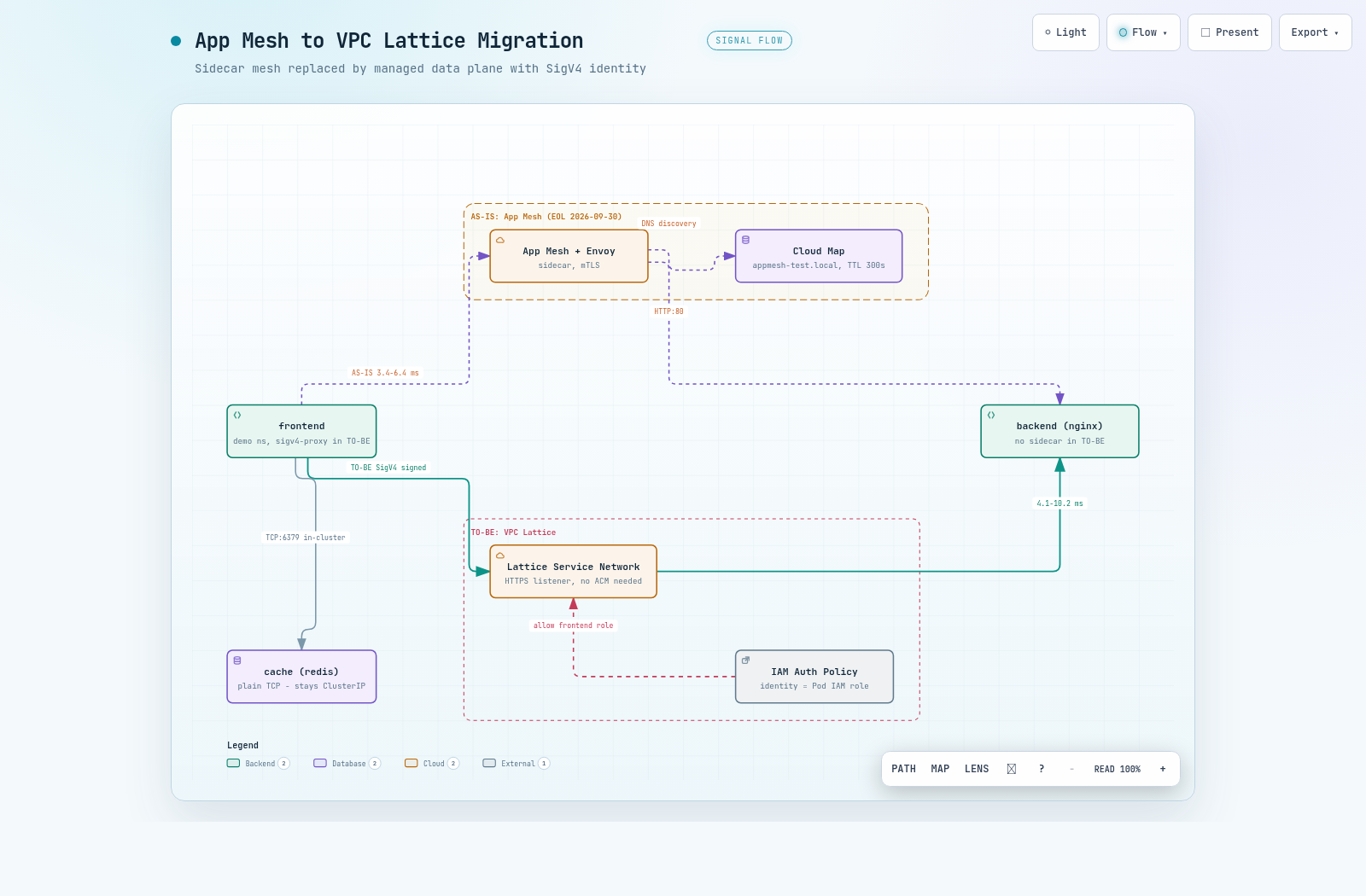
인터랙티브 아키텍처 맵 전체 이미지 - App Mesh AS-IS 경로와 VPC Lattice TO-BE 경로의 전환 구조
그림 2. 인터랙티브 아키텍처 맵 전체 보기. 이미지를 클릭하면 노드 탐색, 경로 추적, 다크/라이트 테마를 지원하는 인터랙티브 버전 ↗이 열립니다.

--참고 자료

공식 문서

  • What is AWS App Mesh? - AWS 공식 문서, App Mesh EOL(2026-09-30) 공지 포함 https://docs.aws.amazon.com/app-mesh/latest/userguide/what-is-app-mesh.html
  • What is Amazon VPC Lattice? - AWS 공식 문서 https://docs.aws.amazon.com/vpc-lattice/latest/ug/what-is-vpc-lattice.html
  • SigV4-signed requests in VPC Lattice - AWS 공식 문서, SigV4 인증 요청 구성 https://docs.aws.amazon.com/vpc-lattice/latest/ug/sigv4-authenticated-requests.html

프로젝트 문서

VPC LATTICE / MIGRATION GUIDE

From App Mesh to VPC Lattice - A Hands-On Migration 5 Weeks Before EOL

With the App Mesh EOL (2026-09-30) approaching, this is a record of executing and measuring every phase of migrating an Envoy sidecar + Cloud Map setup on an EKS 1.33 cluster to VPC Lattice (Gateway API Controller + SigV4). It covers the zero-downtime parallel build, the DNS stale trap at the cutover point, the mTLS replacement, and the limits of TCP services and rollback, all in measured numbers.

01. Written as of - 2026-08-24

02. Audience - EKS workloads using App Mesh (Envoy sidecar + Cloud Map) migrating to VPC Lattice

03. Environment - EKS 1.33, ap-northeast-2, Gateway API CRD v1.2.0 experimental + Controller v1.1.6, verified on 2026-08-20~21

04. Primary sources - hands-on measurements of every phase, plus official AWS documentation

TL;DR

01Why Now, and What It Becomes

AWS App Mesh reaches end of support on 2026-09-30. This document is a record of directly executing and measuring the entire migration from App Mesh to VPC Lattice on a real EKS cluster, about 6 weeks before EOL at measurement time (about 5 weeks before EOL as of the writing date, 2026-08-24). The numbers in this document are not estimates; they were measured twice, across the two days of 2026-08-20~21.

VPC Lattice is a managed application networking service that works without sidecars. On Kubernetes, the AWS Gateway API Controller converts standard Gateway API resources (Gateway, HTTPRoute) into Lattice Service Networks, Services, and Target Groups. AWS manages the data plane, so the Envoy sidecar disappears from the Pod spec.

1.1 Concept Mapping

What does each existing App Mesh resource become in Lattice? The table below is the mapping we actually applied in this migration.

Table 1. App Mesh concepts and their VPC Lattice counterparts
App MeshVPC LatticeNotes
MeshService NetworkExpressed as a Gateway resource
Virtual ServiceLattice Service1 HTTPRoute = 1 Service
Virtual NodeTarget GroupK8s Service referenced via backendRef
Virtual Router / RouteListener / Listener Rulerules of the HTTPRoute
Virtual GatewayNLB / ALBLattice does not take external ingress directly
Envoy sidecarNone (managed data plane)Removed from the Pod spec
Cloud Map DNSLattice DNS (or a custom domain)Beware DNS stale at cutover (04)
mTLSManaged TLS + SigV4 / IAM Auth PolicyEncryption and auth separated; no ACM needed

1.2 The Core Difference - How Identity Is Expressed

The row to watch most closely in the table is mTLS. App Mesh mTLS combined transport encryption with mutual identity verification, but Lattice splits these two roles. Managed TLS (an HTTPS listener) handles encryption, while SigV4 signing and IAM Auth Policy handle authentication.

SigV4 (AWS Signature Version 4) is the request signing scheme used for AWS API calls. Lattice can require this signature on service-to-service HTTP requests as well, and the signing principal becomes the caller's identity.

The core difference, therefore, is how identity is expressed. In App Mesh mTLS the certificate's SAN (Subject Alternative Name) was the service identity, whereas in Lattice the Pod's IAM Role is the identity. IRSA (IAM Roles for Service Accounts) or Pod Identity, which grants each Pod its own IAM Role, is a prerequisite.

The practical gain of this structural change is the disappearance of certificate operations. The work of issuing and rotating certificates with SPIRE or ACM Private CA goes away, and the IAM identity management you already operate takes its place.

02Test Environment and Migration Design

To interpret the results, we first need to pin down what was measured and where. Verification ran twice - a first pass on 2026-08-20 and a second on 2026-08-21 (re-running every phase from a templated structure) - and the conclusions about what works and what does not were identical both times.

2.1 Application Under Verification

We placed one HTTP service and one TCP service in the demo namespace, because the migration paths of the two protocols are completely different (06). frontend calls backend (nginx) over HTTP:80 and cache (redis) over TCP:6379, and service discovery is Cloud Map (appmesh-test.local).

Application under verification (demo namespace)
frontend ──HTTP:80──▶ backend (nginx)
         └─TCP:6379─▶ cache   (redis)
Service discovery: Cloud Map (appmesh-test.local)

The cluster is appmesh-lattice-mig (EKS 1.33, eksctl 0.224.0), with two t3.xlarge nodes (AL2023), all in private subnets. The VPC is lab-dmzvpc (vpc-xxxx), which uses a GWLB egress firewall and interface endpoints; the trap this structure creates is covered in 03.

2.2 Migration Design - Phase Separation and blue/green

The migration is split into Phase 0~6. Up through Phase 2, the existing App Mesh path and the Lattice path run in parallel in a zero-downtime window, and the sidecar removal in Phase 3 is the only cutover point. TCP services were verified separately in Phase 5, apart from the main line.

flowchart LR P0["Phase 0
Pre-work
SG / IRSA"] --> P1["Phase 1
AS-IS baseline
measured"] P1 --> P2["Phase 2
Parallel Lattice build
zero downtime"] P2 --> P3["Phase 3
Sidecar removal
cutover point"] P3 --> P4["Phase 4
SigV4 + IAM
enforce auth"] P4 --> P6["Phase 6
App Mesh cleanup"] P2 -.-> P5["Phase 5
TCP / TLSRoute
separate verification"]
Figure 1. Migration phase flow. Up through Phase 2, both paths operate simultaneously in a zero-downtime window where rollback is free, and Phase 3 is the only cutover point. How to pass this point is the subject of 04.

There are two ways to pass the cutover point. in-place removes the sidecars directly in the demo namespace; blue/green stands up a sidecar-free copy (demo-green) alongside and moves only the entry point. Simply not attaching the Mesh label to the green namespace prevents both sidecar injection and Cloud Map registration, fully isolating it from blue.

Which is safer? In our measurements, in-place produced a DNS stale failure window (04), while blue/green had 0 failures across 269 requests during cutover and rollback. This document measures the in-place path step by step to expose the traps, but recommends blue/green whenever the choice is available.

2.3 4 Prerequisites for Reproduction

This verification has 4 prerequisites that are hard to learn from official documentation alone. Miss any one of them and the results in this document will not reproduce.

  1. The Gateway API CRDs must come from the experimental channel. The standard channel lacks TLSRoute, so Phase 5 fails with no matches for kind TLSRoute.
  2. The GatewayClass must be created manually. The Helm chart does not create it, and if it is missing the Gateway never becomes PROGRAMMED and the cause is hard to trace.
  3. The Phase 5 control group's tlsbackend-cert Secret must be created first, or the control-group Pod will not start.
  4. Per-Pod IRSA must be created first. App Mesh's Envoy XDS access and Lattice's SigV4 identity use the same role.
Verifying the reproduction prerequisites
kubectl get crd tlsroutes.gateway.networking.k8s.io \
  -o jsonpath='{.metadata.annotations.gateway\.networking\.k8s\.io/channel}'   # → experimental
kubectl get gatewayclass
kubectl -n demo get secret tlsbackend-cert
kubectl -n demo get sa frontend -o jsonpath='{.metadata.annotations.eks\.amazonaws\.com/role-arn}'

03Zero-Downtime Parallel Build (Phase 0~2)

The goal of Phase 0~2 is to complete the Lattice path alongside, without touching existing App Mesh traffic. In our measurements this window was indeed zero-downtime, and we confirmed both paths returning 200 at the same time. Before starting, however, there are two gates to clear at the network layer.

3.1 Allow the Lattice Prefix Lists in the Cluster SG (Phase 0)

Lattice sends traffic to Pods from link-local addresses (a special range that is not routed and is valid only within the same link). If the cluster security group does not allow this range, every request times out, so allow the AWS-managed prefix lists first.

Allowing the Lattice prefix lists (IPv4 + IPv6)
CLUSTER_SG=$(aws eks describe-cluster --name <cluster> \
  --query 'cluster.resourcesVpcConfig.clusterSecurityGroupId' --output text)

for PL in "com.amazonaws.${REGION}.vpc-lattice" "com.amazonaws.${REGION}.ipv6.vpc-lattice"; do
  PL_ID=$(aws ec2 describe-managed-prefix-lists \
    --filters "Name=prefix-list-name,Values=${PL}" \
    --query 'PrefixLists[0].PrefixListId' --output text)
  aws ec2 authorize-security-group-ingress --group-id "$CLUSTER_SG" \
    --ip-permissions "IpProtocol=-1,PrefixListIds=[{PrefixListId=${PL_ID}}]"
done

Is the IPv6 side really needed? In our measurements, the Lattice DNS resolved to IPv6 link-local (fd00:ec2:80::a9fe:ab00). In ap-northeast-2 we allowed both pl-0cd842b438fee3b4b (IPv4) and pl-06da045b37607c8a5 (IPv6); the IPv6 prefix list must not be omitted.

3.2 A Private-Subnet Trap - An Issue We Actually Hit

In the verification cluster all nodes sit in private subnets, and AWS API traffic goes through interface VPC endpoints. In this structure, the new cluster's SG is not allowed on the endpoint SGs, so node bootstrap fails.

nodeadm log from a node that failed to bootstrap
nodeadm[2321]: SDK ... retrying request EC2/DescribeInstances, attempt 14
[FAILED] Failed to start nodeadm-config.service - EKS Nodeadm Config.
fatal: operation error EC2: DescribeInstances, context deadline exceeded

The symptoms are vague and the cause is hard to find. The node instances are running yet never join the cluster, and the node group stays in CREATING for over 20 minutes. The fix is to allow 443 inbound from the new cluster SG on the interface endpoint SGs - ec2, sts, ecr.api, ecr.dkr, logs, and so on - then terminate the failed instances so the ASG replaces them.

Allowing the new cluster SG on the interface endpoint SGs
aws ec2 authorize-security-group-ingress --group-id <endpoint-sg> \
  --ip-permissions "IpProtocol=tcp,FromPort=443,ToPort=443,\
UserIdGroupPairs=[{GroupId=<new-cluster-sg>}]"
Note - This repeats every time you add a cluster to this VPC

If you are creating a new migration cluster for a blue/green strategy, this step must be on your pre-flight checklist.

3.3 AS-IS Baseline (Phase 1)

Before the parallel build, record the App Mesh baseline in numbers - it is the evidence for judging regressions after cutover. The measured baseline: HTTP (frontend → backend) returned 200 at 3.4~6.4ms (10 runs), TCP (frontend → cache) returned +PONG, and Cloud Map registrations were backend 2 / cache 1 / frontend 1.

3.4 Parallel Lattice Build and Verification (Phase 2)

Give the Helm chart a defaultServiceNetwork and the controller handles Service Network creation and the VPC association automatically. Create the GatewayClass manually per the prerequisites in 02, and move the App Mesh resources to HTTPRoute and TargetGroupPolicy following the mapping in Table 1.

The Gateway must be defined in one file only. If a route file redeclares the Gateway, listeners can disappear depending on re-apply order.

How did the conversion turn out? The HTTPRoute was Accepted=True, the Lattice Service backend-demo was ACTIVE, and the Target Group (IP type) had 2 HEALTHY targets. The table below compares calls to both paths while running in parallel.

Table 2. Measurements in the parallel window (1st run, 2026-08-20) - both paths operating simultaneously
ItemApp Mesh pathLattice path
HTTP response200200
Latency3.4~6.4ms4.1~10.2ms
First request-1.03s (1st run; not reproduced in the 2nd run at 19.3ms)

With the Envoy sidecars still alive, both paths return 200 simultaneously. Up to this stage rollback is therefore free, and you can proceed slowly, service by service.

The Lattice path's 1.03-second first request looks like connection-establishment overhead observed in the 1st run, but it did not reproduce in the 2nd run (19.3ms). First-request latency has low reproducibility, so prepare only to the extent of "the first request may be slow" and do not bake this number into an SLO as a fixed value. If a service is latency-sensitive and has no warm-up, account for first-request latency right after cutover.

04The Biggest Trap at Cutover - DNS Stale (Phase 3)

Phase 3 - turning off sidecar injection in the demo namespace and restarting the Deployments - is the only cutover point. The Lattice path itself had zero downtime, but this is where the existing Cloud Map path failed for several minutes. This measurement is the most important part of this document.

Phase 3 - disabling sidecar injection and restarting
kubectl label ns demo appmesh.k8s.aws/sidecarInjectorWebhook=disabled --overwrite
kubectl -n demo rollout restart deploy/backend deploy/frontend

4.1 The Lattice Path Has Zero Downtime

After the restart, the Pod composition changed from 2/2 (nginx, envoy) to 1/1 (nginx). The controller automatically registered the new Pod IPs as HEALTHY in the Target Group and pulled the old IPs out as DRAINING, so calls via Lattice held at 200 (5.7~9.2ms).

4.2 The Old Path Blackholes for 4.5~5 Minutes - The Cause Is Cloud Map's 300-Second TTL

The problem was the existing Cloud Map path. Right after sidecar removal, calls to backend.appmesh-test.local failed completely for about 4.5~5 minutes (HTTP 000, exit code 7, connection refused).

Which layer was stale? The Cloud Map API, the Route 53 PHZ records, and direct queries to the VPC resolver all returned the new IPs. Only the CoreDNS-mediated lookups that Pods actually use kept returning the IPs of terminated old Pods. The time during which stale records linger in a cache and the old path fails is what this document calls the DNS stale window.

Measured CoreDNS responses over time (Pod restart ≈ 00:42:30)
00:45:47  10.11.71.147, 10.11.53.173   # old IPs (terminated Pods)
00:46:31  10.11.53.173, 10.11.71.147   # old IPs
00:47:14  10.11.40.24,  10.11.76.115   # switched to new IPs
00:47:58  10.11.76.115, 10.11.40.24    # normal

The cause is the Cloud Map A record's 300-second TTL. TTL (Time To Live) is how long a DNS response may be cached; even if the control plane updates instantly, resolver-layer caches keep returning the old IPs until the TTL expires. CoreDNS's own cache was 30 seconds, but the upstream record's 300-second TTL was dominant.

4.3 Mitigations Measured - TTL Reduction Cuts It to 36 Seconds

There are three options, in priority order. For an in-place cutover, option 1 is mandatory; to eliminate the failure window entirely, choose option 2.

  1. Lower the Cloud Map service's DNS TTL before migrating (300s → 15~30s). Wait at least twice the TTL, then start the cutover.
  2. Use a blue/green strategy. Deploy a sidecar-free copy in a new namespace and switch the callers; this window never occurs. Actual implementation and measurement confirmed 0 failed requests.
  3. If in-place is unavoidable, perform it in a maintenance window.

Option 1 is a single API call - no code change, no redeployment.

Lowering the Cloud Map DNS TTL (300s → 30s)
aws servicediscovery update-service --id <service-id> \
  --service '{"DnsConfig":{"DnsRecords":[{"Type":"A","TTL":30}]}}'

How much does it help? On the same cluster we lowered only the TTL to 30 seconds and re-ran the cutover. Observation ran at 3-second intervals from a separate Pod outside the migration scope (not in the mesh).

Cutover observed with TTL at 30 seconds (rollout restart = 02:08:17)
02:08:20  dns=10.11.56.196,10.11.87.65  http=200   # old IPs, healthy
02:08:23  dns=10.11.56.196,10.11.87.65  http=503   # old Pods begin terminating (Envoy draining)
  ...       (503 continues)
02:08:51  dns=10.11.56.196,10.11.87.65  http=503
02:08:54  dns=10.11.56.196,10.11.87.65  http=000   # old Pods gone
02:08:59  dns=10.11.40.24,10.11.85.13   http=200   # switched to new IPs, recovered

The table below compares the old-path failure window before and after the TTL reduction.

Table 3. Old-path failure window before and after the Cloud Map TTL reduction (measured)
ItemTTL 300sTTL 30s
Old-path failure window approx. 4.5~5 min approx. 36 sec (02:08:23 → 02:08:59)
Failure pattern Connection refused (exit 7 / HTTP 000) Mostly 503; 000 only in the last few seconds

The failure window scales almost linearly with the TTL value. If you choose an in-place cutover, lowering the TTL is a step that must come first.

This window is exactly why the AWS blog limits the in-place approach to cases "where downtime is acceptable". The official documentation gives no numbers for the failure window, so we measured it ourselves.

Warning - Cutting over right after lowering the TTL has no effect

The TTL change is reflected in the Route 53 PHZ records immediately, but responses cached under the old 300-second TTL must expire first - wait up to 300 more seconds before cutting over for the change to take effect.

The failure pattern also changes. While the old Pods are terminating, the Envoy sidecar is still alive and returns 503 with no upstream; only after they are fully gone does it become connection refused (000). HTTP 5xx is also a symptom of the DNS stale window, so monitoring must not miss it.

4.4 Avoiding App Code Changes - Custom Domains

If callers must switch to the Lattice-generated DNS name after cutover, application changes become necessary. To avoid this, assign a custom domain to the Lattice Service and, in the Route 53 PHZ, CNAME the existing name (backend.appmesh-test.local) to the Lattice DNS. With this path you can cut over without changing application endpoints.

05From mTLS to SigV4 (Phase 4)

Phase 4 replaces what App Mesh mTLS used to do with the Lattice way. mTLS combined transport encryption with mutual identity verification, but in Lattice, managed TLS (an HTTPS listener) handles encryption while SigV4 signing and IAM Auth Policy handle authentication. We measured each segment to see whether this separation is actually equivalent to mTLS.

5.1 Client Side - The sigv4-proxy Sidecar

The caller must attach a SigV4 signature to each request. To handle this without touching app code, use the aws-sigv4-proxy sidecar. The only thing the application changes is one base URL (http://localhost:8080); signatures and credentials never appear in code.

frontend Deployment - sigv4-proxy sidecar (excerpt)
      serviceAccountName: frontend        # reuse the IRSA created in Phase 0
      containers:
        - name: sigv4-proxy
          image: public.ecr.aws/aws-observability/aws-sigv4-proxy:1.8
          args:
            - --name
            - vpc-lattice-svcs
            - --region
            - ap-northeast-2
            - --host                      # pin the target to the proxy
            - <backend's Lattice domain>
            - --unsigned-payload          # for streaming / large bodies
            - --upstream-url-scheme       # required; default is https
            - http
          ports: [{ containerPort: 8080 }]

Credentials are injected by IRSA through the standard AWS SDK credential chain, so no keys appear in the app or even in the Deployment. One trap is --upstream-url-scheme http. The proxy's upstream default is HTTPS, so if the Lattice listener is HTTP:80 you get a 502 - and because the signature succeeds and the failure happens at the proxy stage, you have to read the logs to see the cause.

Note - Do not replace this with a shared egress proxy

If multiple services share a single proxy Deployment, their signing identities collapse into one, and the IAM Auth Policy Principal can no longer distinguish callers. The "403 for another service's identity" case in 5.4 stops holding, so keep the sidecar and preserve per-Pod identity.

5.2 The HTTPS Listener Needs No ACM Certificate - Measured

Does the encryption side need certificate preparation? Add an HTTPS listener to the Gateway and Lattice automatically issues a managed certificate for its self-generated FQDN. In our measurements the HTTPS listener was created with customDomainName=null and certificateArn=null, SigV4 calls returned 200, and an ACM certificate (BYOC) is needed only when you use a custom domain.

HTTPS listener working without a custom domain/certificate (measured)
# Check the Lattice Service configuration
{"customDomainName": null, "certificateArn": null, "authType": "AWS_IAM"}

# Call via sigv4-proxy --upstream-url-scheme https
200  0.094 / 0.008 / 0.004 / 0.005 / 0.004 s
# Anonymous (unsigned) direct HTTPS call
403

There is one spec-level trap. Leaving tls.certificateRefs empty on an HTTPS listener is rejected by the Gateway API CRD - not because a custom domain or ACM certificate is required. It is merely a spec requirement and the controller does not use the value, so a dummy name passes.

Keeping the HTTPS listener on 443 is advantageous. On a non-443 port you must give sigv4-proxy both --host <domain>:<port> and --sign-host.

5.3 From Lattice to the Pod - Re-encryption and the Health Check Trap

To be equivalent to mTLS's transport encryption, the Lattice-to-Pod segment must be encrypted too. Put a TLS-terminating backend behind it and set protocol: HTTPS on the TargetGroupPolicy - but if you omit healthCheck.protocol: HTTPS, the targets become permanently UNHEALTHY. The health check default is HTTP, so plaintext requests go to the TLS port and the backend returns 400.

Before and after healthCheck.protocol (measured, TLS-terminating nginx:8443)
# protocol: HTTPS, healthCheck.protocol unset
ip             port   reason                   status
10.11.88.145   8443   StatusCodeMismatch_400   UNHEALTHY
10.11.47.2     8443   StatusCodeMismatch_400   UNHEALTHY

# after adding healthCheck.protocol: HTTPS → reflected within 25 seconds
ip             port   reason   status
10.11.88.145   8443   None     HEALTHY
10.11.47.2     8443   None     HEALTHY

After the fix, the end-to-end path (client → HTTPS:443 → Lattice → HTTPS:8443 → Pod) returned 200 with SigV4 applied - 0.120s for the first request, 0.004~0.009s afterward. With both segments enabled, you get end-to-end encryption equivalent to mTLS's transport encryption.

A self-signed backend certificate is sufficient, and no CA/trust-bundle setup is needed, because Lattice does not validate the backend certificate.

5.4 Service Side - Is IAM Auth Policy Equivalent to mTLS Identity Verification?

Identity verification is the job of the service-side IAMAuthPolicy. IAMAuthPolicy is a resource-based authorization policy attached to a route; applying it switches the Lattice Service's authType from NONE to AWS_IAM. The Principal is the frontend Pod's IAM Role (IRSA) ARN.

IAMAuthPolicy - applied to the backend route
apiVersion: application-networking.k8s.aws/v1alpha1
kind: IAMAuthPolicy
metadata: { name: backend-auth, namespace: demo }
spec:
  targetRef: { group: gateway.networking.k8s.io, kind: HTTPRoute, name: backend }
  policy: |
    { "Version": "2012-10-17",
      "Statement": [{ "Effect": "Allow",
        "Principal": { "AWS": "<frontend Pod IAM Role ARN>" },
        "Action": "vpc-lattice-svcs:Invoke", "Resource": "*",
        "Condition": { "StringEquals": { "vpc-lattice-svcs:SourceVpc": "vpc-xxxx" } } }] }

The Principal's Role ARN is only fixed after cluster creation, so hard-coding it into a manifest makes it non-reusable in other environments. It is safer to fill it in with a rendering tool after the IRSA is created.

How many cases must be split to judge equivalence with mTLS's SAN-based identity verification? Three. The table below shows measured results of calling the same service as three callers.

Table 4. IAM Auth Policy - 3 cases measured
#CallerResultMeaning
1No signature (anonymous)403Unauthenticated calls blocked
2frontend identity + signature200 (4.7~42ms)Authorized service passes
3cache identity + signature403Other service identity blocked

Case 3 is the key. The cache role was granted the vpc-lattice-svcs:Invoke permission, yet it still gets 403. Caller-side IAM permission and service-side authorization apply independently, in duplicate - a per-service authorization equivalent to mTLS's SAN-based identity verification.

Denial responses (measured; account/resource IDs abbreviated)
# 1) unsigned request
AccessDeniedException: User: anonymous is not authorized to perform:
  vpc-lattice-svcs:Invoke on resource: arn:aws:vpc-lattice:...:service/svc-091a.../

# 3) cache identity (IAM allows Invoke, but not an Auth Policy Principal)
AccessDeniedException: User: arn:aws:sts::********6239:assumed-role/...Role1-z3IS...
  is not authorized to perform: vpc-lattice-svcs:Invoke ...

5.5 Staged Rollout Order

Tightening everything at once makes fault isolation hard. Our measurements also followed the order below, and each step has one signal to check.

  1. Shift traffic to Lattice with authType=NONE and verify the path.
  2. Introduce the sigv4-proxy sidecar and confirm the signed path returns 200 (auth still OFF).
  3. Apply the IAMAuthPolicy and confirm the switch to AWS_IAM and 403 for anonymous calls.
  4. Narrow the Principal to actual callers only and strengthen Conditions such as SourceVpc.

06TCP Services Cannot Migrate As-Is (Phase 5)

The HTTP path is migrated, but cache (redis, TCP:6379) remains. Lattice's TCP support takes the form of TLS passthrough. TLS passthrough means Lattice does not terminate TLS and passes the encrypted connection through to the backend as-is, configured with a TLSRoute resource. This was the part that most needed a judgment call, so we isolated the cause with a control experiment.

6.1 The Attempt - Migrating redis with TLSRoute

Every resource is created normally. The TLSRoute was Accepted=True, the Lattice Service cache-demo was ACTIVE, and the listener was created with the TLS_PASSTHROUGH type. Yet the redis connection fails either way.

redis connection failures (measured)
# 1) plaintext TCP to the TLS listener
$ exec 3<>/dev/tcp/cache-demo-....on.aws/443; printf 'PING\r\n' >&3
Connection reset by peer                                    (exit 1)

# 2) proper TLS handshake with SNI matched to the TLSRoute hostname
$ curl -sk --connect-to 'cache.appmesh-test.local:443:<lattice-dns>:443' \
    https://cache.appmesh-test.local/
HTTP 000                                                    (exit 28, timeout)

Case 2 matters. SNI (a TLS extension that announces the target hostname up front during the handshake) passed through without issue, but the backend (redis) could not answer the TLS handshake and timed out. The blocking point is therefore not Lattice but the backend.

The passthrough listener used 443 in the 1st run, then moved to 8443 for regression testing after 443 was handed to the HTTPS listener; the conclusion and failure pattern were identical regardless of port.

6.2 The Control Group - A TLS-Speaking Backend Works Fine

To pin down the cause, we attached a TLS-terminating nginx (8443, self-signed certificate) to the same TLS listener. With SNI matched to the TLSRoute hostname it returned 200 with the tls-passthrough-ok body, and sending the Lattice-generated domain as SNI gave exit 35 (a TLS error). This confirms both that routing is SNI-based and that redis's failure is a backend problem.

Two side findings also matter for operations. The TargetGroupPolicy health check protocol supports only HTTP/HTTPS - TCP health checks are impossible - so TCP targets must be left without a healthCheck, and even though targets then show UNAVAILABLE (HealthCheckDisabled), traffic is not blocked. The table below is the conclusion of the Phase 5 measurements.

Table 5. Phase 5 conclusions - TLS passthrough measurements
Checked itemResult
Lattice TLS passthrough behaviorWorks correctly
Routing criterionSNI-based - TLSRoute hostnames and SNI must match
Target UNAVAILABLE (HealthCheckDisabled)Does not block traffic (communication works)
TCP health checksNot supported (HTTP/HTTPS only)
Plaintext TCP services (e.g., redis)Cannot migrate - the backend must speak TLS
IAM auth on the TLS passthrough pathNot applicable (SigV4 is an HTTP-layer mechanism)

6.3 3 Options for Plaintext TCP Services

So what should plaintext TCP services like redis do? There are three options.

  1. Apply TLS to the backend and migrate with TLSRoute (e.g., redis --tls-port). IAM auth does not apply, however, so authorization relies on the SG/network layer.
  2. Exclude it from Lattice and keep in-cluster communication (ClusterIP/Headless).
  3. If it must cross a VPC boundary, evaluate Lattice Resource Configuration (TCP resources).

As a practical judgment, there is no reason to force a plaintext cache used only inside the same cluster, like cache, onto Lattice, so option 2 is the simplest and most reasonable. In a blue/green strategy, green's cache simply stays ClusterIP, which makes this choice the default design rather than an exception.

07Rollback and Operations Guide

You can only cut over if you can go back. If the App Mesh controller and Mesh/VirtualNode are kept after Phase 3, you can return to AS-IS; we actually executed the procedure below and confirmed recovery all the way to the App Mesh baseline.

Rollback procedure (execution-verified)
# 1) Remove Lattice resources (the Lattice Service / Target Group are deleted together)
kubectl -n demo delete iamauthpolicy backend-auth
kubectl -n demo delete httproute backend
kubectl -n demo delete tlsroute cache tlsbackend
kubectl -n demo delete targetgrouppolicy backend cache

# 2) Restore the Envoy sidecars
kubectl label ns demo appmesh.k8s.aws/sidecarInjectorWebhook=enabled --overwrite
kubectl -n demo rollout restart deploy/backend deploy/frontend deploy/cache

Four behaviors were observed during rollback.

  • Deleting a route (HTTPRoute/TLSRoute) deletes both the corresponding Lattice Service and Target Group.
  • Deleting the Gateway keeps the Service Network, because it is managed by defaultServiceNetwork.
  • Re-applying the Gateway reattaches to the existing Service Network, and a new Lattice Service ID is issued.
  • Sidecar restoration recovered everything to 2/2 with just a rollout restart, and the Envoy egress clusters were recreated as well.
Warning - Recreating changes the Lattice domain

A Lattice Service's domain is based on the service ID, so it changes on recreation. If the caller uses the Lattice-generated domain directly, the endpoint differs when you re-migrate after a rollback. Using a custom domain with a Route 53 CNAME (04) removes this problem.

7.1 Reproducibility - The 2nd Verification Run

The results in this document do not come from a single run. On 2026-08-21 we re-ran all of Phase 1~5 with manifests rewritten into a templated structure. Individual numbers such as latency varied slightly between runs, but the conclusions about what works and what does not were identical both times.

7.2 Recommended Order - Summary

Compressing all the measurements into an operational procedure gives five steps.

  1. Preparation - allow the Lattice prefix lists in the SG (IPv4 + IPv6), create per-Pod IRSA, and for an in-place cutover, lower the Cloud Map TTL first.
  2. Parallel build - create the Lattice path with Gateway/HTTPRoute and confirm both paths return 200 simultaneously.
  3. Cutover - choose blue/green if possible; for in-place, lower the TTL and wait up to 300 seconds for the existing cache to expire before proceeding.
  4. Auth hardening - tighten step by step in the order authType=NONE, sigv4-proxy, IAMAuthPolicy, then narrowing Principal/Condition.
  5. Cleanup - keep plaintext TCP on in-cluster communication, and remove App Mesh resources only after the need for rollback is gone.

Conclusion: In one sentence, the essence of this migration is not deleting sidecars but moving identity from certificates (SAN) to IAM Roles; failures occur not in Lattice but in the DNS cache at the cutover point and in plaintext TCP, so if you first lower the TTL (measured failure window of about 36 seconds) or choose blue/green (0 failures measured) and separate TCP by design, you can migrate safely before EOL.

Full interactive architecture map - the App Mesh AS-IS path and the VPC Lattice TO-BE path side by side
Figure 2. Full view of the interactive architecture map. Click the image to open the interactive version ↗ with node exploration, path tracing, and dark/light themes.

--References

Official Documentation

  • What is AWS App Mesh? - AWS official documentation, including the App Mesh EOL (2026-09-30) notice https://docs.aws.amazon.com/app-mesh/latest/userguide/what-is-app-mesh.html
  • What is Amazon VPC Lattice? - AWS official documentation https://docs.aws.amazon.com/vpc-lattice/latest/ug/what-is-vpc-lattice.html
  • SigV4-signed requests in VPC Lattice - AWS official documentation, configuring SigV4-authenticated requests https://docs.aws.amazon.com/vpc-lattice/latest/ug/sigv4-authenticated-requests.html

Project Documentation